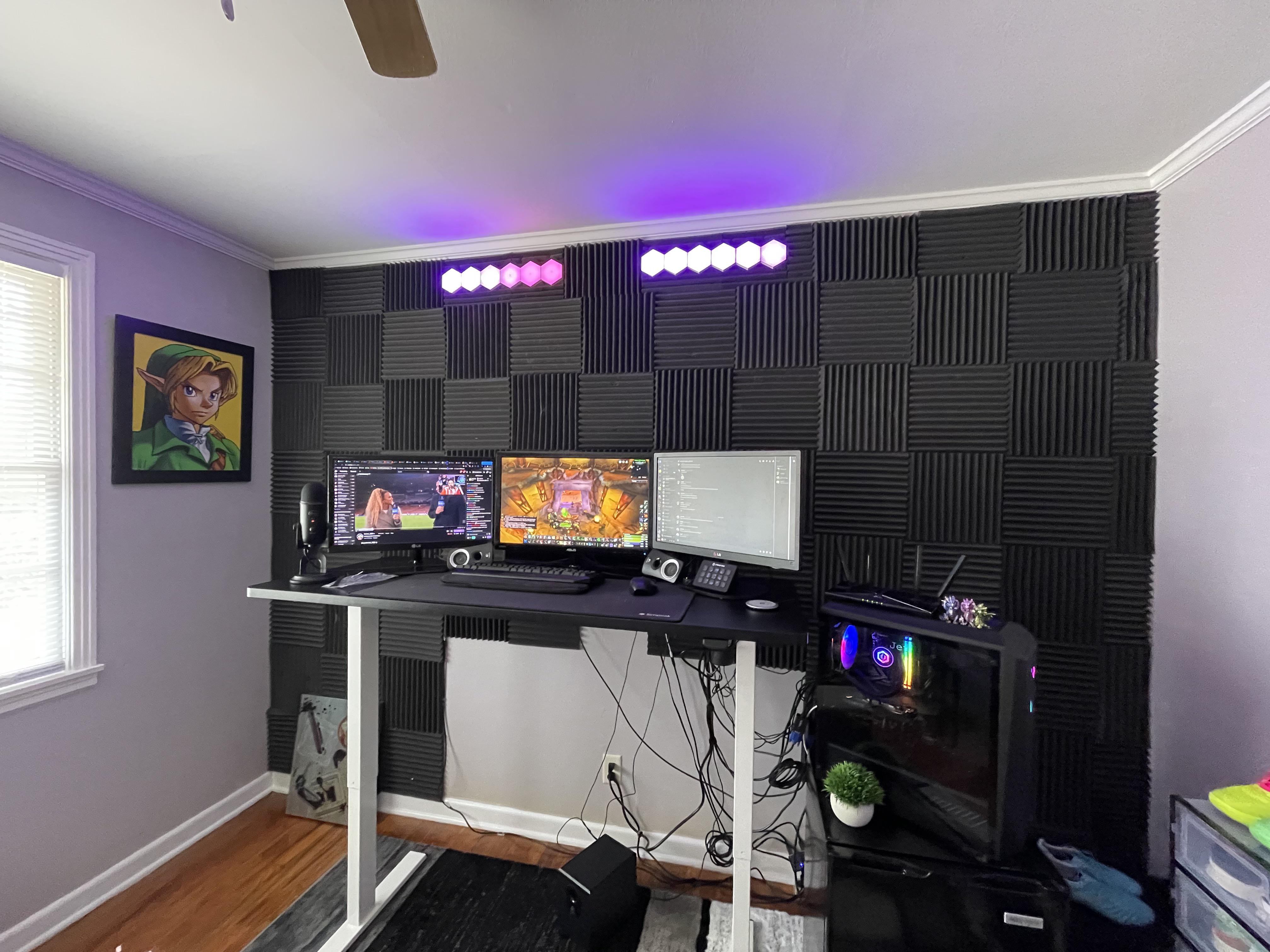
I just got this raising desk so I need some slack in the wires but what can I do? Also, anything you guys would add or change with this set up? Anything at all. Thank you!
by iphonesoccer420

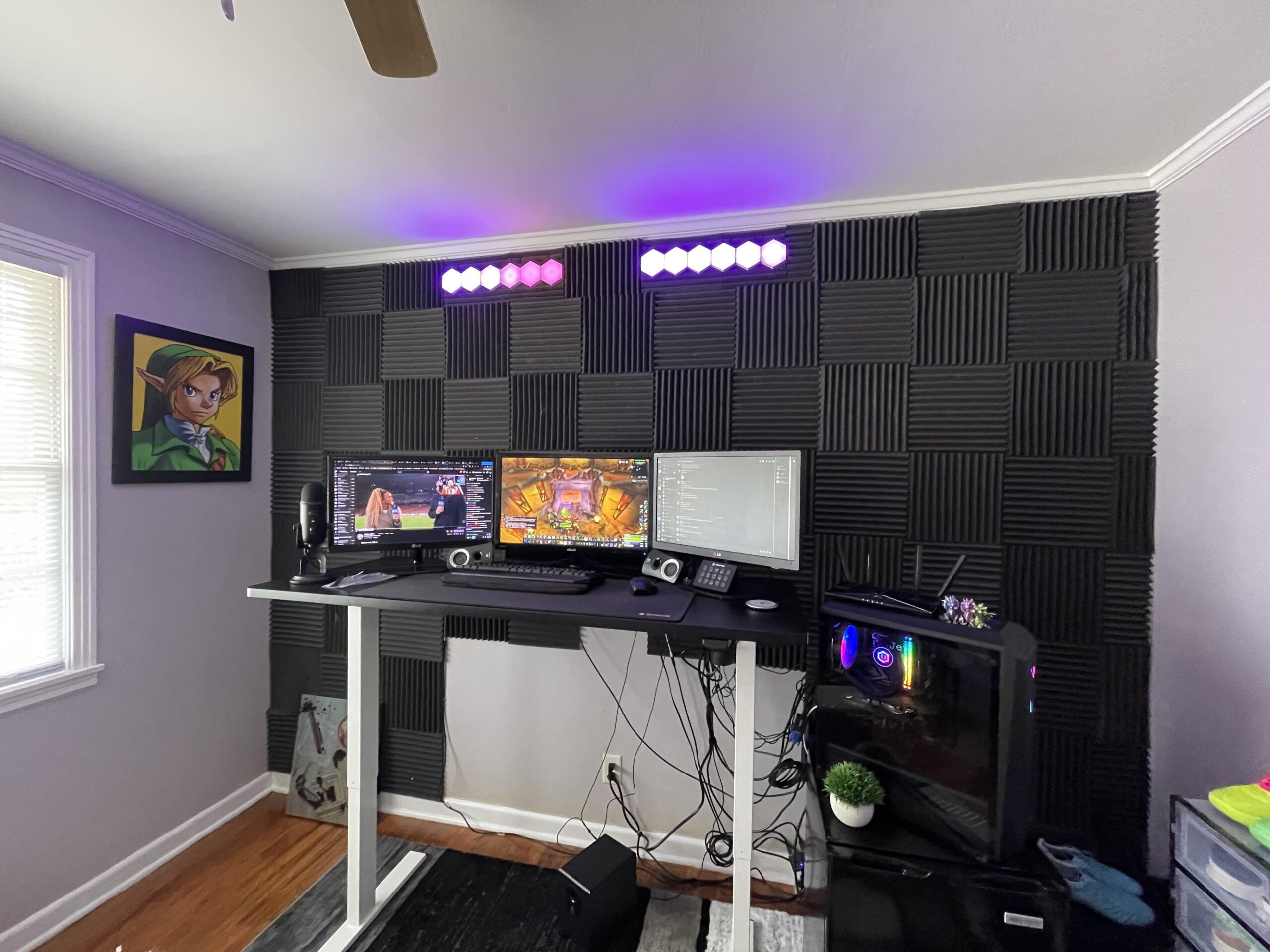
I just got this raising desk so I need some slack in the wires but what can I do? Also, anything you guys would add or change with this set up? Anything at all. Thank you!
by iphonesoccer420
26 Comments
They make sleeves or wraps you can wrap the cables in to make it much neater
hang lots of cables on the wall so they will become a feature
Maybe not hide them, but zip tie them into a nice little braid I’ve done. It still looks clean and it’s just one single thick, good-looking, strand of cables. Make sure that you leave enough slack for the desk to go up and down if you have that.
Attach a power strip to the desk so you only have one wire to worry about when moving the desk. Plug all desk items into the power strip.
Usually, those desks have a cable tray on the bottom for cables. I would route all the cable excess from desk-mounted items to that tray and neatly zip-tie them in place so nothing is hanging.
For the wires that go to your tower (SFF on the desk would fix this), zip-tie all the cables together and cover them with a cable sleeve.
I would try bundling the wires as neatly as you can and then using either light board or possibly fabric across the back of your desk.
I ran into the same problem but I’m moving in a year so this is the most I’m going to do with them for now. When it gets redone I’ll have to get extensions or longer cables for the monitors and stuff. https://imgur.com/gallery/z6WEbBr
Get a cable snake or something to wrap the cables in a bundle. You may actually need to buy some longer wires to accomplish this.
Also get a cable raceway or some kind of way to have the cables run horizontally under the desk, so they all only have to go down at one point.
with the pc being on a seperate thing that doesnt move youll need a cable spine
There are cable spirals which u can wrap around all the wires to complete them to one neat “wire” (just dont the right english word here)
There you go
[https://imgur.com/a/oImxku0](https://imgur.com/a/oImxku0)
I just installed one of these recently and it rules. I’ve routed all of my cables through it so nothing dangles when the desk is in standing mode. Big recommend.
[https://www.amazon.com/gp/product/B07D1GKHL9/ref=ppx_yo_dt_b_search_asin_title?ie=UTF8&th=1](https://www.amazon.com/gp/product/B07D1GKHL9/ref=ppx_yo_dt_b_search_asin_title?ie=UTF8&th=1)
Under desk cable management tray, cable hiders, longer cables (6+ ft), black and white zip ties, and a power strip.
All of these can be purchased from Amazon. I did a cable management setup for my standing desk at home with a similar 3 monitor setup and the desktop on a table to the right. You’ll want longer cables because I can see some cables that would struggle to be routed through cable hiders. The zip ties are to reduce slack as needed on longer cables.
Edit: Added some additional recommendations to include more things I used to do my cable management.
Under the table with tape and strips and clips !!
Bendy tube
Zug zug
Mount power strip under desk. Use a cable tray, box, net, or similar to keep the wires neat. Plug power strip into wall.
Those damn wires😤
hamster, guinea pig, rabbit and a little brother.
Mount a powerstrip under your desk.
Get some zipties or velcro ties and some cable-sleeves you can put several cables into.
Pair them off and plug everything in. Bundle up excess cables and hide away somehow. Where applicable (hdmis, power cables etc) replace them and get the perfect length.
I see you have a desk you can raise/lower, so ideally here if you had your pc mounted under your desk (or on top), the only cable you would need to have that could adjust lengthwise for it to raise/lower would be that of the powerstrip.
Forgive my ignorance but what are the black squares on the wall?
I have the same kind of desk, and I got a couple of metal baskets that go underneath at the back. I put in those a extension lead that has my speakers, desk & monitors plugged in. I also overextended one side of my desk top more, and got a Cpu mount so my unit is attached to the underneath of the desk, as I was worried about cables being pulled, and not being able to conceal them enough.
Could you put a board behind the desk then add cable raceways behind the board
Not sure if you could mount cables to the underside of the desk anyway great looking setup though
Paint them
Can u buy a organizer for wires that is a good solution
You don’t.
Buy wireless cables 👍
DMoose Cable Management Box -… https://www.amazon.com/dp/B0C1W7FF2R?ref=ppx_pop_mob_ap_share
SimpleCord J Channel Desk Cable… https://www.amazon.com/dp/B06XZPYP7Y?ref=ppx_pop_mob_ap_share