why do you have explorer open you going threw your 100tb of porn folder?
interrex41
easy to solve just restart it lol
Ferro_Giconi
Right click on it and select restart. Sometimes explorer just does stupid things and needs to be restarted.
Candid_Equipment_296
Exploring?
YoureGettingTheBelt
Induced demand.
Add more lanes to a highway to fix congestion, more people choose to drive due to all the new space.
NoirGamester
Gotta explore all the files
19rex85
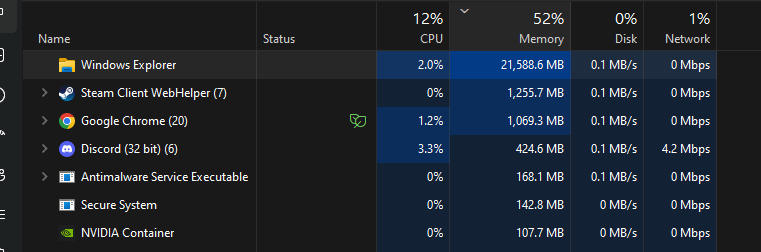
Usually corrupted files and disk errors will make it run high..even having too many files making indexing slow down cpu… have you done any defrag on HDD or trimming on SSD?
Bossnage
hungy
ToxicBuiltYT
Windows ☕
Rough-University142
It’s exploring
alphabytes
and Antimalware executable service… major PITA
FieldOfFox
Malware…? Check Explorer extensions.
Oh also there was a Windows Update recently to fix some memory issue with explorer and HEIF thumbnails. Check updates, and then check again later.
BurningYeard
Could it be that it’s just caching files in case you re-open them? Almost half of the memory is unused, so no reason to deallocate.
debateG0d
Process run through explorer as a parent. Use process explorer from sysinternal suite to see.
abdoul_ra
use sysinternals process explorer to see all the sub-processes, this will help you identify any problems. it’s also useful for detecting overall strange processes or malware.
osmankovan123
Probably some suddenly occurred anomaly that caused RAM leakage. I think restarting Explorer can solve this issue. But if it occurs again, I think it’s from corrupt system files or some sort of virus.
IlFlacco
Free ram is wasted ram /lol
xSnakyy
Unused ram is wasted ram
Justsomeguyin2023
Just press ALT and F4 at the same time. Thank me later.
spikernum1
Some crypto malware is going to town
depricatedzero
Did you run a search? Only time I’ve seen anything remotely like that was when I did a text search on my storage drive and forgot about it until I started trying to figure out why my system was running like shit.
dabombnl
Probably have some shitty explorer extension installed that is leaking memory.
bert_the_one
Run a virus scan and you might find out why.
theallstarkid
Because it’s exploring.
No_Print77
He’s exploring
Kev_Avl
This is why they didn’t want to give us explorer tabs.
corvoscoolsword
its thinking
Rhazier
I think it’s adopting every virus/malware it comes along and taking it home

28 Comments
windows does things
why do you have explorer open you going threw your 100tb of porn folder?
easy to solve just restart it lol
Right click on it and select restart. Sometimes explorer just does stupid things and needs to be restarted.
Exploring?
Induced demand.
Add more lanes to a highway to fix congestion, more people choose to drive due to all the new space.
Gotta explore all the files
Usually corrupted files and disk errors will make it run high..even having too many files making indexing slow down cpu… have you done any defrag on HDD or trimming on SSD?
hungy
Windows ☕
It’s exploring
and Antimalware executable service… major PITA
Malware…? Check Explorer extensions.
Oh also there was a Windows Update recently to fix some memory issue with explorer and HEIF thumbnails. Check updates, and then check again later.
Could it be that it’s just caching files in case you re-open them? Almost half of the memory is unused, so no reason to deallocate.
Process run through explorer as a parent. Use process explorer from sysinternal suite to see.
use sysinternals process explorer to see all the sub-processes, this will help you identify any problems. it’s also useful for detecting overall strange processes or malware.
Probably some suddenly occurred anomaly that caused RAM leakage. I think restarting Explorer can solve this issue. But if it occurs again, I think it’s from corrupt system files or some sort of virus.
Free ram is wasted ram /lol
Unused ram is wasted ram
Just press ALT and F4 at the same time. Thank me later.
Some crypto malware is going to town
Did you run a search? Only time I’ve seen anything remotely like that was when I did a text search on my storage drive and forgot about it until I started trying to figure out why my system was running like shit.
Probably have some shitty explorer extension installed that is leaking memory.
Run a virus scan and you might find out why.
Because it’s exploring.
He’s exploring
This is why they didn’t want to give us explorer tabs.
its thinking
I think it’s adopting every virus/malware it comes along and taking it home