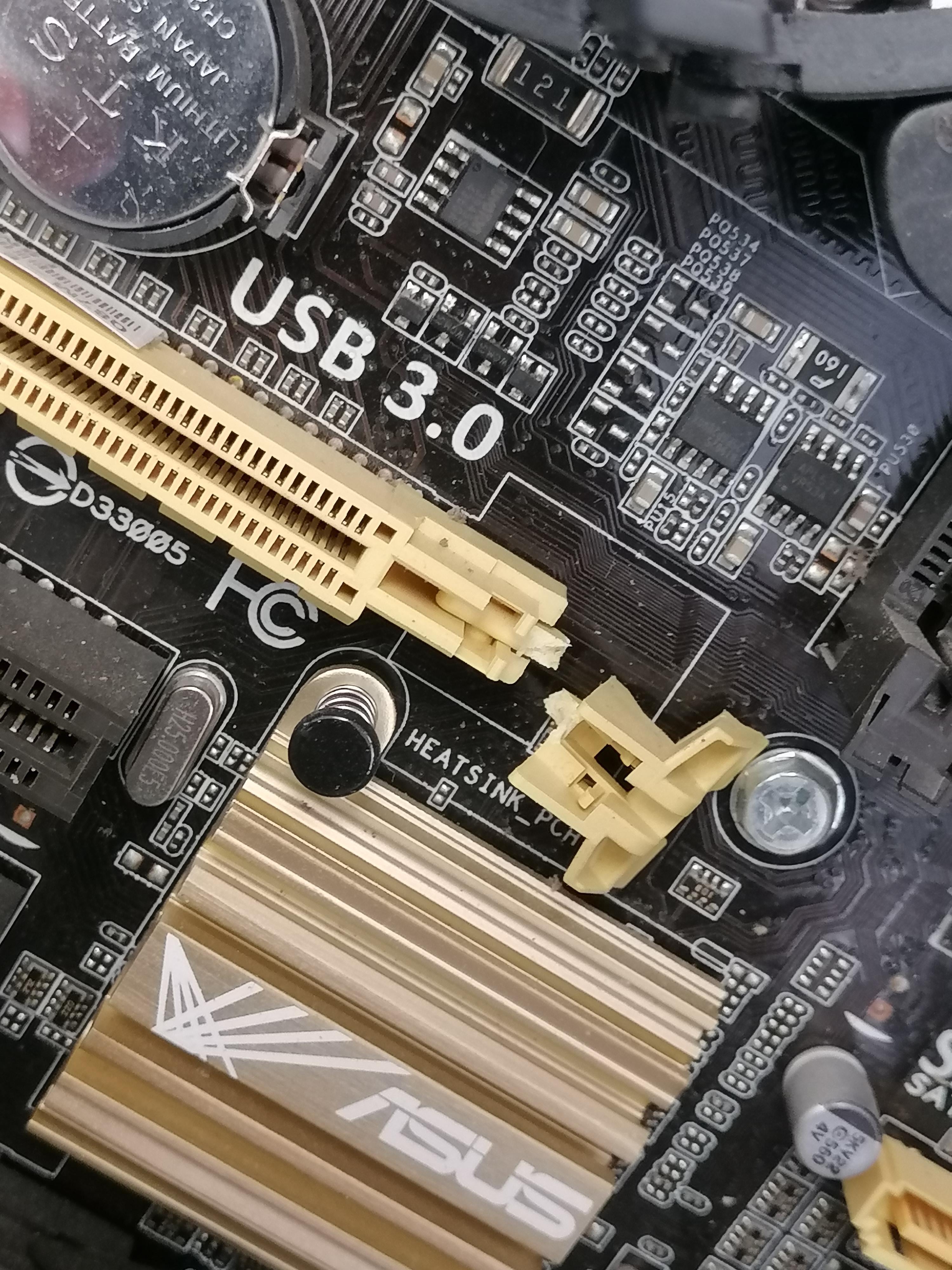
not at all. It’s just a retention clip, if the GPU will stay in the slot without it the card will work just fine.
relpmeraggy
Mines broke and it works fine. No issues
ew435890
I broke the one on my vertical mount GPU a while back. Got Hyte to send me a new riser cable free. They actually sent me two, because the first one was the wrong color. lol
But I still haven’t changed it out. I will next time I open the PC, but it works fine, so I’m in no rush. Been broken for 6+ months now.
TerminalDecline404
You will be fine. You might need to use something to carefully push the remaining bit of the latch back if it is in closed position but other than that just make sure whatever it is you are inserting isnt going to fall out when on because that is a short waiting to happen.
SoDrunkRightNow2
You’re fine, that clip doesn’t really even do anything. It’s supposed to lock the GPU into the slot, but it doesn’t really even do that lol.
AppointmentOwn3947
yes
MoreMen_Pukes
Your GPU slot is only operating at USB 3.0 speeds. You will have some issues with your video output being slow.
/S
TechnicalVet
Mine’s been like that for a couple years now, haven’t experienced any issues yet.
RevTurk
Now you won’t be able to mount your PC on the ceiling.
UlteriorMotive66
Do GPU riser’s also have retention clips like that?
nerdybro1
I have a 4090 that is connected with a broken clip. It’s fine though and has been fine since launch day.
SugarLuger
Mine did that, I bought a GPU bracket to help ensure the GPU stays in place, it’s worked out.
boanerges57
0% screwed from that retention clip.
158% screwed by the economy.
fenikz13
It’s fine just remember it’s loose when you move it
ieya404
So that’s a clip that would help hold your GPU in place. Use a little more care if you’re transporting your PC around as the GPU will be that much more able to slip a bit out of place.
PC sitting there and being used? No prob at all.
Lewdeology
Make sure those screws are tight and use anti sag stand if heavy gpu.
jahermitt
Your fine, but once its in, it will be a real pain to get out unless you pull the piece leftover out as well.
mildmanneredhatter
You might need a pin to get stuff out of the slot but should be fine otherwise.
LivingHormone2
You’re unhinged man..
the_jez
Happened to me on my last build and was pretty worried at the time. Got an anti sag bracket and all is good for a few months so far. You’ll be fine, but if you do ever move, or sell the PC with the same GPU, I’d strongly advise taking it out and storing it securely in an anti static bag. You do NOT want a GPU accidentally bouncing round in transit.
Snoopilaa
it’s fine
Ok-Light-2319
If u wanna be extra safe get a you support that mount to the bottom of the case.
Dr739ake
Just broken plastic, should work properly. Just be carefull not to tilt the pc, GPU could slip out
mbp_tv_
Happened to me when I upgraded to a 3080 never had a issue. But I don’t let it sag at all
cliffgamerz
To make your PC/GPU work, no issues without it, to claim warranty with Asus now or in future, you are just f**cked.
Edit: Nevermind about the warranty claim as it’s an decade old motherboard, maybe Asus themselves won’t remember they made that board.
WheissUK
Not really. It’s gonna work, just remember you need something to hold a gpu
whitemagicseal
I tried fixing it with my own soldering but only ended up with probably a broken mobo
KreacherInTheCorner
Now you’re gonna have trouble talking to girls.
Most-Presence-1350
Well, you can’t screw it.
BaasG11
Asus Q87M-E motherboard from 2013? Good excuse to buy something new.
survivingpsych
Lol, it works fine though if you have a really big graphics card like one of the modern ones getting it out will be an SOB. Had it happen on a sli setup on all of the clips over years and what’s going to install it m.2. decided to buy a new computer about the time I was walking my computer outside with a sledgehammer and thought better of it.
chromefox85
Just put pc on its side then gravity will keep it in anyways
LA_Rym
Should probably use a support bracket or something. Otherwise doesn’t really matter.
Logical_Bit2694
It’s broken. It’ll never work, you’ll have to send it to me for inspection /s
throwITallaway4ever1
Same thing happened but i used one of those gpu sag things to fix it
Hadley_333
I hate that part so much. If you have a big air cooler above it you need to get something like a flathead to push it. I’m always careful because all it takes is a slip to have it break something else on motherboard
Xaniss
Mine was like this for 5 years without me realising, that’s how little of an issue it is.
juggalo16651
I imagine you pressed it until it bottomed out and then said “that’s not far enough” and kept pressing
ThoriatedFlash
I broke mine off my PC a while ago. Just make sure it is in there good and every time you move your PC it is a good idea to make sure it is still in place.
SpankMFlank
If it is still works, don’t worry about it.
zepsuf
Consider it a mod. No issues here!
Creative_Rub3823
Not at all, I don’t even use the retention clip with my GPU. Just need to be aware of it when you move your case.
To open it use a pen or something quite thin, use it to push down on the lever…
DinosJournal
Get some plastic epoxy glue and stick that sucker back on, good as new! Just don’t put to much! 😅 maybe even super hot glue would work just fine. You can also buy industrial hot glue stick.
RandoDando10
Youll be fine, just be extra careful with making sure the GPU is in completely, and if you have a sizeable or heavy card, definitely think about grabbing a GPU bracket/support

47 Comments
not at all. It’s just a retention clip, if the GPU will stay in the slot without it the card will work just fine.
Mines broke and it works fine. No issues
I broke the one on my vertical mount GPU a while back. Got Hyte to send me a new riser cable free. They actually sent me two, because the first one was the wrong color. lol
But I still haven’t changed it out. I will next time I open the PC, but it works fine, so I’m in no rush. Been broken for 6+ months now.
You will be fine. You might need to use something to carefully push the remaining bit of the latch back if it is in closed position but other than that just make sure whatever it is you are inserting isnt going to fall out when on because that is a short waiting to happen.
You’re fine, that clip doesn’t really even do anything. It’s supposed to lock the GPU into the slot, but it doesn’t really even do that lol.
yes
Your GPU slot is only operating at USB 3.0 speeds. You will have some issues with your video output being slow.
/S
Mine’s been like that for a couple years now, haven’t experienced any issues yet.
Now you won’t be able to mount your PC on the ceiling.
Do GPU riser’s also have retention clips like that?
I have a 4090 that is connected with a broken clip. It’s fine though and has been fine since launch day.
Mine did that, I bought a GPU bracket to help ensure the GPU stays in place, it’s worked out.
0% screwed from that retention clip.
158% screwed by the economy.
It’s fine just remember it’s loose when you move it
So that’s a clip that would help hold your GPU in place. Use a little more care if you’re transporting your PC around as the GPU will be that much more able to slip a bit out of place.
PC sitting there and being used? No prob at all.
Make sure those screws are tight and use anti sag stand if heavy gpu.
Your fine, but once its in, it will be a real pain to get out unless you pull the piece leftover out as well.
You might need a pin to get stuff out of the slot but should be fine otherwise.
You’re unhinged man..
Happened to me on my last build and was pretty worried at the time. Got an anti sag bracket and all is good for a few months so far. You’ll be fine, but if you do ever move, or sell the PC with the same GPU, I’d strongly advise taking it out and storing it securely in an anti static bag. You do NOT want a GPU accidentally bouncing round in transit.
it’s fine
If u wanna be extra safe get a you support that mount to the bottom of the case.
Just broken plastic, should work properly. Just be carefull not to tilt the pc, GPU could slip out
Happened to me when I upgraded to a 3080 never had a issue. But I don’t let it sag at all
To make your PC/GPU work, no issues without it, to claim warranty with Asus now or in future, you are just f**cked.
Edit: Nevermind about the warranty claim as it’s an decade old motherboard, maybe Asus themselves won’t remember they made that board.
Not really. It’s gonna work, just remember you need something to hold a gpu
I tried fixing it with my own soldering but only ended up with probably a broken mobo
Now you’re gonna have trouble talking to girls.
Well, you can’t screw it.
Asus Q87M-E motherboard from 2013? Good excuse to buy something new.
Lol, it works fine though if you have a really big graphics card like one of the modern ones getting it out will be an SOB. Had it happen on a sli setup on all of the clips over years and what’s going to install it m.2. decided to buy a new computer about the time I was walking my computer outside with a sledgehammer and thought better of it.
Just put pc on its side then gravity will keep it in anyways
Should probably use a support bracket or something. Otherwise doesn’t really matter.
It’s broken. It’ll never work, you’ll have to send it to me for inspection /s
Same thing happened but i used one of those gpu sag things to fix it
I hate that part so much. If you have a big air cooler above it you need to get something like a flathead to push it. I’m always careful because all it takes is a slip to have it break something else on motherboard
Mine was like this for 5 years without me realising, that’s how little of an issue it is.
I imagine you pressed it until it bottomed out and then said “that’s not far enough” and kept pressing
I broke mine off my PC a while ago. Just make sure it is in there good and every time you move your PC it is a good idea to make sure it is still in place.
If it is still works, don’t worry about it.
Consider it a mod. No issues here!
Not at all, I don’t even use the retention clip with my GPU. Just need to be aware of it when you move your case.
Superglue that badboy, looks like a clean break
Shouldn’t be. Happened to me sunday also.
https://preview.redd.it/oqbhmofhpjlc1.jpeg?width=4031&format=pjpg&auto=webp&s=d718875fedbccf8ebd7a7956102eaf863af3fbd9
Works just fine
To open it use a pen or something quite thin, use it to push down on the lever…
Get some plastic epoxy glue and stick that sucker back on, good as new! Just don’t put to much! 😅 maybe even super hot glue would work just fine. You can also buy industrial hot glue stick.
Youll be fine, just be extra careful with making sure the GPU is in completely, and if you have a sizeable or heavy card, definitely think about grabbing a GPU bracket/support