
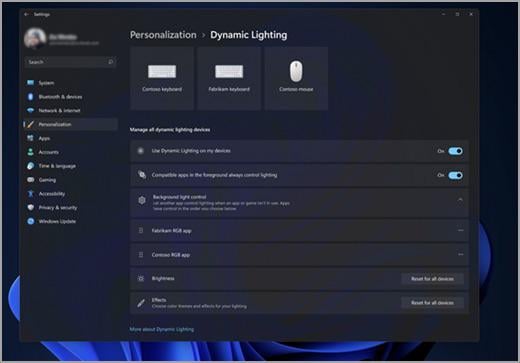
Currently in the Insider Preview of windows there is a [Dynamic Lighting](https://support.microsoft.com/en-us/windows/control-your-dynamic-lighting-devices-in-windows-8e8f22e3-e820-476c-8f9d-9ffc7b6ffcd2) feature where you can control lights on compatible devices without using proprietary software. Microsoft is currently working with Acer, Asus, HP, Logitech, Razer, SteelSeries to release more [compatible](https://learn.microsoft.com/en-us/windows-hardware/design/component-guidelines/dynamic-lighting-devices#partners) devices.
40 Comments
Sounds like it’ll be a buggy shitshow. Can’t wait
Edit: lol why is this controversial. RGB software has always been a buggy mess
If this will actually work it would be the first actual reason for me to switch to 11
> compatible devices
Keyword.
I could see smaller vendors with ARGB wiring messes go for it, I’d be surprised if Lian-Li or Corsair ditched L-Connect and iCUE respectively though.
You also don’t need Insider Preview for it. It’s already available in Windows 11 23h2.
The list of devices is razor thin :
https://learn.microsoft.com/en-us/windows-hardware/design/component-guidelines/dynamic-lighting-devices
It’s mostly also Keyboards/mice and external accessories, not really fans or strips.
And it made no difference for me as I still have to use my manufacturer’s software (Logitech G Hub) to configure my M&K.
Actually this update broke G Hub, it won’t start by itself when Windows starts and people began having other kind of problems.
The biggest culprits of proprietary everything is mostly Corsair and NZXT. It’s quite disgusting. I personally am a minimalist and don’t have much RGB in my system (only RAM and GPU). This is nice to see, but it’s not surprising to see those honestly, shitty companies, specifically not working with Microsoft on the open standard.
Could this be used to control rgb on ram sticks.
Nah, I’m fine having everything (keyboards, mouses, case fans and HUE lights) in Synapse.
if it replaces razer software, I’ll upgrade to windows 10
Jokes on them. I don’t use any lighting.
My machine already has it, and it’s mediocre at best. It keeps stopping whenever the machine is asleep or locked and takes a while to kick in on each boot. It also doesn’t become available unless I install Logitech G Hub, at which point one wonders what the point of it is.
I thought you already could on Windows laptops.
Brightness controls. /s
Do we already know which lightingh effects will be possible? or just static colors?
This update has allowed me to completely stop using G Hub to control the lighting on my Logitech devices. Been using it about a week now and I love it!
Please, for the love of God, be the end of these 9000 different rgb controller programs.
Dynamic Lighting is already available on the stable version of win11. It just doesn’t work with any of my hardware lol
I would like to have support for asus aura, i want to change rgb on my mbo without having to install any bloat
Doing it with logitech. Windows 11 to logi
Would be nice to control fan curves as well.. I will put my pc on “quiet”. Just browsing the web and youtube/twitch. But switch to “balanced if I am gaming.
Because Microsoft sees stuff like OpenRGB, and SteamOS and knows it could take market share. They have to compete somehow. Still, it’s a welcome addition
Soon? I have it already and I’m not on Insider…
Not even this could convince me to switch to 11
I can, it’s called Home Assistant. (oh, it’s not about actually lighting)
I’m not using the Insider Preview of Windows 11 and I have this available. Weird.
Also, it doesn’t reliably control the lighting to my Logitech G915TKL keyboard. The lights turn off on it after about 20 minutes even if I’m using the keyboard which doesn’t happen with G Hub. Same thing happens with SignalRGB, so I’m thinking this keyboard isn’t as comparable with 3rd party software as one might think.
I’m not on an Insider Build and I have Windows 11 Dynamic Lighting for my new Logitech G513 right now
It defaults your devices to your Windows theme colour which is pretty cool
I can control my phone through my PC so I can already control my lights through my PC
cool , another thing to turn off.
I’m concerned how this will interact with devices with both customizable lighting and macros.
I have a PC with no RGB except for the one red letter strip on my GPU that I can’t turn off. Even so, I have lots of other lighting on my desk that I’m curious if I can control using this
rgb doesnt help with anything so yay more windows bloat ware
But will it have the amount of options that icue gives in terms of lighting
Awesome. I refuse to install MSI’s shit software again so i would actually love this.
Big news for Windows – Added a basic function people gave up on years ago and started using free software for.
Roadmap in 5 years – Once everyone is converted, charge for it!
Also, go screw yourself Clipchamp.
oh man, if I could replace icue (memory, fans, AIO), GHUB (peripherals), amorycrate (mobo), and EVGAwhatever it’s called (GPU)…
And even integrate the Hue lights above my desk…. that’s some appeal
Kinda relevant question for people who use multiple brands of rgb fans: Is there currently a reliable 3rd party app(or whatever) that can combine all the fan lighting controls? Google always brings me here for PC stuff. I’m gonna be using Lian Li and NZXT when I finish the aesthetics of my build. If it’s gonna be a constant headache I’ll probably just use NZXT but there’s a specific look I’m going for so figured I’d ask in this post.
Microsoft: We’re taking the first steps to simplify a common complaint with PCs, which isn’t even our fault or responsibility, let us know how we can improve it.
PC Users: This isn’t perfect… kill yourselves!
I stopped using 1 of them. After 3 gb of rame usage
Lovely! It has a kill it all button.
Corsair pls y’all, come on
I’m too lazy. Someone post the competing standards comic
After Windows 10, I plan to go full Linux.