
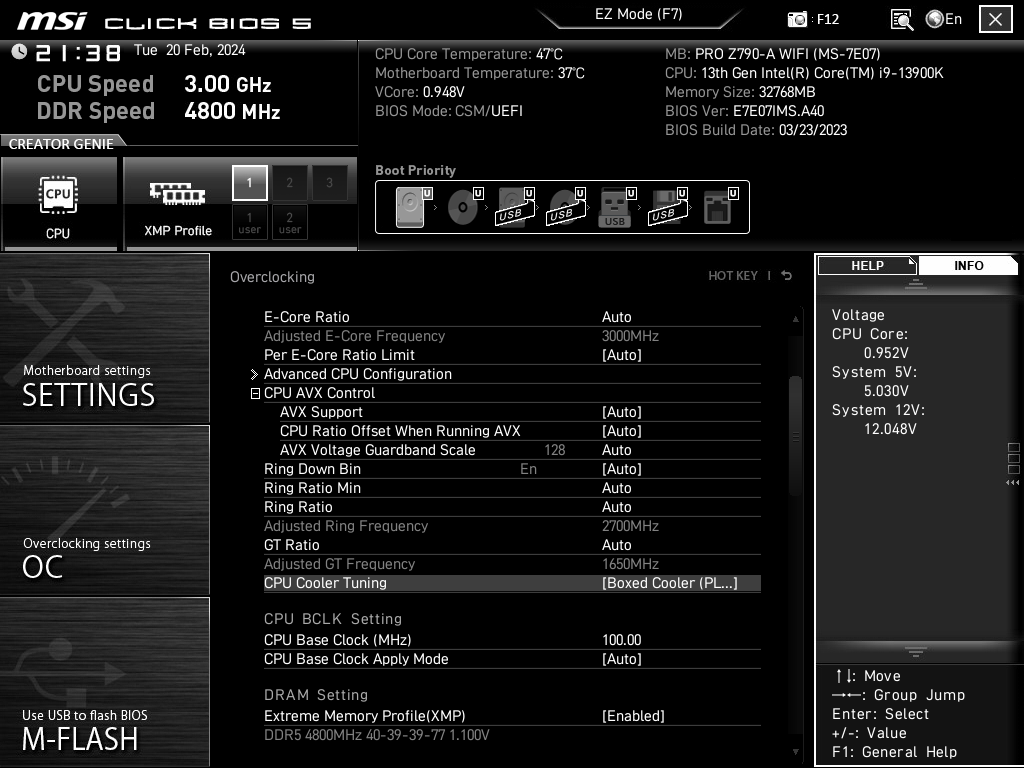
This is a 1 year old computer. Every time I run Prime95, small FFTs test, the same workers (physical cores 5 and 6) fail after a few minutes with this error:
[Feb 20 19:58] Worker starting
[Feb 20 19:58] Beginning a continuous torture test on your computer.
[Feb 20 19:58] Please read stress.txt. Choose Test/Stop to end this test.
[Feb 20 19:58] Test 1 (thread 2 of 2), 76000 Lucas-Lehmer in-place iterations of M4028769 using FMA3 FFT length 200K, Pass1=640, Pass2=320, clm=2.
[Feb 20 19:58] Test 1 (thread 1 of 2), 76000 Lucas-Lehmer in-place iterations of M4028769 using FMA3 FFT length 200K, Pass1=640, Pass2=320, clm=2.
[Feb 20 19:59] FATAL ERROR: Final result was 304D5D54, expected: 6186CC09.
[Feb 20 19:59] Hardware failure detected running 200K FFT size, consult stress.txt file.
[Feb 20 19:59] FATAL ERROR: Final result was DBDE69A3, expected: 6186CC09.
[Feb 20 19:59] Hardware failure detected running 200K FFT size, consult stress.txt file.
[Feb 20 19:59] Torture Test completed 2 tests in 0 minutes – 2 errors, 0 warnings.
[Feb 20 19:59] Worker stopped.
* CPU: 13900K
* CPU cooling: air cooler (Cooler Master Hyper 212)
* GPU: RTX 4090
* Memory: Crucial ct16g48c40u5.m8a1 (Crucial 16GB DDR5-4800 UDIMM) x 2
* Motherboard: MSI PRO-Z790-A-WIFI
* Power supply: Corsair HX1500i
Things I have tried:
* Load default BIOS values
* Change PSU
* Try with one RAM stick or the other and move them between sockets
* Upgrade and downgrade BIOS
Any suggestions?
#update
I just discovered this option
https://i.imgur.com/eW3cJXc.png
https://i.imgur.com/wS2ZF0R.png
Setting it as the first one “boxed cooler” makes prime95 not fail anymore, at least thus far (usually it failed within 2 mins). The other two make it fail. What does this option do? (The third option, water cooler, is the default). Is this really a problem of temperatures? This is a screenshot of core temp whilst I do the prime95 test https://i.imgur.com/OiCq0o6.png
6 Comments
Faulty CPU is my guess after what you’ve tried.
You could try new ram.
Why kind of temps are you getting?
I’m assuming that cooler is not going to be able handle that cpu at stock
You’d probably have to drastically reduce power limit
You could also try intel cpu diagnostic
That cooler isn’t near enough for a 13900k.
do you happen to have xmp on?
is XMP enabled as that is technically overclocking and can cause issues with stability. A lot of times just turning on XMP will require you to tune voltages manually.
Try running that with XMP disabled and see if you still have errors.
I have an ASUS board, and Intel just had my change the SVID settings to “Intel Fail Safe” and I got my stability back. Curious if you’d have a similar setting on the MSI board.