
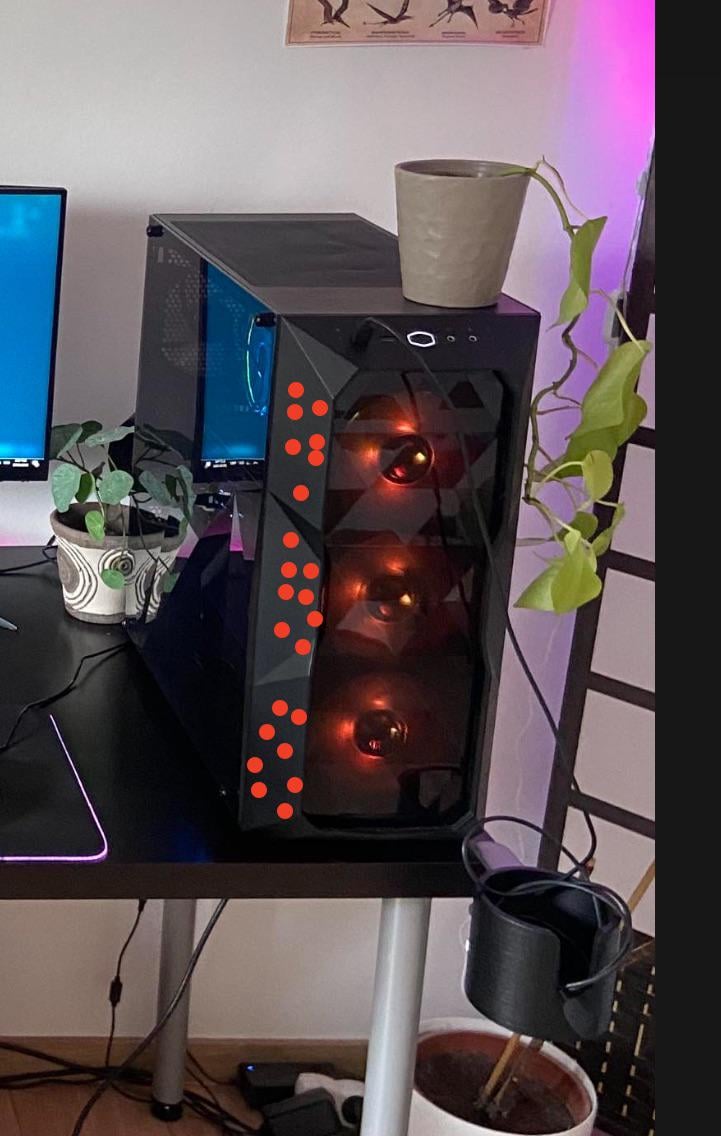
So i just put in a fat 7800xt graphics card in my pc and there is way to much heath buildup.
As it turns out my Cooler Master case actually doesn’t cool enough at all. (Ironic)
When i remove the front of the case my airflow is good and my temps are okay.
So i thought what if i drill 3mm holes all over the front pannel? (red dots)
I think it will look stupid but its gonna help with the airflow right?
46 Comments
I mean, yes, the more holes the more airflow in (unless there’s an exhaust bottleneck). Do you have enough exhaust, though? What’s your current fan setup?
Before you destroy this case sell it and buy decent one
well yes, drilling holes in a mesh case is pretty derranged
if you don’t get enough airflow through that mesh what you need is better fans, not more holes
oh and you should probably remove that top mesh panel thing, the top should be an exhaust, not an intake, so it doesn’t need a mesh filter obstructing airflow
if you have no exhaust fans on the top then that’s probably your main issue
Try these fans if you really need more airflow
https://pcpartpicker.com/product/tQK2FT/bgears-b-blaster-140×38-308-cfm-140-mm-fan-b-blaster-140×38
They are a little bit loud though
How much heat is “way too much”? What are your actual temps?
I got the exact same case, the problem isn’t the case, it’s the stock fans with no PWM and not enough cfm (volume of air moved).
Your solution will be better fans that cover the aforementioned limitations
Just looking at the crap rgb on the fans, you need better fans. Goto amazon and buy uphere fans if you are poor. make sure to get the 4pin pwm ones.
I’d sell the garbage inefficient GPU and buy an NVIDIA one instead.
More holes will probably just make the fans less efficient at channeling air.
https://preview.redd.it/py84gbilfcjc1.jpeg?width=1200&format=pjpg&auto=webp&s=4445a112241d204a089d6955ee4c684609a1d23e
OMG I love this case’s aesthetic! Pls don’t ruin it by drilling holes just remove any dust filters and clean more often to improve airflow!
I don’t think it will help.
If you worried about GPU temp better consider undervolting.
I removed the daft glass front panel from mine and then put server fan grills on to keep the dust out and covered all mounting holes for the same reason. It’s not pretty but my CPU is down 3 centigrade at idle and almost 15 when benchmarking. I’m just glad I managed to tackle the thermal throttling without spending a penny.
It’s hard to tell from the photo but if that’s mesh on the front you’re unlikely to gain anything from drilling holes, you’re just going to be drawing extra dust into your case.
Yes
Pour some water on it
First order of business – remove frontpanel and check if it improves things – yes – keep removed.
No, your problem is elsewhere to find. (eg bad fans, obstructions, bad cooling on components…)
Maybe remove the glass panel first and see if that helps? You might just need an AIO cooler for your CPU
Is the heat build up that bad? My buddy worries when his gpu hits 70 degrees. I’ve been running my gpu at 85 degrees for the past 2 years. Cleaning out the dust in the cpu fan and cooler should help cpu temp. I’ve never cleaned my cooler and she is full lol.
Not all fans are equal. Not all fans perform as well as others. It’s why people vouch for noctua so much despite their “sub-par” color scheme.
Replace those fans with something that can move more air. My bet is those fans are the ones that came with the case, and are performing poorly because they were the cheapest shit CM could throw in the case to advertise RGB.
Meh just open the case and keep it open
also, take the potted plant off of the top
Seems it’s got a glass cover for a front side. Why not to try to take it off and replace it with mesh? Tiny holes won’t help in this case, it just needs better air intake ways.
Yes
Someone doesn’t have a cat!
take out the clear jaded plastic piece.
yes. and i have the same case like yours. lol. but i just add 2 PWM fans behind those 3 fans front intake. problem solved and my GPU RTX 2060 just barely at 69°C (noice) when full load 24/7.
Buy a pc case with more air flow
Yes
That plant get watered ?
Have you tried setting the fan speeds a higher?
is that a fractal case? are those the fans that came with it? i have a fractal focus 2 and the front case fans that came with it are absolutely dogshit, they are loud, they rattle and they move fuck all air, get some nice noctua fans
I did it and it worked great if you use the right drill bit it doesn’t look so bad.
either take of the side panel OR sell and buy a new one as others have suggested?
Just get a 4000D Airflow
If you can do it acuratly and symmetrical and geomatrical correct than you dont need to worry about. But If you suck at all the acuracy thank dont do it.
Sounds dumb but get rid of the dustfilters they also restrict airflow, you only need to Clean your pc more often
Yes it is, you are better getting decent quality fans (if those are the fans that came with the case they’re really bad) or sell the case a buy a better one
Swap those front fans with better fans like the artic f12.
Do you have any exhaust fans?

I have the exact same case with a 5600x/4090 and it really builds up some heat… But the GPU alone is pumping 400W+ so there will be some heat but I’ve never had issues with it. The GPU stays under 60⁰C most of the time and so does the CPU (with a 240mm AIO on Top of the case).
As others mentioned, better fans will solve this and keep you warmer in the winter 🙂
https://preview.redd.it/5h87ze2vwcjc1.jpeg?width=3000&format=pjpg&auto=webp&s=229c93cf436aa713f0aaa959b4737aac0bf8708f
not crazy also running a 7800xt which barely fit
Do it try it out, just be careful of hidden cables that make the front panel work. The other solution is a new case so nothing to lose actually, just be careful with the drilling.
https://preview.redd.it/0hgfxpvj0djc1.jpeg?width=2250&format=pjpg&auto=webp&s=38030f716f777fe645d16475f6ae253f0c2bff72
Do it like me, just remove front panel plastic for ultimate flow
Yes
https://youtu.be/-iPggUimB4k?si=zpNKYb9aAOTFAhXU
Case is perfectly fine. Not a bad case. Not the best, but still. Don’t drill holes, won’t help or so minor it won’t matter.
I am a huge proponent of modifying your belongings. PCMR generally goes for the cleanest, sleekest, most precisely factory made look so everything is shiny and new. I say drill some holes and make it your own! Life is too short (and PC building is too expensive) to keep your case looking fresh out of the box.
Yeah that’s pretty crazy considering you’ve already got one very large hole with three fans in it.
The problem isn’t the case. It’s your fans. Get better fans.