
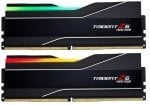
So… I have a kit of g skill neo rgb ram found here: https://www.ebuyer.com/1541991-g-skill-trident-z5-neo-rgb-32gb-6000mhz-cl30-ddr5-memory-amd-f5-6000j3038f16gx2-tz5nr
As far as i know, it’s M die, i’ve copied buildzoids ram timings, have used them for 1+ month gaming now, noticed the temps can be anywhere from 45-65c during games.
I hear the ram can become unstable above 55c, decided to run a ram+gpu test but wasn’t sure how to go about doing it…
My specs before i go further:
* 7800x3d – PBO w/o any CO
* msi 4090 suprim air cooled
* 2x16gb ddr5 g skill neo rgb 6000mhz cl30 ram
I ran OCCT standard GPU test + TM5 absolut, no errors occured after it finished (1 hour tests by default?), however the ram hit 72c and 70c max.
Should i be worried about these temps for gaming use?
Also has anyone managed to cool these ram sticks with a fan or anything without modifying the sticks? I don’t fancy taking off the heatsinks if i can help it.
4 Comments
There’s probably no thermal pad on the PMIC if I have to assume. Taking off the heatsink is your best course of action if you want to dramatically lower temps
Whats your case, CPU cooling and fan setup? What is the actual power draw of the GPU as reported by MSI afterburner?
99% sure your GPU is heat dumping onto your memory and you aren’t circling nearly enough air. Could be worse if your CPU has an AIO cooler and is on intake where the hot air is also sent to the memory area.
Also what is your ambient temps? 72c on an ambient of 32 isn’t horrible even if it affects stability at that point. But a delta T of >50 is definitely something that you need to fix.
Just went through this with my G-skill modules. The original heatsink that comes with them is awful. They’re heat insulators, not heat spreaders. As the other commentor said, there is zero contact between the PMIC and heatspreader. Zero.
A fan pointed directly at the dimms will help, but removing and or replacing the OEM heatspreaders is the real solution if thermals are an issue for you.
With all that said, if you’re not tuning your memory and your current configuration is stable you might not need to do anything. Before modifying my modules I would routinely be in the 60s during heavier loads, granted my DIMMs are A-die and probably running a much higher voltage.
The unstable above 55c dialogue is maybe in reference to tREFI? or maybe another timing that’s temperature sensitive like tREFI? If you’re not pushing these temperature sensitive timings then you won’t have instability.
A classic case of the purely cosmetic “heat spreader”.
Your RAM will function normally until 85C, at which point performance will drop. Higher temps do mean increased instability risk though, and you are already running timings that are tighter than default.
Point a fan directly at the sticks, even an 80-92mm should drop temps by 15-20C.