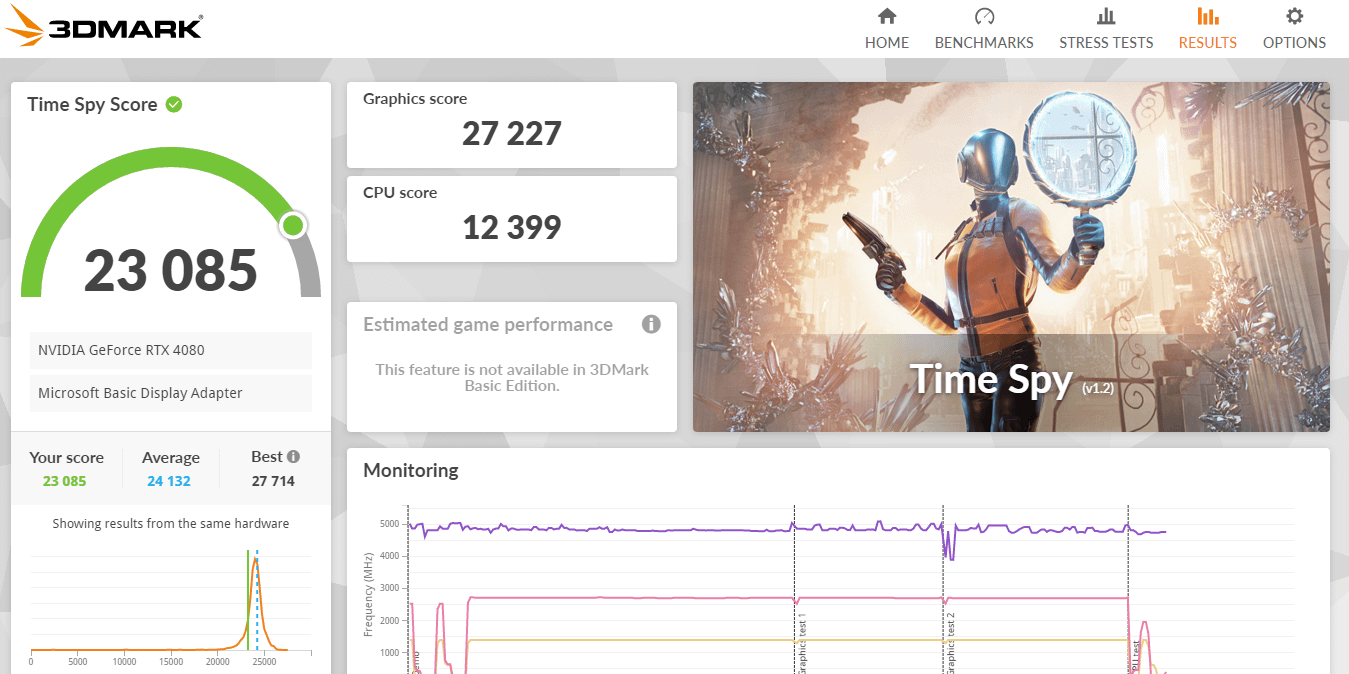
Funny thing is, I did a benchmark before this one with all my usual applications in the background and I got of 23,736 which was better but still below average, so I took some advice and turned off all my background applications and my score got worse by a not insignificant amount?
Active-Quarter-4197
Did you set priority to realtime?
EastLimp1693
Check powerplan in windows
randysailer
The average includes overclocked systems. So if you have a stock rig below average is where it should be.
mandoxian
Set priority higher, watch your temps and overclock if you actually want to score higher than average. My PC scores lower on consecutive runs, too. Haven’t bothered with checking out why as it still performs higher than average somehow.
I-LOVE-TURTLES666
Turn off gsync
King_Archaea
Your Graphics Score is the expected one for a 4080…
BuckieJr
I see gpu massively dips at the start and at the end, it shouldn’t. It should be a nice consistent line with maybe a little wave here and there if you’re bouncing off the power/voltage limit of the card. Maybe a drop in usage when it switches between the tests but not the way it currently is
Your cpu also has some drops in the start and some large dips in the 70% area of the test indicating you’re hitting some kind of barrier there too. The one towards the end looks like it’s at the start of gpu test #2 so could be something to do with loading in stuff how’s the temps of the computer?
[here’s a test of my 4080 founders and 5800x3d at stock.](http://www.3dmark.com/spy/41525513) im not home to actually run the test but maybe these will help as a comparison.
It is normal to be below but close to average on stock settings.
plaskis94
Compared versus overclocked as well. If you want to hit average you need overclock
Educational_Fan_484
What is actually important in this is the thermals. If they are very good then it might be gsync or something else. Remember that 3d mark enthusiasts optimize their pc to the point where it gives them an advantage, and then they overckock

11 Comments
Funny thing is, I did a benchmark before this one with all my usual applications in the background and I got of 23,736 which was better but still below average, so I took some advice and turned off all my background applications and my score got worse by a not insignificant amount?
Did you set priority to realtime?
Check powerplan in windows
The average includes overclocked systems. So if you have a stock rig below average is where it should be.
Set priority higher, watch your temps and overclock if you actually want to score higher than average. My PC scores lower on consecutive runs, too. Haven’t bothered with checking out why as it still performs higher than average somehow.
Turn off gsync
Your Graphics Score is the expected one for a 4080…
I see gpu massively dips at the start and at the end, it shouldn’t. It should be a nice consistent line with maybe a little wave here and there if you’re bouncing off the power/voltage limit of the card. Maybe a drop in usage when it switches between the tests but not the way it currently is
Your cpu also has some drops in the start and some large dips in the 70% area of the test indicating you’re hitting some kind of barrier there too. The one towards the end looks like it’s at the start of gpu test #2 so could be something to do with loading in stuff how’s the temps of the computer?
[here’s a test of my 4080 founders and 5800x3d at stock.](http://www.3dmark.com/spy/41525513) im not home to actually run the test but maybe these will help as a comparison.
[here’s a test with the system overclocked.](http://www.3dmark.com/spy/41079607)
It is normal to be below but close to average on stock settings.
Compared versus overclocked as well. If you want to hit average you need overclock
What is actually important in this is the thermals. If they are very good then it might be gsync or something else. Remember that 3d mark enthusiasts optimize their pc to the point where it gives them an advantage, and then they overckock