
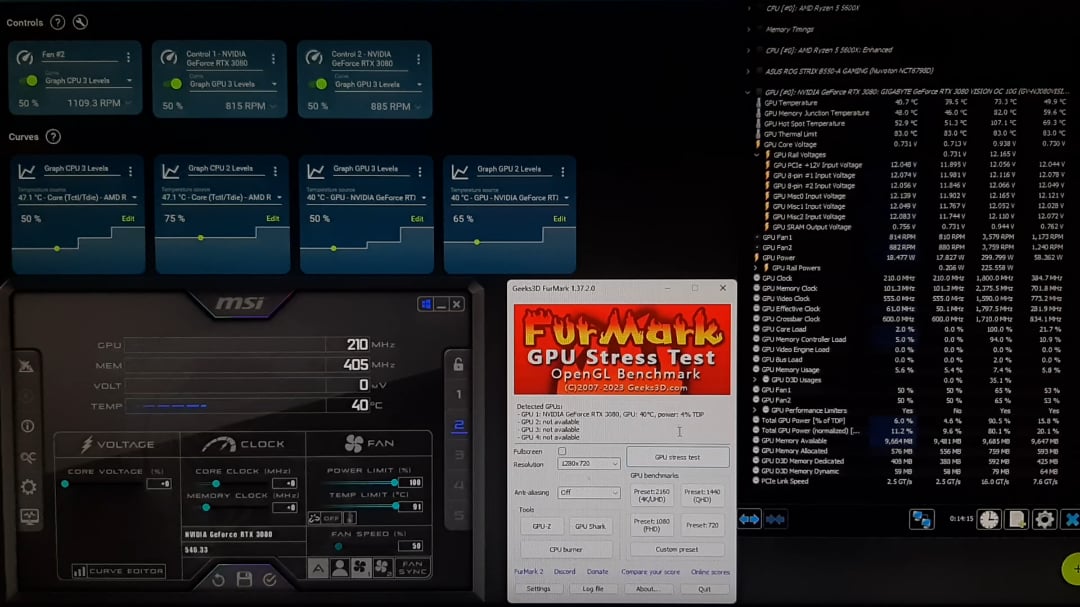
The only tweaks I made to the GPU were FanControl controls and curves, and the Profile 2 in Afterburner, just as it shows in the video.
Describing what I could notice, besides Furmark:
I started Unigine Superposition (DirectX Extreme). In the first 4 seconds, the GPU fans got extremely loud and fast.
According to HWinfo with Furmark, it reached about 3600RPM. Oddly enough, the 100% fan power in FanControl manual control is about 2850RPM.
It’s like a secret protocol for a melting core, but the GPU temperature never went above ~75C, we can see that in HWinfo too.
In Fancontrol, the third level of the graph is at 80C with 100% fan power. The fans never went up to that 100% power: we can see the Furmark Fan percentage is at 65%, but there’s still very high fan noise and RPM at the start.
It’s almost as if there’s a secret fourth undetected fan, and the gpu is melting.
The speed is all messed up. I didn’t notice anything wrong with the memory speeds, but the core speeds are oscillating and don’t even stay at the base 1800MHz. Like, How can I OC with that..
5 Comments
Something with MSI Afterburner messes the fan-control.
Look trough the various settings and tick some boxes there ..
maybe gpu power sensor is faulty but it’s not clear, you have to unroll gpu power rails.
Your hotspot temp is hitting throttle limit, need to repaste. Get some PTM7950.
when hotspot hits 105c, fans override to 100%
also Furmark is no good for testing OC, because it will cause the GPU to hit power limit and reduce the clock speed compared to normal game / benchmark workloads. It’s a good thermal test though.
Time for new thermal paste on the core.
Your core average may be 75C, but the hotspot, which is the reading of the hottest sensor on the die, is showing between 104.8C and 107C, which is way too high. The delta between the core average and hotspot should be 10-15C, not 30C+ as you’re seeing here.
This indicates the paste has pumped out and dried up, leaving bare spots on the die which are getting extremely hot, and hitting the 105C threshold to trigger emergency mode, which runs the fans in excess of the 100% that is configurable by the user, to try to keep the core from melting down.
This will also lead to throttling, as you’re experiencing. New thermal paste on the core will resolve this and get the card back in normal range and stop the fans from running in emergency mode.
PTM7950 pads are a good alternative to paste and will never have to be replaced for the remaining life of the card.
> GPU temperature never went above ~75C, we can see that in HWinfo too
look two lines lower