
I ordered and built this machine the day the 14900k dropped (I think Oct 17th?) The first machine was unstable and would randomly crash while idle (rarely under load). I ordered a 2nd of every component and replaced parts one at a time, until the only thing left was MoBo and Processor. I swapped the Gigabyte Mobo for a Tachi Lite, and a new processor.
The 2nd machine has been much more stable, but has locked up 4-5 times in the last 2 months while gaming. It will bluescreen if I try to run Cenibench. I’ll post the info from the mini dump at the bottom of the thread.
I think it’s a voltage issue. I locked all the cores at 57, and disabled XMP. That alone reduced the crashing to almost 0 (one crash every 4 weeks or so). Anything super processor intensive like Cenibench has the potential for a hard lock or blue screen. 99.99999% of daily use it’s fine. I have never completed a single Cinebench run, blue screen or hard lock every single time.
I don’t know much about the voltages, where can I read up to learn about ring, vcore or anything else that would potentially gain stability?
My SP score is 93 (if I recall correctly) which seems lower. I’m at a point where I’m about to buy a 3rd 14900k and see if I have better luck, but I want to fiddle with voltages some and see if I can get more stability.
Thoughts? Ideas? Suggestions?
Info:
Tachi Lite Z790 latest bios 4.08
14900k – stock
64gig 2x32dim 6800 ddr5 (XMP \*\*NOT\*\* enabled)
Samsung 990 Pro
EVGA RTX 3090 (only part used from the previous build)
Dump information:
CLOCK\_WATCHDOG\_TIMEOUT (101) An expected clock interrupt was not received on a secondary processor in an MP system within the allocated interval. This indicates that the specified processor is hung and not processing interrupts. Arguments: Arg1: 0000000000000006, Clock interrupt time out interval in nominal clock ticks. Arg2: 0000000000000000, 0. Arg3: ffff8901b6c51180, The PRCB address of the hung processor. Arg4: 0000000000000008, The index of the hung processor.
BUGCHECK\_CODE: 101 BUGCHECK\_P1: 6 BUGCHECK\_P2: 0 BUGCHECK\_P3: ffff8901b6c51180 BUGCHECK\_P4: 8 FILE\_IN\_CAB: 011524-10437-01.dmp TAG\_NOT\_DEFINED\_202b: \*\*\* Unknown TAG in analysis list 202b DUMP\_FILE\_ATTRIBUTES: 0x1808 Kernel Generated Triage Dump FAULTING\_PROCESSOR: 8 PROCESS\_NAME: Cinebench.exe FAULTING\_THREAD: ffffc082b0aed080
***^(EDITS/Updates:)***
57 all pcore, 44 all ecore = BSOD in Cinebench 2024 (with in 30 seconds every single time)
56 all pcore, 43 all ecore = Stable in Cinebench 2024 (3 completed runs thus far)
57 all pcore, 43 all ecore = Cinebench hard lock up, but PC Still responsive, just Cinebench Lock. It ran 9 minutes the first time before lock, then 7 mins the second and 3rd time, but never completed a run successfully)
I disabled BCKL Adaptive Voltage prior to testing 56p/44e. It may or may not have helped, I’ll do more testing later.
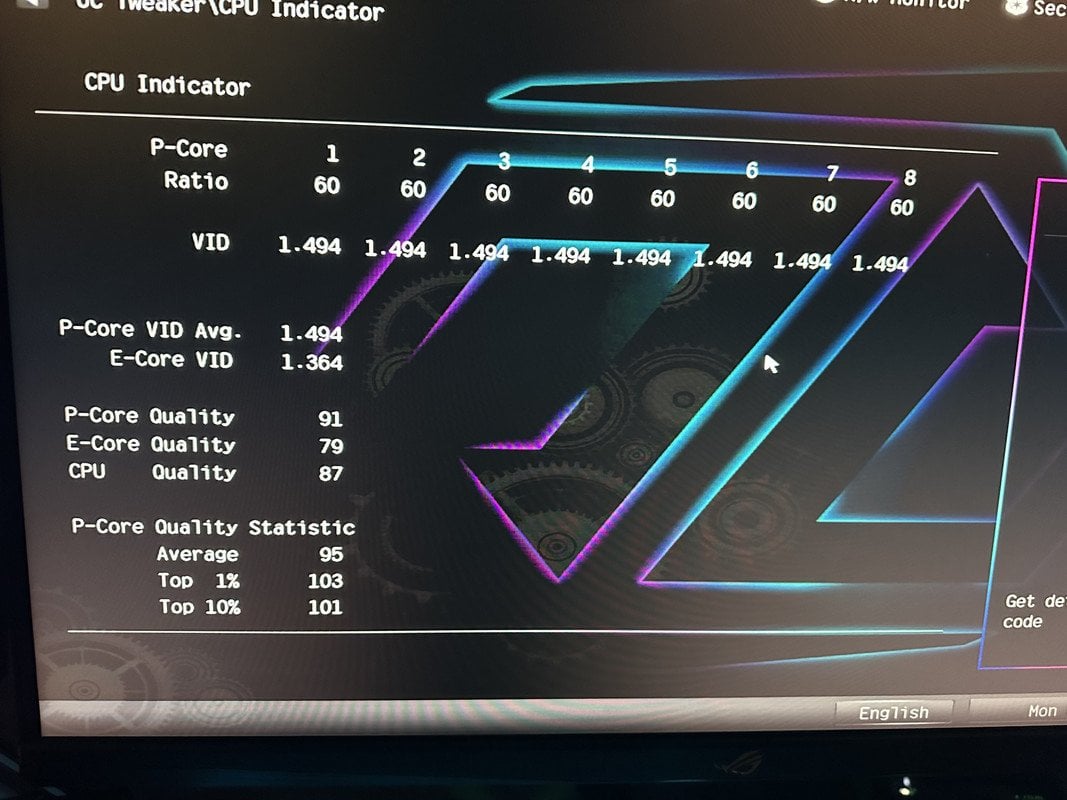
AsRock has a SP Score called “CPU Quality” this processor’s quality is 87, with a p-core quality of 91, and an e-core quality of 79. Screen Shot [HERE](https://postimg.cc/6T6DnxM4)
Looks like I may have hit the lottery for shitty Silicone on my 14900k.
16 Comments
What kind of cooling are you using and what do your temps look like?
What power supply do you have?
Reset cmos?
Clean windows install? With drivers from the motherboard website?
Have you run memtest?
What cpu cooler do you have?
Have you tried using hwinfo64 to monitor voltages and temperatures to see if anything is out of place?
Worth monitoring dram temps? I heard new ddr5 has temp problems that causes instability. This video they talk about it at the 13 min mark. Definitely sounds like a memory problem to me tho. You could try running a fan directly aimed at your ram and see if there is any change.
https://youtu.be/4vROfICq5yE?si=04jhZV0c_f7wlZAF
Id put it all back to stock settings and then just bump the cpu LLC up a level and test. The vcore is probably drooping too much under heavy load
Replace the 14900k. I had to.
First machine sounded like a voltage problem.
Second machine sounds like a heating problem.
If your gpu, 3090, is pumping warm air into the case before being exhausted, that’s likely an issue causing ram to spike in temps likely or the gpu is over heating. Also, check the temps on the 990. The gen 4 m.2 nvme drives get toasty… almost too toasty. This system is extremely power hungry also. I could see this system under full out load to draw 900 watts easily.
what voltages are you seeing under load before crashing on the CPU? Are PL1 and PL2 limits at 253w?
What CPU cooler are you using? Set a 90 degrees limit for the CPU and make sure you have enough airflow in your case so the memory doesn’t get overheated. If it still crashes set all cores to 55-56x and set LLC to 6/7 (not sure about asrock board, try the max value-1). Then select adaptive voltage “-“ “0.03”, BCLK adaptive voltage “OFF” and disable C states. These settings should be able to pass any stress test with 0 problem on the 13900k/14900k (90+ SP)
I’ve had two 14900k. The first was like yours and ran like shit. Second is much better with way lower volts and temps. I’d return it or run a lower all core without the 6ghz boost.
Didn’t read the wall text but yeah. It’s an unstable, crappy processor. You can lower Tjmax and both power limits even down to 85W at first. Should stabilize it. Then you can try to undervolt too.
14th gen processors need a bios upgrade on intel 13th gen ready motherboards, have you updated your bios?
Where did you get your SP score from? I thought that was only a Asus thing. I do recall seeing Asrock have their own way of scoring CPU’s but their score is not really comparable to Asus.
You sure XMP is totally off? Double check in windows what speed your memory is running? Since you’re running 2×32 it’s dual rank, so quite a bit harder to hit higher speeds.
While it’s good to learn about voltages, especially undervolting. You shouldn’t have to do any of that to keep your system from crashing on stock setting (of course ignoring XMP, cause that’s a crapshoot).
Even if temps were an issue, the system would go to 100c during a stress test and then throttle itself down, but not crash.
You mention that you bought a second of every component. Did that include the CPU? If not, I would get that swapped out. I have seen a handful reports from others getting a less than stellar quality CPU sample, and having the same issue.
If you want to try something. But I wouldn’t make it sway your decision to keep the CPU. Is lock your p-cores to 56. The 14900k is just a 13900KS and that’s its default all core.
As others pointed out it could be an unlucky processor.
Could really be a defective CPU, or very bad silicon lottery ticket.
I have a Gigabyte Z690, 14900K , G.skill trident Z RGB 6000MT CL 30, WD Black 850, artic cooler 420 RGB, EVGA 3080.
With curve offset, from 3.4Ghz -0.105, ring offset -0.055, load line calibration medium. It runs super stable, cinebench 39.5K temps above 80s. While gaming temps on average 50-55, peak at 70s.
PL1 and 2 set to Intel POR (253 watts) I can push up to 280 watts but the performance gains are ridiculously low, like 1 to 2% so I doesn’t make any sense to push it, at least in my configuration.
Peak voltage 1.325, core enhancement disabled.
Enabling this option in bios will push all P cores to 6GHZ, still stable bu voltage will pass 1.4 and thermals… Well throttling.
My readings are from HWinfo64
Edit: added more info, amended some typos
The BSOD literally tells you what the problem is, ignore all these people throwing random guesses. CLOCK_WATCHDOG_TIMEOUT aka BSOD 0x101 literally means your CPU core(s) stopped responding. 99% of cases this is tied to vcore. You should be able to stabilize 57x, but that’s probably the limit on an AIO and SP93. If you really want that 100-200Mhz, you can try playing lottery again.
The shitty E-cores on my 13700K does this crap sometimes. Drives me nuts, otherwise stable then out of no where, clock watchdog BSOD.
I know disable E-cores is not a thing for most people, but give it a try. You can even just set their frequency lower, maybe like 3.7ghz to 4ghz only and see if that helps.
GL!
I’ll post edits/updates to the main thread, but here are my findings so far.
EDITS/Updates:
57 all pcore, 44 all ecore = BSOD in Cinebench 2024 (with in 30 seconds every single time)
56 all pcore, 43 all ecore = Stable in Cinebench 2024 (3 completed runs thus far)
57 all pcore, 43 all ecore = Cinebench hard lock up, but PC Still responsive, just Cinebench Lock. It ran 9 minutes the first time before lock, then 7 mins the second and 3rd time, but never completed a run successfully)
I disabled BCKL Adaptive Voltage prior to testing 56p/44e. It may or may not have helped, I’ll do more testing later.
AsRock has a SP Score called “CPU Quality” this processor’s quality is 87, with a p-core quality of 91, and an e-core quality of 79. (I may have misquoted that in the replies down below, I’ll try and edit them.)
Looks like I may have hit the lottery for shitty Silicone on my 14900k.