
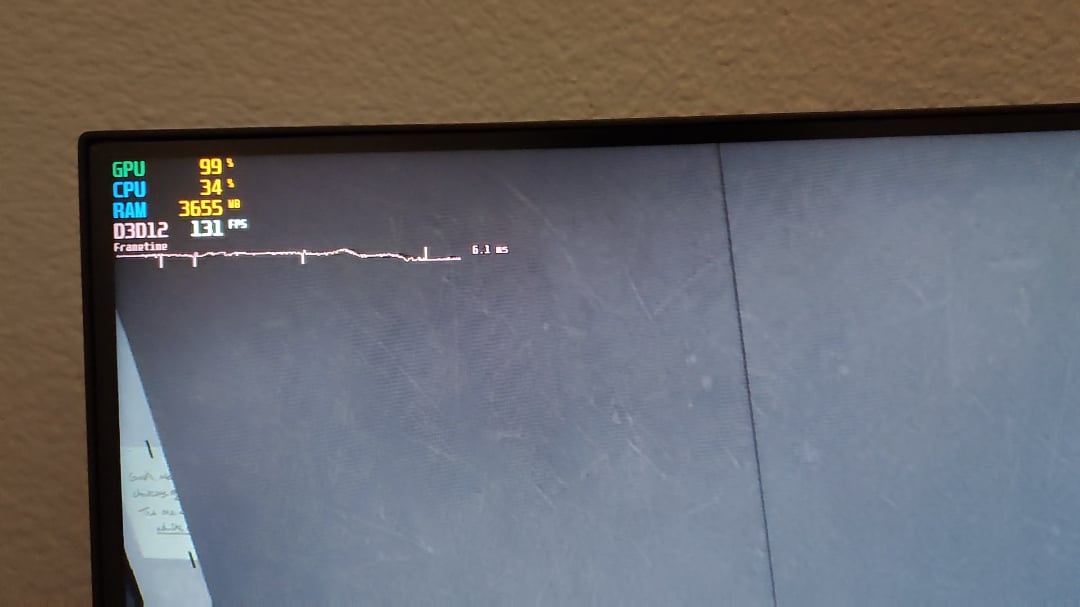
As you can see, my frametime spikes exactly every second when I can run 165 fps consistently. Way more stutters when below 165 fps
Specs:
6700xt
R5 5600
3200MHZ 16gB ram
B550 tomahawk mobo
165hz monitor (freesync compatible)
Freesync is on, GPU and CPU at stock, XMP on, resize bar on, HPET off, used DDU, updated drivers. Don’t know what is causing these spikes. Make the game feel like 30 fps at 165 fps
32 Comments
This happens to me occasionally, tbh I blame AMD. Try turning off freesync, restarting computer, change some graphics card settings (I use nvidia).
Does it happen only in games? Can you see similar spikes in the task manager in CPU/GPU/RAM utilisation?
What’s the name of the software you’re using to detect stutters ?
Maybe the adrenalin gameplay capture function is active and causing this issue, even without active recording that might cause these spikes
Had some similar stutters when enabling FSR (1) on my Steam Deck. Do you use it ?
Never had this behaviour on my desktop Intel/Nvidia.
I see you’re playing Read or Not, the game compiles shaders everytime you load up a map, happens to me too. It’s normal for that game.
And plus the game is poorly optimized.
Try turning off DX12 if the game has one
Had the same issues solved by enabling fast vsync in NCP and setting virtual rendered frame to 1
You have hardware monitoring software running. That “pulse” every second is each time it records the new monitoring data. I realized this after disabling HWinfo.
drivers, most likely.
How often does ping time update in game?
I had that exact same problem on my 144hz monitor, I fixed it by using it at 120hz.
Ready or not is badly optimized unfortunately, like badly badly. Besides the frame time, look at how your FPS dropped by 60 turning your camera around in the same exact spot. It’s crazy to think how unoptimized it is
Had stutters in everygame for a long time, had reinstalled windows again and again. Problem got solved when I reinstalled windows once more again, and this time, first thing I did was installing the chipset drivers and it worked!
I guess installing the drivers before anything else fixed it for me.
RAM fixed it for me. Download it from your favourite ram site.
I have similar but worse pulse stutter in baldurs gate 3. It has persisted even after i formatted windows some time ago.
Enabling antilag completely eliminates it.
Limit the FPS to 100 and see if that helps.
Do you have a pci riser card?
Does it affect your gameplay? If it’s not, then just close Riva tuner and enjoy the game
Turn on v sync. I know gamers hate hearing that but some graphics cards do need it. There’s a reason that feature exists.
Look up what your monitors freesync range is.
They all aren’t built the same.
For instance one of my monitors is 30-240fps range on a 240hz panel.
And one is like 45-60fps on a 144hz panel.
One cost a whole lot more than the other.
I recommend you limit your FPS to the max of your freesync range and see if that helps. If your freesync range is say 60-100fps limit your FPS to 100 that way when it dips below the top of the range it’s still syncing.
Are you in a 60Hz region?
Its also possible if you have enhanced sync in AMD drivers on and freesync on together and though in most games they work perfectly fine together in other instances it might cause problems. Disable any sync solution outside freesync and see if that fixes it
In few though rare situations riva tuner or any other monitoring software can cause those microstutters . Try disabling it and use AMD overlay which now days is really good enable microstutter rate tracking among others
If this is only in one game then is in all likelyhood the games fault
just lock your fps with nvidia control panel or afterburner
Turn off MSI Afterburner and HWinfo if you have it.
I think your best bet is to set a min fps on rivatuner , i do this with all my games and honestly everything feels really smooth but also depends on the game how optimize it is.
If this was 1994 I would tell you it appears to be an IRQ conflict.
Try limiting your frames with riva tuner or any other 3rd party software. In built fps limitiers dont work properly and cause lags/ stutters
We basically have the same pc more or less, and I’d bet its just that rivatuner gets information once every second, and those are the spikes. Ready or Not is not that optimised, but for how it looks and plays its way better than what came out these few years.
Its the MSI Afterburner itself doing it…
See if it happens in other games. If it does, it’s probably a GPU fault. If not, probably something to do with the game itself.
Not gonna read through all comments if this has been mentioned:
I had the same issue when a SATA cable was faulty and the drive would be tried to initialize every second.