Use a blow dryer on high to warm the thermal paste and twist off.
Wipe alcohol on the cooler and heat sink of cpu to remove old thermal paste.
Check pins and use credit card to straighten pins that are bent.
JSkywalker38
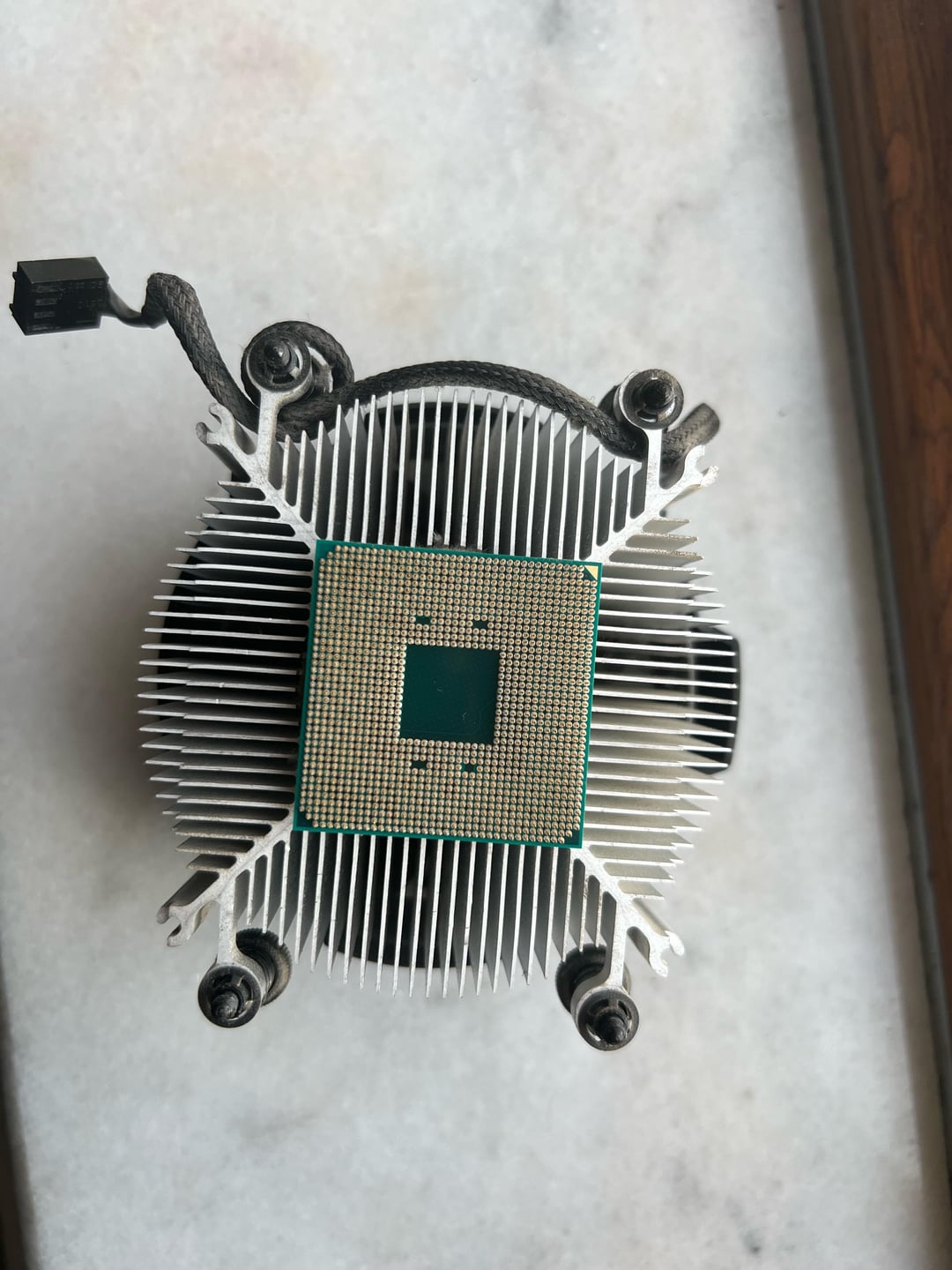
Take some dental floss or fishing line and gently work it in between the CPU and the heatsink. You can try blowing it with a hairdryer to heat up the thermal paste and loosen it slightly. All your pins still seem to be straight so if you are gentle you should be able to get it off without causing damage.
IdleTuesdayAfternoon
Think you might have lost a pin in the top right? 😣 Happened me once, hairdryer did the job with lots of patience and slow movements 👌🏻
Cruiser_Pandora
Don’t even worry too much man. This has been happening for a while with amd. Truth is that this stuff is way more durable than people let on. Just give it a wiggle left right a few times and it should come off.
mirandanielcz
Twist
Dizzy-South9352
am I the only one that fails to understand why is this even A PROBLEM? I swear, people are getting more stupid by the day. what you gonna ask next? how to wipe your bum?
Kallilexa
I once had to use a screwdriver when my cpu did this. Take a small flathead screwdriver and really carefully twist the screwdriver si that on side is against the cpu and one against the cooler. Also use the hair dryer again before this.
Kickin_Wing69
I use a plastic smudger or similar tool to get under. Be careful do it over carpet. It’s all good. Don’t grab the CPU with anything from the PCB you’re begging to bend pins
Dribble76
A hammer with a well placed blow is not the way to go.
Strange-Ostrich8753
Yeah don’t do that.
TheUItramarine
Had that once and it was also stuck very hard. Blowing and dental floss didn’t work. I used a razorblade and “cut” it off. Would not recommend it though, try other things first but it worked for me so I thought I’d share.
BDEfrom14kfeet
Happened to me this last weekend. Broke my motherboard and CPU.
A blow dryer loosened the thermal paste enough to separate it though. Just heat it longer.
Mikhael_Xiazuh
Get a card and scoop between cooler and CPU can also warm it up first if you like, with a hair dryer
mizka900
Flat head screwdriver and just pry off.
SnuffleWumpkins
This is the PC gods way of telling you to upgrade to a 5xxx series CPU.
wikedcrypto
This just happened to me with my 5 5600x. It did bend a pin, but I very carefully bent it back and all seems to be well. I think I will now try twisting instead of pulling.
Ok-Marionberry5920
Also happened to me. Fortunately everything was fine.
Flaky-Lingonberry523
Always run your pc a few minutes to avoid this problem
DungeonCrawlLife
*laughs in intel* I’m really surprised AMD still uses pins.
Games_sans_frontiers
The pins look undamaged, OP. Looks like you got away with it. Don’t panic. I can see that other redditors have stepped up with some good advice on how to separate the CPU from the heatsink but whichever method you go for, just take it slow and easy. Don’t worry, you got this!
RexxVFX
As a general rule of thumb, I like to run a pretty intensive game for about 15 minutes before doing anything CPU/CPU cooler related. That way, your CPU is warm and will be easier to separate from the cooler.
hula_balu
Its too late for this but for next time.. play a game or run some cpu intensive application for a good chunk of time before trying to remove. It will help loosen the paste.
tomecho6
Twist it if the other advice here isn’t working. When this happened to me I tried floss, a razor, heating it up with a hairdryer, dabbing it with isopropyl… In the end gently twisting them apart worked a charm. Can’t say the other things didn’t help but it wouldn’t budge until I treated it like the most gentle game of Bop-It in the world. Good luck
alex74747
Classicos pry it out, already did it, beware of the pins tho !!!
obolikus
Happened to me twice, honestly speaking I would just twist it and it’ll come off. Next time twist the cooler while it is unmounted but still on the board and this won’t happen. As others mentioned heating it can also help.
legal_guy_who_asked
Try Putting it in again, Level the PC running for a few minutes and try again
Zeke--
You’re good. Had this before, still works fine.
Summon_Ari
If nothing else works, soak the CPU and bottom of heatsink in rubbing alcohol and wait 20 min.
As long as you don’t power on for the next couple of hours (or just use your blow dryer to dry it), it doesn’t do any DMG to your parts.
aMythicalNerd
Take a razor blade or small fishing line, etc. and cut away at the paste that’s stuck to the cpu.
graal_10
This is pretty common. Not a huge deal just use some fishing line/floss
Cliffy-
Isopropyl alcohol, let that sink in and it should loosen up a bit, then gently twist it from the corner using a proper tool ( I did that bare hand without bending any pins ) and that’s ez clap.
TatteredPatches
I feel like people only put a tiny bit of force behind trying to twist off the cpu from the cooler because they’re (reasonably) afraid they’ll break something.
It’s not the cpu that’s stuck to the cooler, it’s the paste, which I’m sure you know. It would require an absurd amount of heat to fuse the two, and at that point, your rig would be fried. Twisting it a bit harder to crack the paste isn’t going to shatter your cpu.
shball
hairdryer, heat up the heatsink, that makes it easier to remove
30-percentnotbanana
Press the tip of a butter knife against the side of the IHS (not the PCB substrate, the metal top that’s currently stuck to the heatsink), give it a good taps and it should come loose.
The paste will let go long before you hit hard enough to do any damage.
SignoreOscur0
If the pins are fine you just need to detach the cpu from the cooler and you’ll be fine. It’s a common problem with pga sockets unfortunately.
Seems like your pins are fine but double check them by looking at them at an angle and possibly with a magnifying glass.
Ps: next time wiggle the cooler side to side to loosen the adhesion and then pull out.
themikeysb
Run your pc before changing coolers or cpu
Nizorro
Fishing wire betwen the heatsink and the CPU. Basically saw out the thermalpaste with the wire. It will come off quite easily and you wont accidentally flip or throw your CPU off and potentially bend pins.
Roob0806
Same happened to me with that exact processor and mobo, hairdryer and/or floss should work, isopropylcan be good too.
Just wanted to add that if you do try to remove it by hand, do little side to side twists to weaken the grip instead of pulling straight out, otherwise if it comes off quickly and your fingers slip you’ll end up flinging it off and probably mashing a fair few pins.
Ry0K3N
hairdryer
Nomnom_Chicken
I suggest that it future you let your PC run for a while, before doing this. That way, this should not happen again, at least not often. I always let my PC run for a while, play a quick game, and then shut it down and remove the cooler easily.
Tarc_Axiiom
No you don’t, just put it back and turn it on for a few minutes before you take the heatsink off.
Like it says in the…
RTFM!
xSolasx
Hair dryer, old credit card, floss, exacto knife
averageburgerguy
You’re fine, man. Mostly happens when the thermal paste is cold and becomes sticky.
What I did was I used a string to slowly slice in-between the chip and the heatsink. Pretty nerve wracking but honestly there’s nothing to be nervous about. 😊
aight_ima_gosus
Yea don’t worry lad just a thin object like a screwdriver and it coming right off
hairlesspet3
This is the setup for a big problem but not actually the biggest problem in itself.
RavoGems
This happened to me recently, just use a Hair dryer and a razor blade, it will come off easy
OhSaladYouSoFunny
Same thing happened to me once, just use the hair dryer, you can put a lot of heat into these components, so you can heat it until you cannot touch the CPU, let it cool a bit and it should come off easily, make sure to heat evenly even the heatsink patch that connects with the CPU.
FanboyKeks
Happens to me too I used a hair dryer on the heatsink and than a credit card when I switched my cpu after that I let my PC run for a few minutes and the heat sink came out with ez
50 Comments
cooked
[deleted]
Use a blow dryer on high to warm the thermal paste and twist off.
Wipe alcohol on the cooler and heat sink of cpu to remove old thermal paste.
Check pins and use credit card to straighten pins that are bent.
Take some dental floss or fishing line and gently work it in between the CPU and the heatsink. You can try blowing it with a hairdryer to heat up the thermal paste and loosen it slightly. All your pins still seem to be straight so if you are gentle you should be able to get it off without causing damage.
Think you might have lost a pin in the top right? 😣 Happened me once, hairdryer did the job with lots of patience and slow movements 👌🏻
Don’t even worry too much man. This has been happening for a while with amd. Truth is that this stuff is way more durable than people let on. Just give it a wiggle left right a few times and it should come off.
Twist
am I the only one that fails to understand why is this even A PROBLEM? I swear, people are getting more stupid by the day. what you gonna ask next? how to wipe your bum?
I once had to use a screwdriver when my cpu did this. Take a small flathead screwdriver and really carefully twist the screwdriver si that on side is against the cpu and one against the cooler. Also use the hair dryer again before this.
I use a plastic smudger or similar tool to get under. Be careful do it over carpet. It’s all good. Don’t grab the CPU with anything from the PCB you’re begging to bend pins
A hammer with a well placed blow is not the way to go.
Yeah don’t do that.
Had that once and it was also stuck very hard. Blowing and dental floss didn’t work. I used a razorblade and “cut” it off. Would not recommend it though, try other things first but it worked for me so I thought I’d share.
Happened to me this last weekend. Broke my motherboard and CPU.
A blow dryer loosened the thermal paste enough to separate it though. Just heat it longer.
Get a card and scoop between cooler and CPU can also warm it up first if you like, with a hair dryer
Flat head screwdriver and just pry off.
This is the PC gods way of telling you to upgrade to a 5xxx series CPU.
This just happened to me with my 5 5600x. It did bend a pin, but I very carefully bent it back and all seems to be well. I think I will now try twisting instead of pulling.
Also happened to me. Fortunately everything was fine.
Always run your pc a few minutes to avoid this problem
*laughs in intel* I’m really surprised AMD still uses pins.
The pins look undamaged, OP. Looks like you got away with it. Don’t panic. I can see that other redditors have stepped up with some good advice on how to separate the CPU from the heatsink but whichever method you go for, just take it slow and easy. Don’t worry, you got this!
As a general rule of thumb, I like to run a pretty intensive game for about 15 minutes before doing anything CPU/CPU cooler related. That way, your CPU is warm and will be easier to separate from the cooler.
Its too late for this but for next time.. play a game or run some cpu intensive application for a good chunk of time before trying to remove. It will help loosen the paste.
Twist it if the other advice here isn’t working. When this happened to me I tried floss, a razor, heating it up with a hairdryer, dabbing it with isopropyl… In the end gently twisting them apart worked a charm. Can’t say the other things didn’t help but it wouldn’t budge until I treated it like the most gentle game of Bop-It in the world. Good luck
Classicos pry it out, already did it, beware of the pins tho !!!
Happened to me twice, honestly speaking I would just twist it and it’ll come off. Next time twist the cooler while it is unmounted but still on the board and this won’t happen. As others mentioned heating it can also help.
Try Putting it in again, Level the PC running for a few minutes and try again
You’re good. Had this before, still works fine.
If nothing else works, soak the CPU and bottom of heatsink in rubbing alcohol and wait 20 min.
As long as you don’t power on for the next couple of hours (or just use your blow dryer to dry it), it doesn’t do any DMG to your parts.
Take a razor blade or small fishing line, etc. and cut away at the paste that’s stuck to the cpu.
This is pretty common. Not a huge deal just use some fishing line/floss
Isopropyl alcohol, let that sink in and it should loosen up a bit, then gently twist it from the corner using a proper tool ( I did that bare hand without bending any pins ) and that’s ez clap.
I feel like people only put a tiny bit of force behind trying to twist off the cpu from the cooler because they’re (reasonably) afraid they’ll break something.
It’s not the cpu that’s stuck to the cooler, it’s the paste, which I’m sure you know. It would require an absurd amount of heat to fuse the two, and at that point, your rig would be fried. Twisting it a bit harder to crack the paste isn’t going to shatter your cpu.
hairdryer, heat up the heatsink, that makes it easier to remove
Press the tip of a butter knife against the side of the IHS (not the PCB substrate, the metal top that’s currently stuck to the heatsink), give it a good taps and it should come loose.
The paste will let go long before you hit hard enough to do any damage.
If the pins are fine you just need to detach the cpu from the cooler and you’ll be fine. It’s a common problem with pga sockets unfortunately.
Seems like your pins are fine but double check them by looking at them at an angle and possibly with a magnifying glass.
Ps: next time wiggle the cooler side to side to loosen the adhesion and then pull out.
Run your pc before changing coolers or cpu
Fishing wire betwen the heatsink and the CPU. Basically saw out the thermalpaste with the wire. It will come off quite easily and you wont accidentally flip or throw your CPU off and potentially bend pins.
Same happened to me with that exact processor and mobo, hairdryer and/or floss should work, isopropylcan be good too.
Just wanted to add that if you do try to remove it by hand, do little side to side twists to weaken the grip instead of pulling straight out, otherwise if it comes off quickly and your fingers slip you’ll end up flinging it off and probably mashing a fair few pins.
hairdryer
I suggest that it future you let your PC run for a while, before doing this. That way, this should not happen again, at least not often. I always let my PC run for a while, play a quick game, and then shut it down and remove the cooler easily.
No you don’t, just put it back and turn it on for a few minutes before you take the heatsink off.
Like it says in the…
RTFM!
Hair dryer, old credit card, floss, exacto knife
You’re fine, man. Mostly happens when the thermal paste is cold and becomes sticky.
What I did was I used a string to slowly slice in-between the chip and the heatsink. Pretty nerve wracking but honestly there’s nothing to be nervous about. 😊
Yea don’t worry lad just a thin object like a screwdriver and it coming right off
This is the setup for a big problem but not actually the biggest problem in itself.
This happened to me recently, just use a Hair dryer and a razor blade, it will come off easy
Same thing happened to me once, just use the hair dryer, you can put a lot of heat into these components, so you can heat it until you cannot touch the CPU, let it cool a bit and it should come off easily, make sure to heat evenly even the heatsink patch that connects with the CPU.
Happens to me too I used a hair dryer on the heatsink and than a credit card when I switched my cpu after that I let my PC run for a few minutes and the heat sink came out with ez
