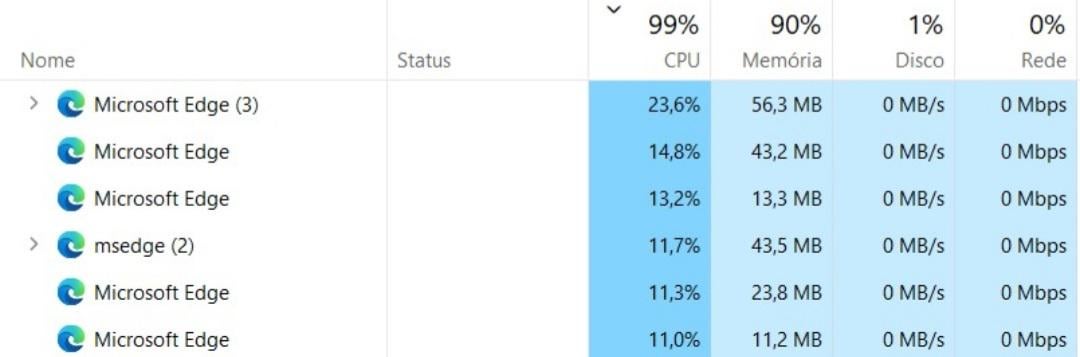
What is happening? Microsoft edge keeps doing this, and when i try to finish the task, it comes back after some time. What should I do?

What is happening? Microsoft edge keeps doing this, and when i try to finish the task, it comes back after some time. What should I do?
11 Comments
> What should I do?
Stop using Edge.
Did you turn off startup boost within Edge?
edge://settings/system
​
https://preview.redd.it/6twa9i3x45bc1.png?width=816&format=png&auto=webp&s=130e526bcb660955463d7714137f9d41f6d88128
Most people don’t use Edge for their main browser though, but I don’t believe you can easily remove it.
Strange I use Edge and I don’t have this problem. I have a different problem sometimes. When I close edge sometimes it remains in suspension or on pause in the task manager and uses around 100mb to 200mb. But if I give it end task it will close. I have a suspicion that one of the extensions is keeping it active or doesn’t let it close fully.
Get a Time Machine and slap the shit out of some execs around 2008
Start using a better browser, and disable edge.
Download Revo uninstaller and read each step carefully when you go to remove it, it will remove all the traces/logs and registry keys so it won’t come back apart from when windows does its updates.
Get rid of edge. Use chrome instead
I know everyone is in here just shitting on Edge for no reason, but thats not normal behavior obviously. Notably it shouldn’t be running multiple separate tasks like that to begin with, Edge runs within one “Microsoft Edge” category normally and uses 0% of your CPU when its in the background (so Startup Boost shouldnt be causing that either).
You may want to scan for malware, make sure theres no odd extensions installed, etc.
Uninstall then reinstall if you want to keep it
Classic Microsoft “Totally not using your system to mine crypto in a botnet” Edge
Microsoft edge is edging!?