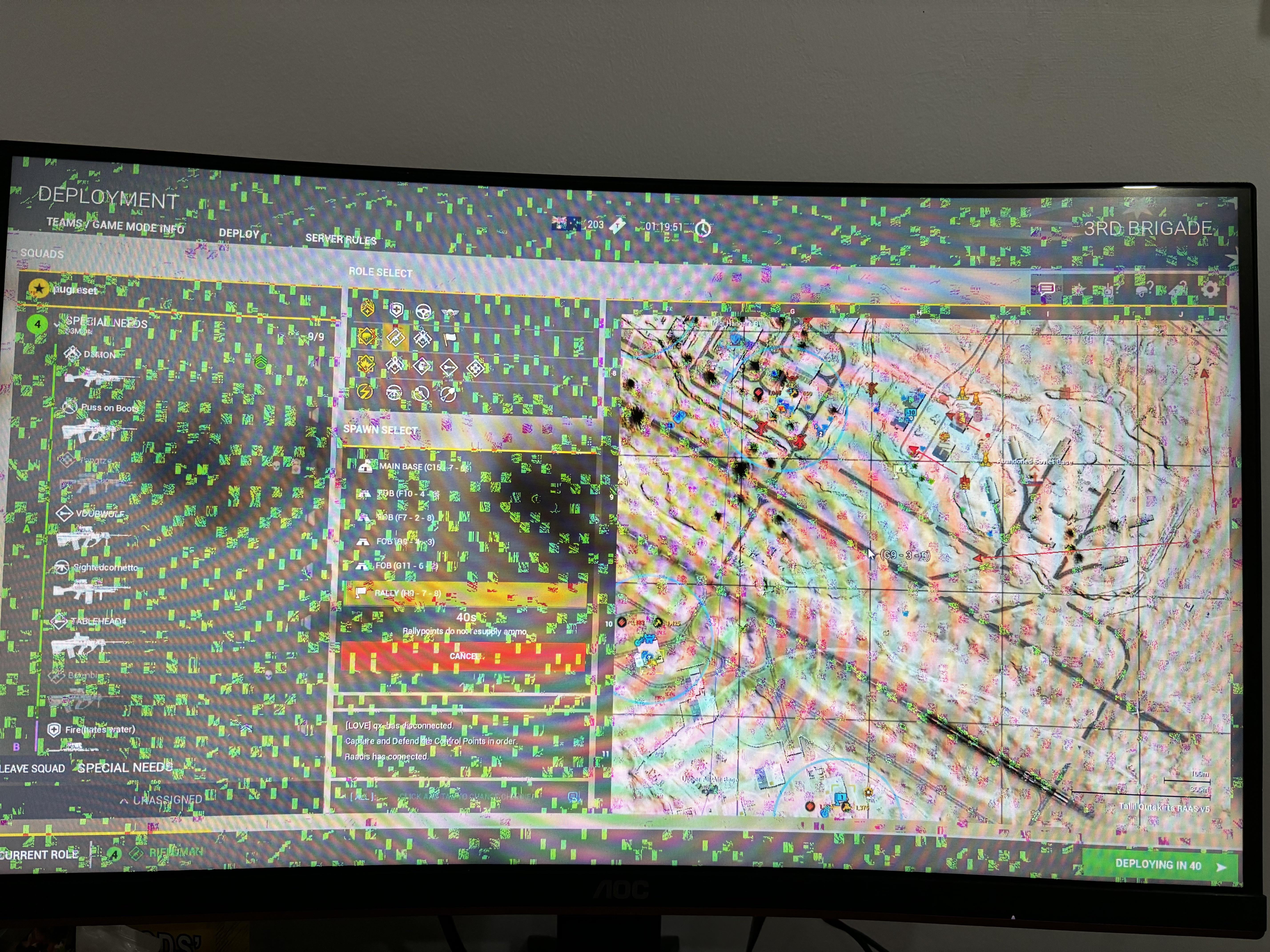
I was trying to join a game and the monitor started flickering and hanged as seen in the photo and the system restarted by it self. Is this a monitor issue or a gpu issue? Appreciate all the answers, thank you.

I was trying to join a game and the monitor started flickering and hanged as seen in the photo and the system restarted by it self. Is this a monitor issue or a gpu issue? Appreciate all the answers, thank you.
37 Comments
The fact your system hung/restarted would suggest it might be a GPU or other hardware issue. Still, try the monitor with another device or your PC with another display.
Usually this is a graphic card issue. Try running DDU to completely uninstall drivers and install the newest version fresh and see if it helps. Could be hardware issue though unfortunately.
Smack it with a fork
VRAM issue probably
you need a new gpu unfortunately.
No.
But you need a new graphics card.
You probably need a new gpu
Looks like a faulty GPU. Artifacts
Its almost definitly some graphics card problem try reinstalling the drivers then replacing the gpu
You need a new GPU my friend
It’s GPU issue. My 2060 did the same right before it died
Looks like a failing GPU as many others have suggested, but i would say try with a different monitor or hdmi enabled tv set if available and if you are comfortable disassembling the gpu, change thermal paste and try again. Unless you are within the warranty period then just get the manufacturer to deal with it for you.
Maybe your gpu is fried man
He only needs a hug 🥺
Looks like a gpu problem so either u need to reinstall drivers or u need to get a new gpu but u could also test to see if it’s ur monitor by plugging it into another device and also plug ur computer into another screen that should tell u if it’s the screen or the gpu
Edit: it could also be a faulty hdmi cable
You sadly gave a ggpu not a gpu now
Either a new GPU or Neo you are the chosen one.
as the others said, doesnt look like a monitor issue, probably a issue with your gpu itself or with the drivers of said gpu
monitor? nah. them’s artifacts. gpu vram’s starting to go bad.
Gpu is fucked.
new gpu
The system restarted by itself. Its definitely a pc issue. I had something similar when it overheated.
It turns on. What else ya want?
Looks like GPU memory
First try connecting it through a CPU video output see results if it is good than Try running linux live usb see any different results.
Playing Squad , I see . Also my third favorite game after Tarkov and Stalker .
Congratulations, you have to spend money on a new or different GPU!
Try stressing it with furmark, if it appears or gets worse it’s the GPU.
This is usually a sign of VRAM going bad, so you’ll likely need a new GPU soon. Try to eliminate other possibilities (try with another cable, clean the cable ports of dust, plug into a TV or another monitor) to rule out other components, but it’s very likely that your GPU is on it’s way out.
If you really need to edge out some more time from the GPU (if you can confirm it’s the issue), you can underclock the VRAM to maybe get a temporary fix
video error not monitor
Reseat everything in your pc including the cpu. Had the same issue last year with my girlfriends pc. Could not find the issue after trying the gpu in my pc along with screen/cables. Reseated the cpu and bam it’s been fine since.
Had the same problem
Reinstall gforce experience if you have nvidia and chekc all cables – fixed it for me
no, you need a new graphics card
This happened to me once, updated gpu drivers and it never happened again
Fresh reinstall the GPU drivers, had similar before and bought a new monitor only to find that out.
It’s your cheapest first option to try anyway.
1. Put Your GPU in rice
2. Cry loudly
3. Order new GPU
Looks like your GPU is shot.
Possible causes:
1. Driver issues
2. Display cable is damaged
3. Screen is dying/damaged
4. Some part of the GPU/iGPU has been damaged
Steps to diagnose:
1. DDU the driver
2. Try another cable
3. Change refresh rate
4. Try another screen
5. If iGPU only: Reset BIOS to system defaults
6. Replug the cable in another graphics card port
7. Try another display port on the screen
8. Switch to the iGPU of the CPU via BIOS or removing the graphics card (if available) and plug the display cable in the motherboards display out
9. Plug the graphics card into another x16 slot
You’ve found the cause once any of these steps solves the issue. If neither does it’s a whole other ball game.
Your GPU gave you a 2 weeks notice. Mine did the same. Had to replace it.