Where did you buy it from? Was it a reputable seller, or some back alley sketch-show? Brand?
dweller_12
If there is no additional volumes in disk management, then the disk is likely a 120GB one.
upreality
Check for unallocated space or maybe volumes in unknown formats that windows can’t see, use disk manager or diskpart, if there is no other volume or free unallocated space, im afraid you got scamazed
BeerGogglesFTW
Windows+R to Run
Enter “compmgmt.msc”
Go to “Disk Management” in the left panel. See if there is unallocated space on the drive.
If so, you should be able to extend the drive to utilize that space.
ZiggyTuzla
go to disk managment, maybe its not formatted right
SmokesLetsGoBois
Disk management
Drive partition
msanangelo
did you clone from a small one and forgot to expand?
Kraken_Kraterium
Partition.
Then-Tangelo-4949
I bought a 500 gig ssd and it’s 1 tb
rabbiferret
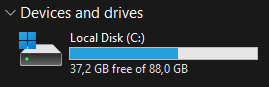
I noticed this is your C drive. Is it possible that you bought a new SSD to replace an old one and used a clone tool to replicate your old drive before replacing it?
FYI: Clone tools will also replicate the allocated space on the new disk. you need to manually extend the allocated portion to the full capacity of the new drive.
DayneTreader
Go into Disk Management, initialize your disk and create a volume.
SuperVegito559
Increase the partition size to 120gb and create a new partition for apps and shit. Keep the OS partition clean.
Vadzerz
Something wrong with the partitioning of the disk. Check the disc manager
wick3dr0se
Because you’re using an 88GB primary partition. Pretty easy to extend it with disk partitioning
Sync1211
Do ppl not fornat new disks anymore?
Shady_Hero
you might have gotten scammed…..
Nictel
Now for only 90$ a 1terrabit drive!
PRAuroraYT
Might be fake
frogmicky
What brand of SSD is it?
Kur0h4i
Good you’ve been scammed or your partition table is wrong, reset the partition table
L0rdLogan
Likely a fake
TOM-EEG
Am i the only who here who thinks it’s stupid it isn’t plug and play? Why do you have to activate the empty space i just don’t get it
sharknice
try clearing your System32 cache
DannyArtt
Sooooo… the TB on the package stands for Too Bad…?

24 Comments
Where did you buy it from? Was it a reputable seller, or some back alley sketch-show? Brand?
If there is no additional volumes in disk management, then the disk is likely a 120GB one.
Check for unallocated space or maybe volumes in unknown formats that windows can’t see, use disk manager or diskpart, if there is no other volume or free unallocated space, im afraid you got scamazed
Windows+R to Run
Enter “compmgmt.msc”
Go to “Disk Management” in the left panel. See if there is unallocated space on the drive.
If so, you should be able to extend the drive to utilize that space.
go to disk managment, maybe its not formatted right
Disk management
Drive partition
did you clone from a small one and forgot to expand?
Partition.
I bought a 500 gig ssd and it’s 1 tb
I noticed this is your C drive. Is it possible that you bought a new SSD to replace an old one and used a clone tool to replicate your old drive before replacing it?
FYI: Clone tools will also replicate the allocated space on the new disk. you need to manually extend the allocated portion to the full capacity of the new drive.
Go into Disk Management, initialize your disk and create a volume.
Increase the partition size to 120gb and create a new partition for apps and shit. Keep the OS partition clean.
Something wrong with the partitioning of the disk. Check the disc manager
Because you’re using an 88GB primary partition. Pretty easy to extend it with disk partitioning
Do ppl not fornat new disks anymore?
you might have gotten scammed…..
Now for only 90$ a 1terrabit drive!
Might be fake
What brand of SSD is it?
Good you’ve been scammed or your partition table is wrong, reset the partition table
Likely a fake
Am i the only who here who thinks it’s stupid it isn’t plug and play? Why do you have to activate the empty space i just don’t get it
try clearing your System32 cache
Sooooo… the TB on the package stands for Too Bad…?