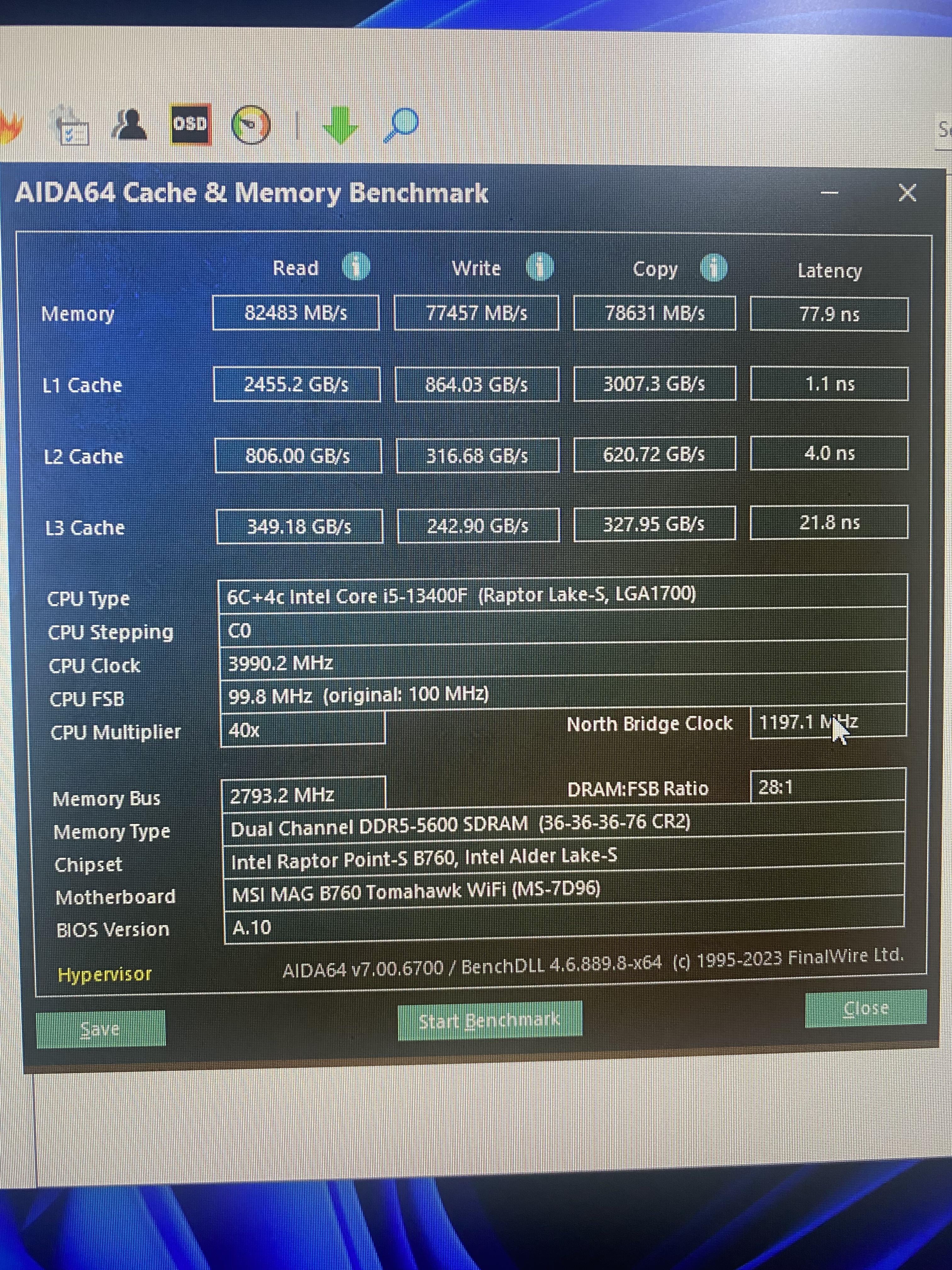
A no expert here but that ram looks terrible, is 5600 it’s advertised speed or have you set something wrong?
gutbart
because those numbers rely heavily on ram performance. you could optimize your rams (sub-) timings and maybe even oc your ram to 6000 if your motherboard allows it, i wouldnt go over 1.35v on the ram tho. optimizing timings is a tedious process, takes a lot of time and trial and error and won’t give you a noticeable performance boost in most real work applications/games.
​
What ram does your nephew have?
Repulsive_Claim_5035
I’m no expert, but maybe the motherboard tried to automatically OC your CPU and thought that a 40x multiplier was the most stable for your setup. My MB has an “Auto OC” setting and it for some reason sets the multiplier below the advertised speeds.
Aspire_SK
Latency is really bad
psychoOC
Looks normal to me. Got to get proper ram for proper numbers. But this is fine for gaming
_therealERNESTO_
Bandwidth numbers are actually ok (read, copy and write), it’s just the latency that’s kinda high. Try running the test in safe mode and disable virtualization in the bios, unfortunatly aida isn’t very consistent with its results but this should improve it.
If you want to minimize latency overclock the memory and tune the sub-timings. The CPU’s ring clock also has a great effect on it, so if you could lock it to the maximum allowed ratio it would be ideal, but I don’t know how much freedom you will have on a locked CPU. Disabling e-cores might help too.

6 Comments
A no expert here but that ram looks terrible, is 5600 it’s advertised speed or have you set something wrong?
because those numbers rely heavily on ram performance. you could optimize your rams (sub-) timings and maybe even oc your ram to 6000 if your motherboard allows it, i wouldnt go over 1.35v on the ram tho. optimizing timings is a tedious process, takes a lot of time and trial and error and won’t give you a noticeable performance boost in most real work applications/games.
​
What ram does your nephew have?
I’m no expert, but maybe the motherboard tried to automatically OC your CPU and thought that a 40x multiplier was the most stable for your setup. My MB has an “Auto OC” setting and it for some reason sets the multiplier below the advertised speeds.
Latency is really bad
Looks normal to me. Got to get proper ram for proper numbers. But this is fine for gaming
Bandwidth numbers are actually ok (read, copy and write), it’s just the latency that’s kinda high. Try running the test in safe mode and disable virtualization in the bios, unfortunatly aida isn’t very consistent with its results but this should improve it.
If you want to minimize latency overclock the memory and tune the sub-timings. The CPU’s ring clock also has a great effect on it, so if you could lock it to the maximum allowed ratio it would be ideal, but I don’t know how much freedom you will have on a locked CPU. Disabling e-cores might help too.