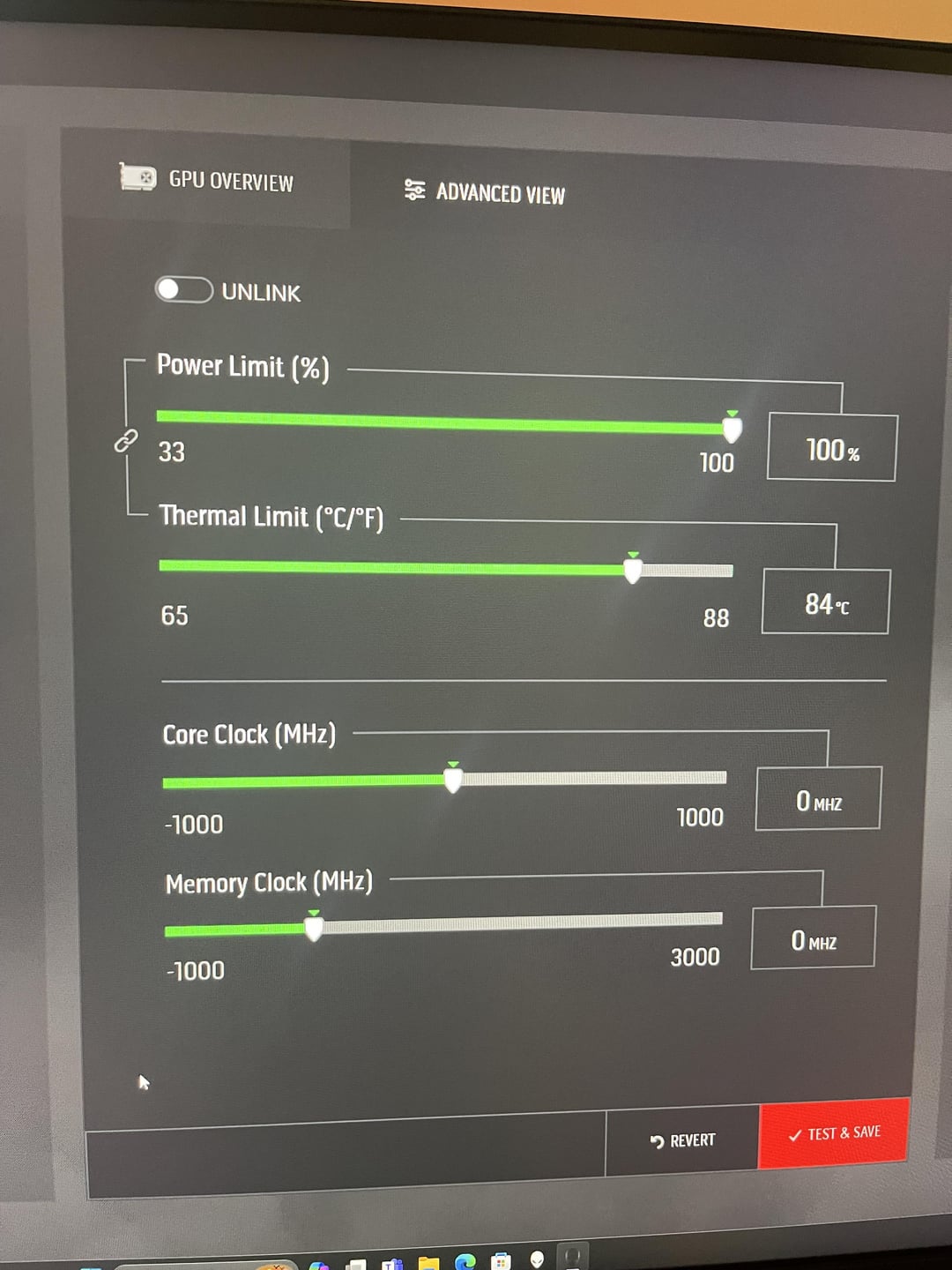
I’m new to gaming PCs. I’ve been trying to understand overclocking, read a few web pages. But I’m super lost. I like to play CP2077
What does any of this mean in the screenshots and should I be making any adjustments? Help a newbie out maybe?

I’m new to gaming PCs. I’ve been trying to understand overclocking, read a few web pages. But I’m super lost. I like to play CP2077
What does any of this mean in the screenshots and should I be making any adjustments? Help a newbie out maybe?
2 Comments
It means, that you haven’t read enough web pages.
so first i‘d say you have to know what a graphics hard is made of: there 2 main components, that are overclockable: 1st the core (so the part that actually does the calculations, kinda like the processor in your pc) and 2nd the video memory (it is basically the graphics card‘s ram). so making the core clock and the memory clock higher just makes the graphics card calculate faster. but for that you need to have more power or else the graphics card will be unstable. and you can adjust that with the power limit. and lastly, the thermal limit controls, how hot the graphics card can get before it starts to slow itself down automatically to prevent damage (you can put it as high as ~90° if your software allows you, but if you have a beefy cooler it should be ok). feel free to ask further questions
(edit: i only explained the 1st pic, but most principals apply for the 2nd pic too)