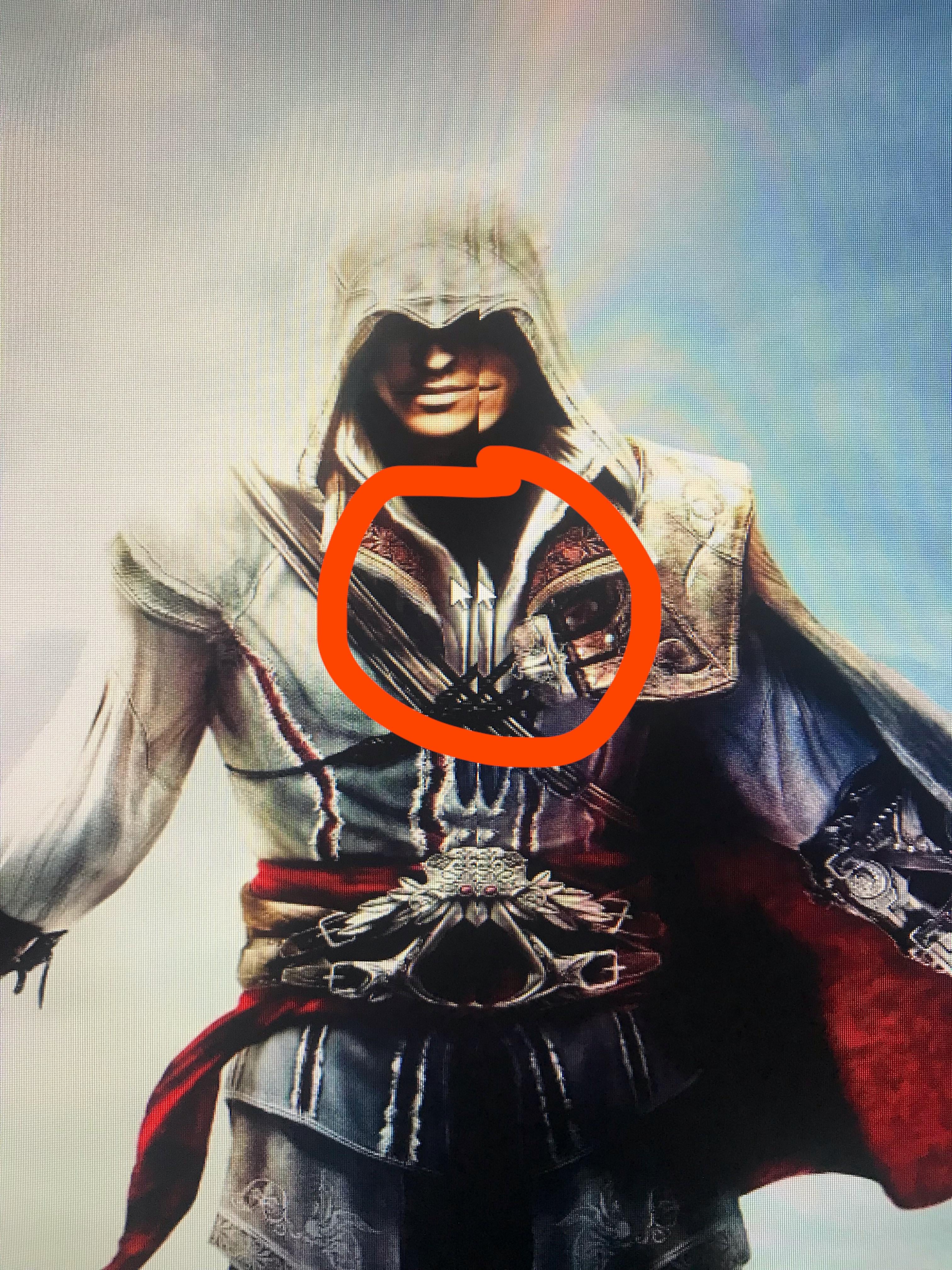
I was messing with my monitors resolution because I wanted to play 1720×1080 instead of 1920. And now I have this issue. It’s a vertical line that runs down the middle of my screen and mirrors whatever it’s going through before continuing on.

I was messing with my monitors resolution because I wanted to play 1720×1080 instead of 1920. And now I have this issue. It’s a vertical line that runs down the middle of my screen and mirrors whatever it’s going through before continuing on.
29 Comments
Your screen probably just can’t handle that resolution correctly.
Go into your graphics card settings (nvidia control panel or AMd Adrenalin I think) and set it to do screen scaling on the GPU instead of on the screen. Make sure it is also set to maintain aspect ratio.
This will cause the GPU to send a 1920 x 1080 signal to the screen with black bars on the side, instead of sending a 1720 x 1080 signal to the screen which is weird and unexpected to most monitors.
He’s starting to believe.
While i don’t know the answer to your question, i really want to know why you’d play in such a weird resolution?
You should never run your monitor at a non-native resolution. Just run content windowed if you want to use weird resolutions
I don’t know the answer to your question, but I gotta know man, why such a funky Resolution?
My monitor does this sometimes for no reason. I just turn it off and back on again and it goes back to normal
You fortnite kids and your wacky ideas. Just play at native res.
This happened with one of my monitors. Turn it off and turn it back on. Display panels have most likely come out of sync.
Put food on it and you’ve solved world hunger
Easy. Put it back to 1920×1080.
Displays only tend to run at the officially supported resolution. The scaler built into your display probably can’t run at that weird resolution.
Just like, run with native or use the in game options to scale.
Killing civilians results in loss of synchronization
It’s caused by brain damage.
Brain damage can be sustained by running your monitor below native resolution.
/s
Desynchronization as a result of you not following the tailed NPC
Don’t play with stupid resolution only because xxPr0Gamerxx from g2 plays like this… streched res it’s not an advantage, i tried it and it fucking sucks
damn i don’t think there is an hsync
*finishes 8th beer* Doin what???
Talk about a split personality…
Its a 1080p monitor, use its native res like its designed for
I had a monitor that did something similar but with only one vertical line of pixels being moved. With that particular monitor, you just had to power cycle, and it would go back to normal in one or two clicks of the power button. I hope yours is as simple a fix.
Mine does that sometimes (rarely). Turning it off and on again fixes the problem every time
Learn to play at a normal resolution
>I was messing with my monitors resolution
There you go.
Sebab boleh dik
Your mouse is in SLI mode.
I just had this happen to me yesterday, I just restarted and it went away. I use native 1440p tho.
Unplug your second mouse dawg, I doubt you need it
So you’re trying to… Play the game at a lower resolution? Why?
Unstretch your shit.
Plus, your behavior in this post leads me to believe that you probably should just stick with consoles.