
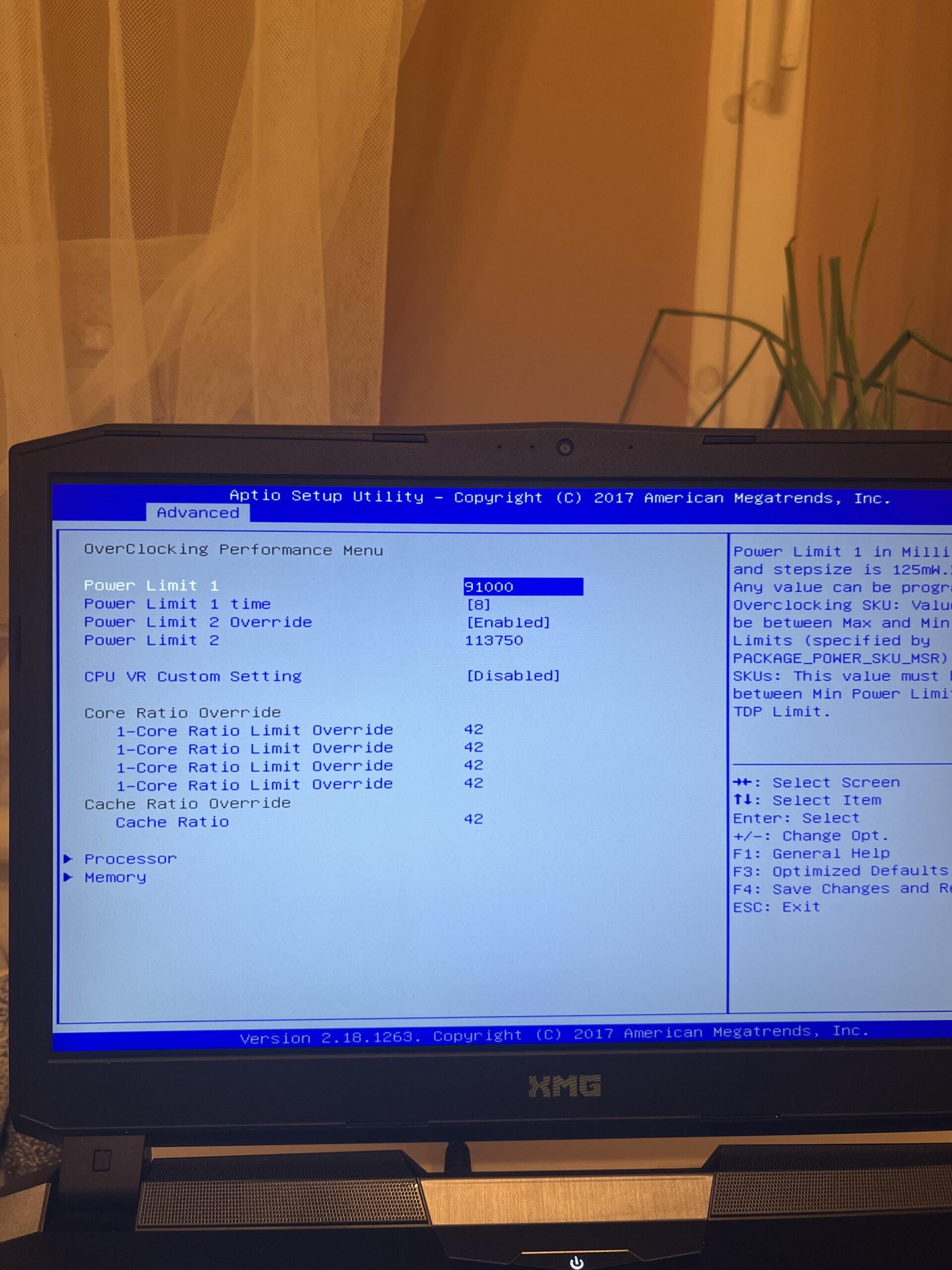
This is my BIOS settings in my gaming laptop. As cannot change frequency of my cpu is any of these settings re able to lower my cpu power and with it the temperature of cpu while gaming. Because at this moment I get fps drops and temps are between 90 to 100 Celsius.
5 Comments
CPU is I7 7700K GPU rtx 1080 mobile 8gb
16gb ram
Your current setting is 91w for limit 1, and over 113 for limit 2. My desktop cpu pulls 113w and gets mildly hot with an AIO, so I can only imagine how hot that laptop is getting. That’s a lot for a laptop, depending on cooling solution. Maybe drop that to 50000 for both of the power limits. This would set you at 50w which is a much more reasonable number, although still high for a laptop. Hopefully someone with more intel knowledge can help you out by explaining what each power limit is for, but I assume limit 1 is turbo based on the fact it has a time setting. Could be wrong.
Keep in mind laptops have to use the same cooling solution for cpu and GPU, so balance is important. You probably don’t need the cpu to be able to pull that much power, as it will limit what’s available to the gpu which will make your problem even worse.
Desktop chip, laptop cooling. Gotta love folks that build this crap.
Disable the power Limit 2, 113W is stupid. Lower the limit 1 to 80000 and test.
Laptops are designed to run in the thermal limit. There is just not enough physical space to dissipate that much heat. Just let it run how it does, or undervolt. The cpu won’t take any damage, as it regulates boost, voltage and temperature on its own. Also repaste it, if not already done.
Edit: Saw you get fps drops. Repaste, check thermal pads, because vrms could be a problem, as this machine seems a bit older. Check if undervolting is an option.
Did some of that undervolting so I believe it helped. Before temps were at 98 constantly while playing, now it stays at 85 max. Thanks for the help.