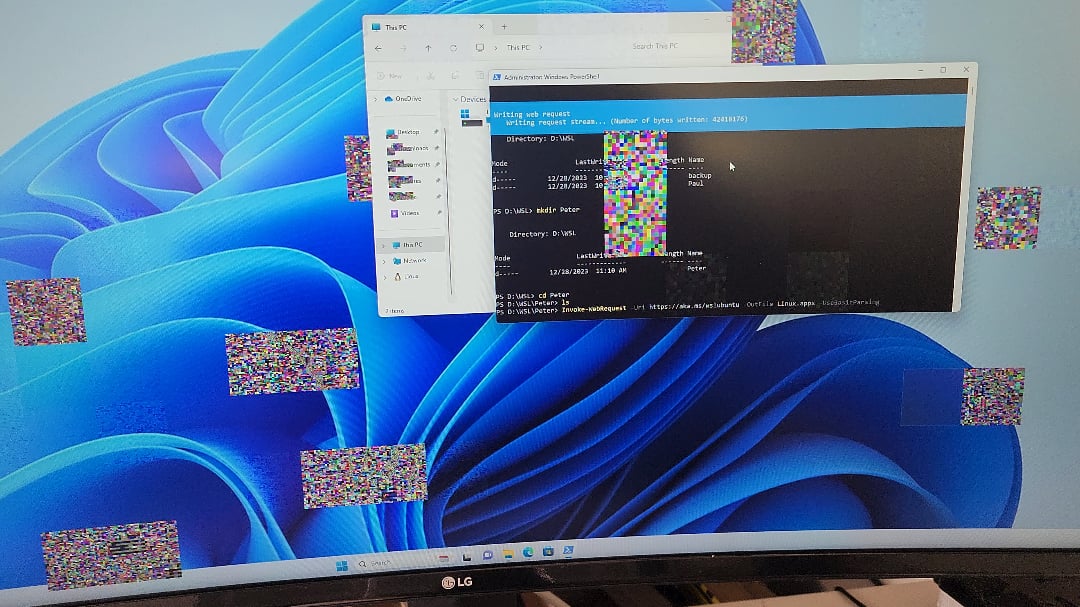
Just got this PC built at microcenter yesterday and when plugged in to the monitor, there seems to be a ton of artifacts when switched to the 2nd user when downloading wsl via the terminal. Wondering if it’s a CPU issue or a RAM issue? Thanks!

Just got this PC built at microcenter yesterday and when plugged in to the monitor, there seems to be a ton of artifacts when switched to the 2nd user when downloading wsl via the terminal. Wondering if it’s a CPU issue or a RAM issue? Thanks!
40 Comments
Much more likely to be the GPU.
PC specs are:
AMD Ryzen 9 7950x3d
4x DDR5 48gb memory
RTX 4070
I noticed how this problem only occurs when switching to another user. The main user has none of these issues.
The ryzen’s iGPU is the one that is sending out the video signal currently with no load on the rtx GPU
I would start with gpu.
Neither its most likely your gpu. Are your graphics drivers up to date?
Weird issue that it only affects other users and that it is the iGPU. Usually, a picture like that points to the cable or GPU is the issue. If not, it would be the drivers. Try replacing the cable. If not, installing ( or reinstalling) the AMD GPU drivers.
I would bet on the GPU.
RAM have nothing to do with picture its gpu
Is there like increased solar activity or something? There are so many posts recently about GPUs suddenly artifacting.
Looks like faulty VRAM or your GPU core is dying. RMA if you can.
It could be RAM.
It could be GPU.
It could be the warped PCB and the core or RAM or both have pads disconnected.
A good tech who specialises in the Video Card repairs will have to sort it out.
I suggest [Northwest repairs YouTube channel](https://www.youtube.com/@northwestrepair) but there are many others.
i would start with the cables
GPU vram is dying.
Looks like gpu, it could be drivers
Neither, its the GPU
Missingno Pokemon
Oh, this hurts my heart :’-( my dude.
I’ve seen similar shit with an unstable RAM overclock on AM5
GPU dying
Graphic Card
Rave party moment
If it works for one user but not another it is a software issue. Since it is a new computer reinstall Windows and get rid of any bloatware,
that looks like GPU ram
Your vram has alzheimers
MissingNo?
Replug your cables, if doesn’t help – GPU is on the last breath.
[GPU](https://youtu.be/C9_ooljYl60?si=ggZ2jiArYKhQKNHS)
Probably vram
Always check the simple things first, like using different cords, restarting your PC, or updating your display drivers.
• Does your video card have multiple HDMI or Display Port? If so try one of those. May have a dirty / junk in the port.
• Try removing / reinserting the video card into the pcie slot. It may not be seated properly.
Unplug and reseat your PSU cables at the gpu and psu ends of the cable.
• you noted its artifacting when switching to 2nd user account. Does it only do this in the secondary account? Or does it happen in all user accounts? What happens if you boot into safe mode into either account? There could be an app in the primary account that’s not suspending or an app in the second account that trying to resume that’s freaking out.
• what if you boot the computer and directly go into the secondary account and then switch to the primary admin account? Does the admin account then artifact or does the secondary account artifact when you boot to it first still?
• have you tried running dxdiag from windows command? I would log into the secondary account that’s artifacting, Let that scan answer then tab through see if it has any errors. I don’t think it will find anything but worth a shot.
Yes
GPU or the cabling to said GPU is more likely the issue unless you don’t have a dedicated GPU
I had smaller glitches and found that I had to go back to the manufacturers driver which came with it. Problem went away immediately. Have been careful not to use the Universal driver ever since
Instead of troubleshooting yourself just take it into microcenter
Yes
Probably gpu
Update video drivers
Change HDMI/DP cable
Try different GPU if possible
Missingno
Seems like the pgu went bye bye
Re-house your RAM and make sure the GPU isnt sagging. Gravity can dislodge it or if you’ve moved the PC can sometimes pop them out of place. Also make sure the monitor is plugged in to the GPU like others have mentioned.
Vram’s running hot. Open the side and point a fan at the card, if it stops, there ya go.