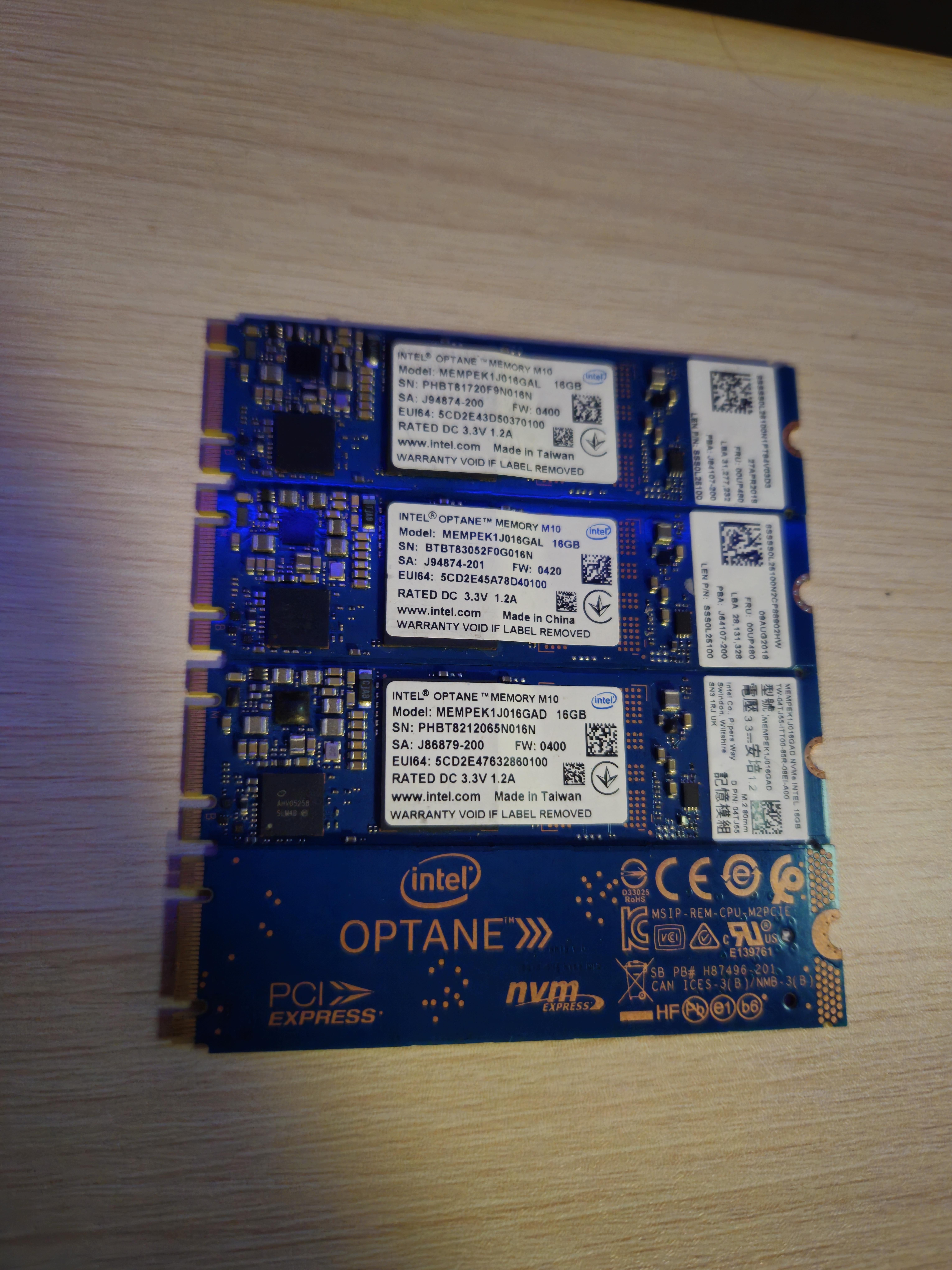
Does your motherboard support Optane memory? If yes there’s no harm in giving them a try.
Hephaestus002
if you got a slot available try them out, otherwise they are pretty useless in normal rigs
[deleted]
[deleted]
YaqutFan
If the 1 TB SSD is already an NVMe I wouldn’t bother, if it’s a SATA it could be a pretty cool addition.
FIWDIM
Get a PCIE to NVME card and you get a brutally fast drive out of it.
Hattix
Not worth it. You could perhaps find a bridge-based PCIe 4x M.2 card and get a 64 GB fast SSD out of them, but that’s a fair bit of money and I’d say it’s not worth it.
Optane/3D-Xpoint failed. It was just too expensive to manufacture, offered little above 3D-VNAND, and its purported latency advantage wasn’t big enough to be relevant.
Randomtxtbox
If you already have a 1tb ssd then a couple of 16gig sticks probably won’t do much
AnnihilationBoom123
If you have mini pc or sbc and want to have reliable boot drive, use them
I maybe biased, been an optane fan for a while and also built couple systems with it, and the performance is not that great compared to other drives at the time but the IOPS is really high and makes any system snappier than whatever budget nvme drive i have at the time
Note though, I’m using 64 and i believe 118gb variant so it can store os as well as some apps without resorting to only install the apps on additional storage
32Ferreira
Absolutely no. Optane was (and is) trash. The proof is the fact that Intel completely abandoned it.
Tikkinger
I’m on HDD atm and would be happy to use that.
Give it a try, what to loose?
Fhksws
Optane is nothing short of trash. Recycle all immediately
PeterPun
You can RAID it with hdd to it give a little push
mcfool123
Get some NVME to USB-C enclosures and have some fast/long lasting “flash drives”. The 16 GB models were made for caching but since you are using a SSD this is null.
Abysmal_Improvement
At this point no, initially these small drives were supposed to be used as HDD cache, optane itself offered very poor value but excellent latency so installing os and select programs on it would offer improved responsiveness compared to SSD, as in latency department there was little to no progress for quite some time(this is why gen 5 ssds are waste of money for consumer applications)
Currently the main usage for these variant is as metadata cache for nas as they are much faster than HDD and much more durable than ssd
CorValidum
A midway solution while transition to m.2 and nvme took place…. no not really only if you still use old school HDDs them yeah it will help
KYO297
If the SSD is SATA, not NVMe, it might be worth using. Other than that, not really, no. Even then, idk if it’ll actually help, they were meant to make hard drives feel faster. An SSD, even a SATA one, is already noticeably faster
Relevant_Scallion_38
Can Optane memory just be used as storage like a small ssd? If so I would find out if I could get a PCIE adapter that let me slap on a few of these. Then turn each one into a different emulator storage device for classic games. Basically all my classic and small arcade games on steam as well. Got a few dozen under 2-3gb.
Known-Pop-8355
This was intels way of trying to give consumers ssd like speeds since ssds at the time were still pretty new and VERY EXPENSIVE. What it does is caches up to 16GB worth of data from the hdd and basically runs from that. It sorta acts like RAM in a way. This is great for older machines that support m2 key slots
Precursor19
This hardware is the absolute bane of my existence as a repair tech. If for any reason your drives deconcatenate, your data is fucked. I have looked into every possible recovery method, and due to the way the drives structure your data, it is devastating to it when it has problems similar to different types of raid. I have heard that these have been used in data centers to provide some meaningful improvements, but in any other circumstance these are practically pointless. An NVME will always be faster.
Fun fact, these also come in the form of standard a NVME for absolutely no reason. So you get the performance of an NVME combined with the terrible design of optane and the risk of data loss it comes with.
do_you_know_de_whey
I mean sure, if you were using a HDD it would be really be worth it, but since you’re on an NVMe SSD drive I doubt you’d see any noticeable improvement.
Optane acts as a permanent cache for your HDD/SSD, so if you were opening the same file every day, it would be stored on the fast optane drive rather than your slow HDD thus making your computer feel a lot snappier for commonly done tasks.
Once your on an SSD this becomes a whole lot less impactful because of how much faster SSDs are.
New_Fee_887
Maybe you van find an adapter for usb, then you have some really fast usb’s
itsokayimhandsome2
I remember when PCIE ssd cards were a thing thinking it would be the fastest forever but at the cost of thousands. So glad I didnt buy them now that we have nvme 4.0 and 5.0
mohicannn
I use those as keychain not-fogetters.
Few-Monies
Ewaste salvage.
HenrikTJ
If your pc has any HDD, you could use it as a cache. Or as a cache in a NAS if you have one
Gibs679
These drives are top tier cache drives for a TrueNAS setup, cache drive for an HDD using primocache in windows, and maybe some variation on linux. Too small for a boot drive even on many linux distros. Essentially useless outside of their original purpose of being a cache drive.
HunterCZ122_
I only can think of using it as cache for your HDDs/SSDs. On Linux, bcachefs can do that: [https://bcachefs.org/Caching/](https://bcachefs.org/Caching/), no clue on Windows unfortunately.
MachineCarl
Buy usb adapters and use them as super-duper fast USB Thumb Drives 🙂
Active_Club3487
Probably not
kadoslav
If you have NVme ssd then it is totally worthless, if u have Sata ssd, and your device supports it, then maybe
NightIgnite
It would be easier to buy new storage than a raid setup or type c adapter. The most you should do is dualboot either android or linux as a party trick.
leonardob0880
This 16gb optanes are to use as cache for mechanical hdd’s. If you dont have a mechanical hdd it’s not worth it
Lente_ui
If your PC runs primairily from an HDD or SATA SSD’s, yes.
~~If your motherboard doesn’t have NVME M.2 slots, you can buy a PCIe card with M.2 slots and mount them there.~~
You must have at least a 7th gen Intel Core processor and Windows 10 64-bit for M10 Optane to be supported.
If your PC is running off an NVME SSD, then don’t bother.
[edit]
These connect to SATA M.2 connectors. They are not NVME.
[/edit]
EJ_Tech
For those niche scenarios where you need to accelerate a large HDD (like 4TB+) for some reason, in which case you should be using a 32GB Optane anyways.
The only other use I could think of is for a tiny boot SSD for a server or Linux machine.
Otherwise, maybe as a very fast but small portable drive in an enclosure.
Akainen
You can feed it to your friendly neighborhood Protogen.
SpaceGator3000
E-waste
Gryffon_Atarangi
Only 2 use cases I see being practical now that NVMe drives are plentiful and cheap:
1) If you have a spare hard drive, or a few, setup a NAS and use these as a Level 2 Arc and a Slog through TrueNAS, it’d be good for stuff like a media library or a backup server.
2) buy some USB enclosures and turn them into stupid fast USB drives. Might make the W10 install not unbearably slow.

37 Comments
Does your motherboard support Optane memory? If yes there’s no harm in giving them a try.
if you got a slot available try them out, otherwise they are pretty useless in normal rigs
[deleted]
If the 1 TB SSD is already an NVMe I wouldn’t bother, if it’s a SATA it could be a pretty cool addition.
Get a PCIE to NVME card and you get a brutally fast drive out of it.
Not worth it. You could perhaps find a bridge-based PCIe 4x M.2 card and get a 64 GB fast SSD out of them, but that’s a fair bit of money and I’d say it’s not worth it.
Optane/3D-Xpoint failed. It was just too expensive to manufacture, offered little above 3D-VNAND, and its purported latency advantage wasn’t big enough to be relevant.
If you already have a 1tb ssd then a couple of 16gig sticks probably won’t do much
If you have mini pc or sbc and want to have reliable boot drive, use them
I maybe biased, been an optane fan for a while and also built couple systems with it, and the performance is not that great compared to other drives at the time but the IOPS is really high and makes any system snappier than whatever budget nvme drive i have at the time
Note though, I’m using 64 and i believe 118gb variant so it can store os as well as some apps without resorting to only install the apps on additional storage
Absolutely no. Optane was (and is) trash. The proof is the fact that Intel completely abandoned it.
I’m on HDD atm and would be happy to use that.
Give it a try, what to loose?
Optane is nothing short of trash. Recycle all immediately
You can RAID it with hdd to it give a little push
Get some NVME to USB-C enclosures and have some fast/long lasting “flash drives”. The 16 GB models were made for caching but since you are using a SSD this is null.
At this point no, initially these small drives were supposed to be used as HDD cache, optane itself offered very poor value but excellent latency so installing os and select programs on it would offer improved responsiveness compared to SSD, as in latency department there was little to no progress for quite some time(this is why gen 5 ssds are waste of money for consumer applications)
Currently the main usage for these variant is as metadata cache for nas as they are much faster than HDD and much more durable than ssd
A midway solution while transition to m.2 and nvme took place…. no not really only if you still use old school HDDs them yeah it will help
If the SSD is SATA, not NVMe, it might be worth using. Other than that, not really, no. Even then, idk if it’ll actually help, they were meant to make hard drives feel faster. An SSD, even a SATA one, is already noticeably faster
Can Optane memory just be used as storage like a small ssd? If so I would find out if I could get a PCIE adapter that let me slap on a few of these. Then turn each one into a different emulator storage device for classic games. Basically all my classic and small arcade games on steam as well. Got a few dozen under 2-3gb.
This was intels way of trying to give consumers ssd like speeds since ssds at the time were still pretty new and VERY EXPENSIVE. What it does is caches up to 16GB worth of data from the hdd and basically runs from that. It sorta acts like RAM in a way. This is great for older machines that support m2 key slots
This hardware is the absolute bane of my existence as a repair tech. If for any reason your drives deconcatenate, your data is fucked. I have looked into every possible recovery method, and due to the way the drives structure your data, it is devastating to it when it has problems similar to different types of raid. I have heard that these have been used in data centers to provide some meaningful improvements, but in any other circumstance these are practically pointless. An NVME will always be faster.
Fun fact, these also come in the form of standard a NVME for absolutely no reason. So you get the performance of an NVME combined with the terrible design of optane and the risk of data loss it comes with.
I mean sure, if you were using a HDD it would be really be worth it, but since you’re on an NVMe SSD drive I doubt you’d see any noticeable improvement.
Optane acts as a permanent cache for your HDD/SSD, so if you were opening the same file every day, it would be stored on the fast optane drive rather than your slow HDD thus making your computer feel a lot snappier for commonly done tasks.
Once your on an SSD this becomes a whole lot less impactful because of how much faster SSDs are.
Maybe you van find an adapter for usb, then you have some really fast usb’s
I remember when PCIE ssd cards were a thing thinking it would be the fastest forever but at the cost of thousands. So glad I didnt buy them now that we have nvme 4.0 and 5.0
I use those as keychain not-fogetters.
Ewaste salvage.
If your pc has any HDD, you could use it as a cache. Or as a cache in a NAS if you have one
These drives are top tier cache drives for a TrueNAS setup, cache drive for an HDD using primocache in windows, and maybe some variation on linux. Too small for a boot drive even on many linux distros. Essentially useless outside of their original purpose of being a cache drive.
I only can think of using it as cache for your HDDs/SSDs. On Linux, bcachefs can do that: [https://bcachefs.org/Caching/](https://bcachefs.org/Caching/), no clue on Windows unfortunately.
Buy usb adapters and use them as super-duper fast USB Thumb Drives 🙂
Probably not
If you have NVme ssd then it is totally worthless, if u have Sata ssd, and your device supports it, then maybe
It would be easier to buy new storage than a raid setup or type c adapter. The most you should do is dualboot either android or linux as a party trick.
This 16gb optanes are to use as cache for mechanical hdd’s. If you dont have a mechanical hdd it’s not worth it
If your PC runs primairily from an HDD or SATA SSD’s, yes.
~~If your motherboard doesn’t have NVME M.2 slots, you can buy a PCIe card with M.2 slots and mount them there.~~
You must have at least a 7th gen Intel Core processor and Windows 10 64-bit for M10 Optane to be supported.
If your PC is running off an NVME SSD, then don’t bother.
[edit]
These connect to SATA M.2 connectors. They are not NVME.
[/edit]
For those niche scenarios where you need to accelerate a large HDD (like 4TB+) for some reason, in which case you should be using a 32GB Optane anyways.
The only other use I could think of is for a tiny boot SSD for a server or Linux machine.
Otherwise, maybe as a very fast but small portable drive in an enclosure.
You can feed it to your friendly neighborhood Protogen.
E-waste
Only 2 use cases I see being practical now that NVMe drives are plentiful and cheap:
1) If you have a spare hard drive, or a few, setup a NAS and use these as a Level 2 Arc and a Slog through TrueNAS, it’d be good for stuff like a media library or a backup server.
2) buy some USB enclosures and turn them into stupid fast USB drives. Might make the W10 install not unbearably slow.