or at least set it to the lowest hz that you can get fps for.
PenguinsRcool2
Ya lol i legitimately just found out the tv i got for christmas last year has a 120 fps mode…. lol i use it for 4k couch gaming on occasion, rarely get over 60 fps but with dlss I’ll hit 80 in some games, so excited about it 🤣 especially in returnal lol thats about all i use my media center/ couch gaming setup for. Returnal and star wars jedi haha
MakeshiftRocketship
For some reason that Lego fortnight cooks my gpu so I set it to 60fps now it runs at 71c figured I didn’t need the frames lol
Recent-Mongoose-4955
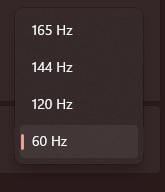
It’s done. 120 hz in the TV connected at my Series X and 165 hz on the PC’s monitor.
Checkinginonthememes
I double checked and confirmed my screen is set to max…60hz. Thanks for the public service!
DarhkBlu
Lmao I set my monitor to its highest(144Hz) as soon as I got it,Lmao how does one forget…
Burntmuffinz
300hz 🙂
dankweabooo
If only I got a new monitor for Christmas 😩
Throwaythisacco
i need a DP cable because my new KG241Y can only do 60hz with HDMI
n00kie1
Sometimes my monitor is booting with lower refresh rate but I immediately notice it by mouse motions on the desktop. Have to restart again to set back to highest refresh rate.
thefear900
Double check that often too, it will revert itself with updates or other changes sometimes.
Kougeru
And yet another reminder that you shouldn’t need to. This has worked automatically, with no issues, since at least 2015 when windows 10 came out.
Denaviro
Stop making me paranoid!!! It’s 144Hz I swear
Deimos_Aeternum
Highest *supported* refresh rate
Z1dan
Remember to check in nvidia/amd’s control panel too guys
Jemis7913
that and display port is better than hdmi
Ok-Reputation-2720
I have 1 display port, 1 hdmi port but 2 monitors @144hz put my pc is just letting me use 1 at 144hz and the other 60hz
Googlesignedmeupwhy
144hz people talking about how much better it is
​
Then realizing it was set to 60hz
bt123456789
went to do this and found out mine did it automatically, thank you computer XD
TTYY200
Tbh – there are a LOT of settings everyone should be playing with then they get a new monitor 😛
It’s like a religious right of passage to fiddle with all the settings.
HubjinTheGreat
And use freesync or gsync
EightSeven69
I have a max of 75Hz and it’s set on 60Hz
fight me
Meat_Goliath
Also make sure to check your monitors settings, and what your monitor, GPU, and cable are capable of so you don’t wind up going with 4k at 30hz or something.
Blazanar
I ran my monitor for at least a year at 60hz because I had no idea about this. I just knew it was way better than console gaming on my TV. Once I switched to 144hz, my mind was blown lol.
I cannot game on my TV with my Xbox One anymore because it will give me a massive headache within a couple of minutes
Thishal_BS
well thanks for reminding but its 60Hz for me anyways sooo …. [sad noises]
Hewatza
I’ll never forget realizing this on my first monitor (144Hz) like a year after I got it. I had never seen 144Hz so I had no idea. My mind was blown when I found the setting.
RuneHearth
I have to save energy lol
Wolfrages
I’ve been gaming at 60fps/60hrz(30/30 for console) for 20 years. I will die on this hill.
Mundus6
My friend played on his 3090 for more than a year before i visited his house and noticed it after like 2 seconds in Windows and changed it for him.
Solid-Stranger-3036
windows does this on it’s own in my experience
cardinaltribe
My phone goes to 144hz it’s mind blowing playing Star Field on a OLED in my hands
TitaniumHazard
Is it worth getting a 144hz monitor? Mines 74hz at the moment!
MasterTacticianAlba
I’m never gonna forget playing PUBG with my friends and one of them complaining he never gets over 60fps despite being on a 144hz monitor.
Immediately asked him if he had set it to 144hz in the display settings.
“What?”
Old mate spent over $1000 on a 144hz monitor just to play games at 60hz for 3-years until we told him to change his settings.

33 Comments
or at least set it to the lowest hz that you can get fps for.
Ya lol i legitimately just found out the tv i got for christmas last year has a 120 fps mode…. lol i use it for 4k couch gaming on occasion, rarely get over 60 fps but with dlss I’ll hit 80 in some games, so excited about it 🤣 especially in returnal lol thats about all i use my media center/ couch gaming setup for. Returnal and star wars jedi haha
For some reason that Lego fortnight cooks my gpu so I set it to 60fps now it runs at 71c figured I didn’t need the frames lol
It’s done. 120 hz in the TV connected at my Series X and 165 hz on the PC’s monitor.
I double checked and confirmed my screen is set to max…60hz. Thanks for the public service!
Lmao I set my monitor to its highest(144Hz) as soon as I got it,Lmao how does one forget…
300hz 🙂
If only I got a new monitor for Christmas 😩
i need a DP cable because my new KG241Y can only do 60hz with HDMI
Sometimes my monitor is booting with lower refresh rate but I immediately notice it by mouse motions on the desktop. Have to restart again to set back to highest refresh rate.
Double check that often too, it will revert itself with updates or other changes sometimes.
And yet another reminder that you shouldn’t need to. This has worked automatically, with no issues, since at least 2015 when windows 10 came out.
Stop making me paranoid!!! It’s 144Hz I swear
Highest *supported* refresh rate
Remember to check in nvidia/amd’s control panel too guys
that and display port is better than hdmi
I have 1 display port, 1 hdmi port but 2 monitors @144hz put my pc is just letting me use 1 at 144hz and the other 60hz
144hz people talking about how much better it is
​
Then realizing it was set to 60hz
went to do this and found out mine did it automatically, thank you computer XD
Tbh – there are a LOT of settings everyone should be playing with then they get a new monitor 😛
It’s like a religious right of passage to fiddle with all the settings.
And use freesync or gsync
I have a max of 75Hz and it’s set on 60Hz
fight me
Also make sure to check your monitors settings, and what your monitor, GPU, and cable are capable of so you don’t wind up going with 4k at 30hz or something.
I ran my monitor for at least a year at 60hz because I had no idea about this. I just knew it was way better than console gaming on my TV. Once I switched to 144hz, my mind was blown lol.
I cannot game on my TV with my Xbox One anymore because it will give me a massive headache within a couple of minutes
well thanks for reminding but its 60Hz for me anyways sooo …. [sad noises]
I’ll never forget realizing this on my first monitor (144Hz) like a year after I got it. I had never seen 144Hz so I had no idea. My mind was blown when I found the setting.
I have to save energy lol
I’ve been gaming at 60fps/60hrz(30/30 for console) for 20 years. I will die on this hill.
My friend played on his 3090 for more than a year before i visited his house and noticed it after like 2 seconds in Windows and changed it for him.
windows does this on it’s own in my experience
My phone goes to 144hz it’s mind blowing playing Star Field on a OLED in my hands
Is it worth getting a 144hz monitor? Mines 74hz at the moment!
I’m never gonna forget playing PUBG with my friends and one of them complaining he never gets over 60fps despite being on a 144hz monitor.
Immediately asked him if he had set it to 144hz in the display settings.
“What?”
Old mate spent over $1000 on a 144hz monitor just to play games at 60hz for 3-years until we told him to change his settings.