Look at the top of your case. Is there any build-up on the filter? Any other components covered in the material?
bobby4385739048579
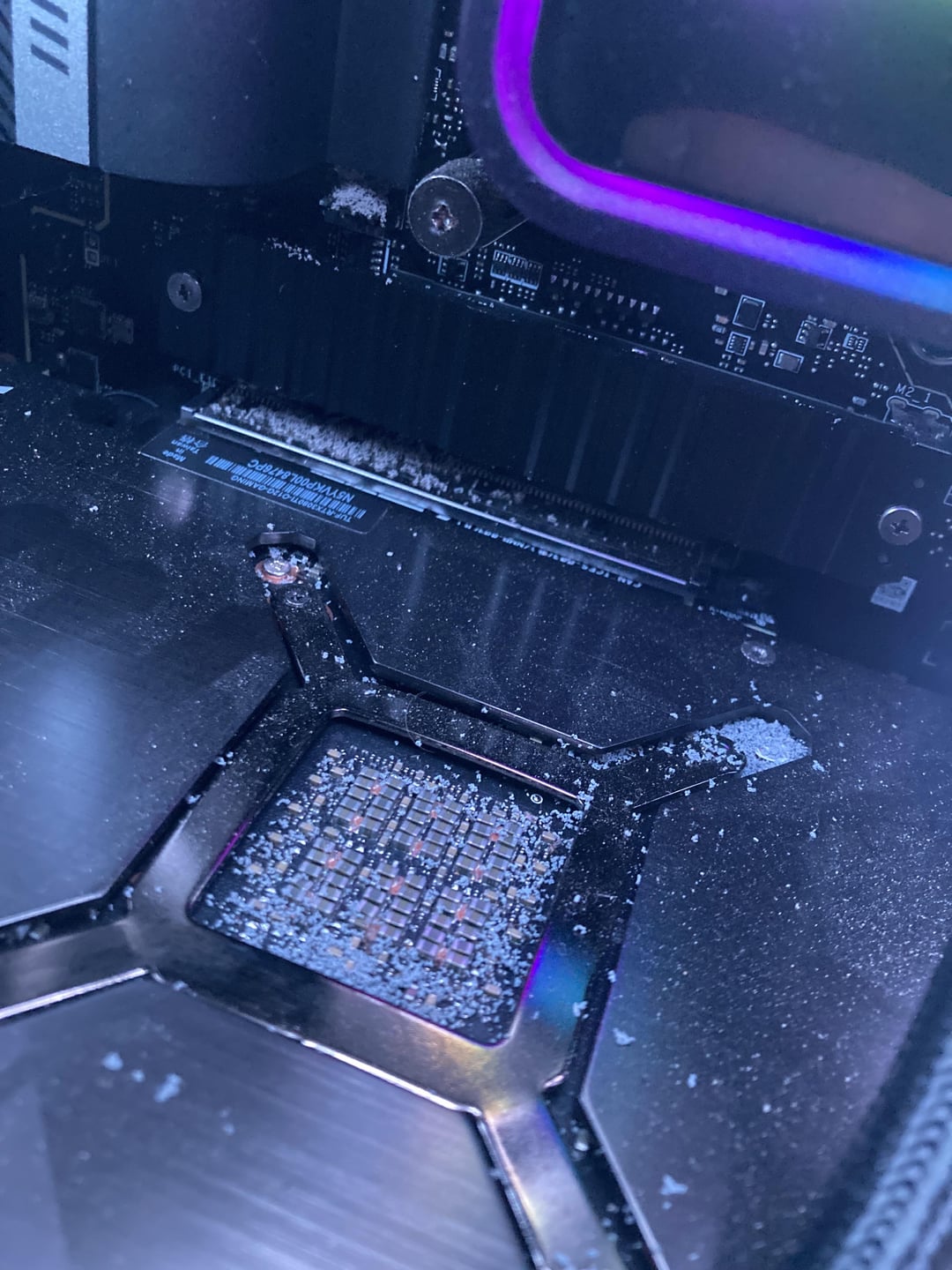
its not dust thats for sure
it looks like lil bits of some thing.
going to have to dig deeper to see were its coming from, is it on intake fans?
ChettManly
What colour are the fans above it? Looks like plastic that’s been grinding off tiny bits over time.
SoftwareRound
Mouse in the house?
LiliNotACult
Looks a bit like salt. Do you have a salt lamp in the room OP?
If not, check the front filter for your PC case. I’m guessing it is either falling onto the top of the case or the fans are sucking it in out of the air.
EducationalCamel1043
looks like some kind of degraded plastic that is falling down from above the pc
remind me of plastic that has been left outside and degraded by the sun to the point it flakes apart.
slapstick223
Dandruff
MartyrKomplx-Prime
Is your AIO leaking? Is that dried residue?
4iDragon
That’s bugger sugar. jk. It could be Ceiling Popcorn dust.
RevolutionWeak2342
That’s fentanyl
-SlinxTheFox-
Looks like bits of silicone or dried thermal paste to me. Weird. Saw you said it seems it’s coming from inside, hope your gpu isn’t toast
tblazen87
I blame your cooling cat 🐈 that lays on top
dirtysanchos
Do you have popcorn ceiling? They’re notorious for “shedding” Lil bits like these. If you have a fan/vent on top of case they could be falling in.
Surgiss
Kinetic sand?
Addy-Freeze-BangBang
check your AIO for leaks and corrosion on the copper plate.
MojitoChico
Cummies
s1rrah
That is called “semen.” Totally normal.
metalmayne
are you a vaper? could that be vg that somehow cooked?
Night_lon3r
hmmm, do you see any ants inside?
Ghostfriendd
Dried nut?
Recent-Ad-9975
dandruff
Top-Jellyfish9557
Only thing I can think of that does that is styrofoam, but probly not the case.
Raido95
Your pc has dandruff, a bottle of head and shoulders should fix it
unbelievableonion
Graphics dust, aka pixel powder.
seansinha
Is your AIO leaking by chance?
orion1836
r/itsfrass
(not really, but close)
A10010010
Nanobots.
Arko9699
OP’s PC doing lines now?
TWR19
Ants. Nom nom thermal pads. You need a solid cleaning not just in your pc, but surrounding area. Wish I could tell you how other than a flamethrower, but you’re a smart cookie, I’m sure you’ll google it out.
l4derman
The cat needs head n shoulders shampoo.
JordansBigPenis69
my bad bro
sparklingvireo
Everywhere that has thermal pads should be checked. The mobo VRMs that are under the nice IO shield housing and elsewhere, the m.2 drive heatsink, and the gpu.
If it’s ants, you can put your case on a case stand with castors and then put insect traps under the castors. If your case has tall enough feet to go over the trap then you could skip the case stand altogether. Something like this: https://www.amazon.ca/Trap-Insect-Interceptors-Furniture-Allbugsupplies/dp/B083L9CTBF The outer ring has super slippery walls that is hard to climb, so they get stuck.
Beyond that it’s more basic pest control advice.
NothingbutLuck0
Damn heat leeches!
Disastrous-Rips
Ants. They shred thermal pads for some reason
PersonalHam
Salt
Automatic_Scratch210
Cigarette ashes
thatfordboy429
Looks like your AIO might have leaked. Hopefully someone else caught this, but, not the first couple comments.
Check CPU temps, if notably high, shut down and pull it. If not high, shut down, and inspect it. If I am right(which needless to say I have seen that once before) Be glad your hardware is okay.
sleepnutz
Gpu lice droppings …… ewww
FreezyKnight
Most likely you.
Feralpaw
You have a cat that jumps on the top of the PC? Cat litter falling in?

42 Comments
Is your PC on carpet while it’s on?
What is above it?
Looks like some sort of dust/debris that’s falling from above. You can see some accumulating on the motherboard as well.
https://preview.redd.it/st9xopht7d5c1.png?width=756&format=png&auto=webp&s=6f0be3f2d43d86ba494123443be1a12d1bf74c27
Look at the top of your case. Is there any build-up on the filter? Any other components covered in the material?
its not dust thats for sure
it looks like lil bits of some thing.
going to have to dig deeper to see were its coming from, is it on intake fans?
What colour are the fans above it? Looks like plastic that’s been grinding off tiny bits over time.
Mouse in the house?
Looks a bit like salt. Do you have a salt lamp in the room OP?
If not, check the front filter for your PC case. I’m guessing it is either falling onto the top of the case or the fans are sucking it in out of the air.
looks like some kind of degraded plastic that is falling down from above the pc
remind me of plastic that has been left outside and degraded by the sun to the point it flakes apart.
Dandruff
Is your AIO leaking? Is that dried residue?
That’s bugger sugar. jk. It could be Ceiling Popcorn dust.
That’s fentanyl
Looks like bits of silicone or dried thermal paste to me. Weird. Saw you said it seems it’s coming from inside, hope your gpu isn’t toast
I blame your cooling cat 🐈 that lays on top
Do you have popcorn ceiling? They’re notorious for “shedding” Lil bits like these. If you have a fan/vent on top of case they could be falling in.
Kinetic sand?
check your AIO for leaks and corrosion on the copper plate.
Cummies
That is called “semen.” Totally normal.
are you a vaper? could that be vg that somehow cooked?
hmmm, do you see any ants inside?
Dried nut?
dandruff
Only thing I can think of that does that is styrofoam, but probly not the case.
Your pc has dandruff, a bottle of head and shoulders should fix it
Graphics dust, aka pixel powder.
Is your AIO leaking by chance?
r/itsfrass
(not really, but close)
Nanobots.
OP’s PC doing lines now?
Ants. Nom nom thermal pads. You need a solid cleaning not just in your pc, but surrounding area. Wish I could tell you how other than a flamethrower, but you’re a smart cookie, I’m sure you’ll google it out.
The cat needs head n shoulders shampoo.
my bad bro
Everywhere that has thermal pads should be checked. The mobo VRMs that are under the nice IO shield housing and elsewhere, the m.2 drive heatsink, and the gpu.
If it’s ants, you can put your case on a case stand with castors and then put insect traps under the castors. If your case has tall enough feet to go over the trap then you could skip the case stand altogether. Something like this: https://www.amazon.ca/Trap-Insect-Interceptors-Furniture-Allbugsupplies/dp/B083L9CTBF The outer ring has super slippery walls that is hard to climb, so they get stuck.
Beyond that it’s more basic pest control advice.
Damn heat leeches!
Ants. They shred thermal pads for some reason
Salt
Cigarette ashes
Looks like your AIO might have leaked. Hopefully someone else caught this, but, not the first couple comments.
Check CPU temps, if notably high, shut down and pull it. If not high, shut down, and inspect it. If I am right(which needless to say I have seen that once before) Be glad your hardware is okay.
Gpu lice droppings …… ewww
Most likely you.
You have a cat that jumps on the top of the PC? Cat litter falling in?