
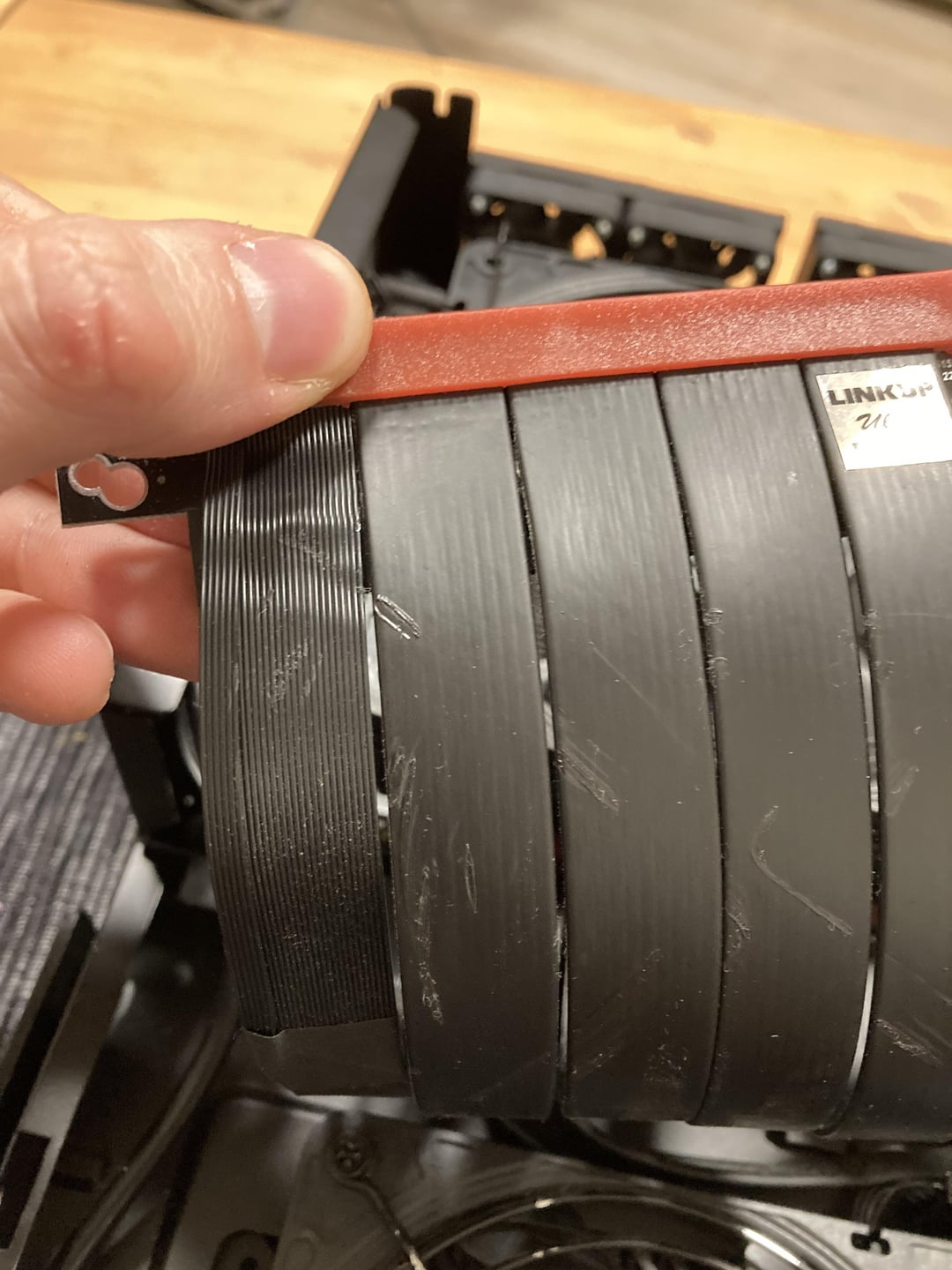
Recently started having sudden black screens leading to crashes. On further inspection noticed small indents, to possible melts on my PCIe riser. Could those be a potential cause? Can sudden blackouts be caused by something else? Computer seem to be running fine after the blackout, but after even 10 seconds even the sound is gone.
18 Comments
You could test it by just using the gpu without the riser for a few days. If the issue persists, then it’s not the cause. If it’s still ongoing, then it was not the cause. I think it’s unlikely the riser cable would cause that, but testing is the best way to tell 100%.
That depends. They could, or they could not.
You won’t be able to determine if those marks are the cause of your crashes, but what you could do is try using it without the riser cable and see if he crashing goes away, then try a new cable if needed.
Check system logs for anything mentioning “target-abort” “master-aport” or “SERR”, these are PCI errors relating to data integrity.
I would say likely. PCI operates on very tight specs and requires quality connections. Damage to the cable would almost certainly increase instability and cause outright crashes due to incomplete data delivery.
It could still be other factors, but that cable definitely looks like a problem
possible
Seen a lot of issues with those risers, those wires are really sensitive. Even if only the isolation is damaged it could cause interferance making the gpu not having a stable connection with the motherboard. Think about unshielded cat5 cables with gigabit connections, not stable.
What gen is that riser?
I would replace it either way. The damage could cause other problems down the line
Yes absolutely.
Those wires are thin as hell and very suceptibles to interference.
Check windows event logs for critical error 41’s.
In the xml part of the log there is a bugcheck code that you can google for more info in what direction to search for.
If there is no bugcheck code windows had no time to write one and you need to check for hardware issues
Man riser cables are trash. Unfortunately you don’t have much choice but I avoid them at all cost. Vertical mounting looks awesome, but for me I want the gpu slotted directly into the pcie slot
Is that a Linkup pcie gen 4.0 riser cable? If so I’ve been having the same issue now for a year.
Try running directly gpu to motherboard with no riser in the same game/app that crashes
“small indents”… Dem cables got mangled!
You have to test without.
I finally took my cable mod cables out because I was tired of random crashes with no logs to explain. Solved the issue. Will never use anything but the cables that come with PSU again
No, but crush damage – as depicted in your pics, certainly cold.
Yup – also check what your GPU is actually running at in something like GPU-Z. I went through 3 in my Meshlicious, all of them failed in some way or other and all from LinkUp. 1 failed entirely and TBH that was during my building the machine, the other two would always be stuck at PCIE3.0 8X or 4X and had similar minor damage on them as yours from rubbing/bending after about 6 months each.
I gave up and just rebuilt in case that I wouldn’t need to do it again. PCI-E 4 risers are massively expensive and fragile.
Worth trying. After a few weeks of near constant black screen crashes I was able to fix the issue by replacing the hdmi cable. Not even changing the port in use either. Still kinda baffled by the lack of issues I’m having.