
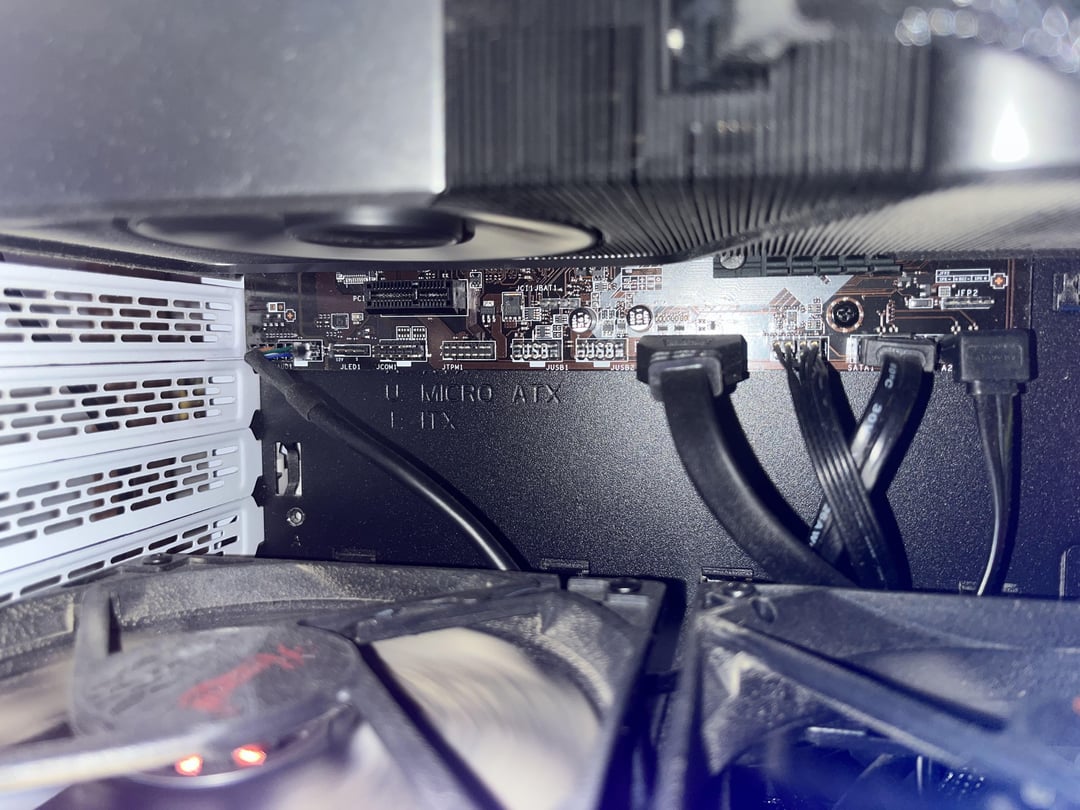
When I built my pc, I went and got this motherboard and it didn’t have WiFi or Bluetooth.
(https://www.msi.com/Motherboard/B450M-PRO-M2-V2/Specification)
Now I’m wondering if I will have enough space for my gpu fan (3070ti) if I go and install a WiFi card in the slot underneath it.
It looks like there won’t be much space between the gpu and card at all, but there is still space towards the bottom of the case for air to move around, so I’m unsure if this is a bad idea or not.
Would appreciate any advice. Thanks
25 Comments
There might be just enough space and if you get a lower profile card you likely won’t interfere with airflow much either.
You can get an M.2 based one as well
You may be better off geting a usb one.
You could try a pcie riser cable and mount it loose in the cabinet somewhere. Its not a very clean solution though
If you want to try a stable connection via USB.
Look for High Gain USB Wifi 6/6E. I have been using one and they are pretty reliable. (I have the one with USB 3.0 wire)
Look for TP LINK AX1800
https://amzn.eu/d/izaIvO9
USB ones tend to be pretty good these days
I think it will fit, but then your GPU will start overheating and that’ll render your computer unusable
you could probably fit one, but it’s not woth choking your GPU. Go for a USB adapter.
this i what i would get
https://preview.redd.it/pr20z9th534c1.png?width=385&format=png&auto=webp&s=7d86c3f49253359d1f135b8e1d573c6304a4b0d1
I had the same problem.
I don’t know if this solution would work for you, but it worked for me.
I brought a PCI ribbon extension with a small male, routed out my case, plugged it in the WiFi card, and it has been working fine for 2 years.
https://preview.redd.it/q9p7z5d7734c1.jpeg?width=2268&format=pjpg&auto=webp&s=9ac05ba96c8f1a0c8f8c1aae2d9c18f6a44068b4
Or you could just buy a USB WiFi adapter or m.2 WiFi card.
Get an external usb Wifi dongle. In my experience the back of the pc is a very bad spot for a wifi antenna anyways, too much interference
I’ve used a pice ribbon cable to get access to otherwise blocked pcie slots. It isn’t very expensive and it works. You have the otherwise unusable expansion slots sitting there in the case so nothing to lose.
I would do usb or a riser cable for the pcie
You can get a pciex1 riser cable. Move the card to the slot just below the motherboard.
Will be fine. The wifi card will probably only overlap the fan 1/2 at most and with that fan as long as it isnt pressed flush against it it will still draw air fine.
They are usually small so it could be fine, that said when I had one it had packet loss and ping spikes probably because it was so close to many sources of EM signals. I recommend usb one, but I have bad experience with them either since they had problems with disconnecting. I can only recommend Asus one, it worked great, but you are far better with just ethernet if that is possible.
It should be fine as long as it’s not one that takes up a lot of space
If you already have the card, you can get a PCI extender.
https://www.newegg.com/p/1W7-00TE-00058?item=9SIAMKHK1J6381
(Link is just for reference..I know there are good versions of these, it was just the first I found..I’ve done zero research on this particular one)
Ah I see, you purchased a budget microATX motherboard originally, when long term you may have benefited from a standard ATX motherboard with more slots for expansion cards.
It looks like your case can fit a standard ATX motherboard, but it is unnecessary. I’d avoid using the PCIe cable harnesses like some others have recommended and would go with a USB WiFi stick. Cheap ones on Amazon have been great for me when I needed to add WiFi to a desktop without an internal WiFi NIC.
Just plug IT to an Ethernet cable
If you have to ask probably yes
So I got a mobo w/o wifi as my plan was to always be wired right into the modem, and did that for years until I moved. Apartment I’m in now only has one wire coming in to the living room and I didn’t want to clutter the central living space so my pc is in my bedroom with a usb wifi receiver. Never had an issue.
Not sure how big your WiFi card is but I had a similar issue a few months back. I did end up installing the card and have had no issues.
[https://www.reddit.com/r/pcmasterrace/s/STrLOi5zzj](https://www.reddit.com/r/pcmasterrace/s/STrLOi5zzj)
u can get an extension for the pcie but Idk if its trist able
A combination of things I would do,
USB Bluetooth dongle,
An external wifi router plugged into the ethernet port, using the router in bridge mode.
You’d get better throughput with the external wifi option, and Incase there were other devices nearby, you could also hardwire them too.
(Yes you’re still using WiFi, however the external router will receive stronger signal, better throughput and possibly re create the wifi where you are for some Devices too