I disable them from starting on boot and I close whatever I started up when I’m done using it. Yes, it sucks to have so many, but we don’t have to let them ruin our experiences.
El_BurritoPatadaSoft
Drm = lost liberty
the_abortionat0r
Lol I don’t mess with that EGS garbo and only have to deal with Uplay launcher on game launch. Same with EA and R*.
You don’t even really need the GoG launcher as their games don’t have DRM so just add them to Steam.
fourstroke4life
One time we had a fiber optic cable break. Internet was down for an entire service provider stemming from that trunk, about our whole county area.
I had games downloaded, that required no internet, that I legally purchased.
I could not run them because Epic Games couldn’t verify my login details.
Steam didn’t care. Played Portal 2 again.
stu7ldl0s3r
game pass will literally have you like this💀 its so annoying i have to download the launcher just to play a game i could’ve launched from the xbox app??!??
Sevinki
Just only use steam, problem solved.
If the game isn’t on steam, it doesn’t exist for me.
R3dstar_
steam shouldntve let the games on their store to have you downloading third party launchers
ehuud
why do people keep running everything when they don’t need all of them running at the same time
Lynx2161
The ubisoft launcher is worse than egs, it takes up 14gb for no reason, trash pile
Asymtech1
If you would just by a console and give in, we wouldn’t have to keep doing this to you! – Idfk bill gates or something.
whitemagicseal
Windows defender is definitely a game launcher.
Hentai__Dude
I never even Downloaded anything else apart from Steam when i got my new rig
Origin is useless and you cant give Games Back because EA is the worst company in ever existance, lmao Just dont use Origin holy fuck why do i explain this🤷🏻♂️
Epic Games is a worse Data Kraken than Steam (and is useless If you already have Steam apart from fortnite)
Battle.net has also become totally useless since (i think) Most Games are on Steam now
Uplay is Just a Shadow of itself nowadays, also Takes Up 14 FUCKING GIGABYTES for no reason at all, and is also useless if you have steam
Gog. Is pretty neat since you actually own the Game, but If you dont Care about that Just use Steam, since cyberpunk, Witcher etc. Will download the gog CD Projekt Red Launcher anyway
Edit: i forgot Xbox Gamepass, i mean.. yeah its an Option, but you dont actually OWN the game yourself soooo… Idk about that i never used it myself
I think that were all launchers
Brawndo_or_Water
Task Manager -> Startup Apps -> Sort them by Status, disable the enabled ones you don’t want at startup.
IMTHEKINGOFTHEWORL
i use playnite instead. Its a all in one fully customizable game launcher. It works with steam, EA, GOG and literally every other game laucnher. I suggest you check it out.
Deep_Tone_9752
Task manager’s startups menu:

Abdowo
why would you have them running in the background in the first place.
zammba
I have a couple other launchers (Epic, Xbox, Itch.io) but I mostly use Steam because that’s where my larger library is. I tend to forget that I even have some games though, so recently I installed [Playnite](https://playnite.link/), set it up so that it aggregates all the games I have from every launcher (and some emulators), and now I can open up all my stuff from there without remembering which game is in which launcher.
On the other hand, there’s a Stats tab that told me that I wasted 56 full days of my life playing videogames and that was something I’d rather have never learnt, so take it with a grain of salt
NekulturneHovado
So you can have 10GB of your RAM used by useless programs instead of the actual game.
DrunkRhino18
Bluetooth is my favourite game launcher
eatingdonuts44
I only keep steam to open on startup, rest can fuck off
Iam73atman
its not that bad
blue_tounge_skink_
r/fuckthes
jabbafart
almost as bad as peripheral RGB software
kimaro
Autoclose when exiting games. Use playnite. Then you only have 1 open unless you’re actually playing the game.
AidenNo1
I dont see Blizzards game launcher
Civil-Lie3437
I made a folder on my desktop and just named it “WHY”
Go to task manager, from there you can stop programs from launching on startup
SegaSystem16C
This is what happens when you buy games in all digital stores instead of just Steam. I have some games on EGS and Uplay I got all for free, never installed any of them an never will because of the launchers.
EastLimp1693
Controversial opinion: you dont need more than 2 (thanks goobiesoft/rockstar) running at the same time.
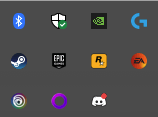

33 Comments
I disable them from starting on boot and I close whatever I started up when I’m done using it. Yes, it sucks to have so many, but we don’t have to let them ruin our experiences.
Drm = lost liberty
Lol I don’t mess with that EGS garbo and only have to deal with Uplay launcher on game launch. Same with EA and R*.
You don’t even really need the GoG launcher as their games don’t have DRM so just add them to Steam.
One time we had a fiber optic cable break. Internet was down for an entire service provider stemming from that trunk, about our whole county area.
I had games downloaded, that required no internet, that I legally purchased.
I could not run them because Epic Games couldn’t verify my login details.
Steam didn’t care. Played Portal 2 again.
game pass will literally have you like this💀 its so annoying i have to download the launcher just to play a game i could’ve launched from the xbox app??!??
Just only use steam, problem solved.
If the game isn’t on steam, it doesn’t exist for me.
steam shouldntve let the games on their store to have you downloading third party launchers
why do people keep running everything when they don’t need all of them running at the same time
The ubisoft launcher is worse than egs, it takes up 14gb for no reason, trash pile
If you would just by a console and give in, we wouldn’t have to keep doing this to you! – Idfk bill gates or something.
Windows defender is definitely a game launcher.
I never even Downloaded anything else apart from Steam when i got my new rig
Origin is useless and you cant give Games Back because EA is the worst company in ever existance, lmao Just dont use Origin holy fuck why do i explain this🤷🏻♂️
Epic Games is a worse Data Kraken than Steam (and is useless If you already have Steam apart from fortnite)
Battle.net has also become totally useless since (i think) Most Games are on Steam now
Uplay is Just a Shadow of itself nowadays, also Takes Up 14 FUCKING GIGABYTES for no reason at all, and is also useless if you have steam
Gog. Is pretty neat since you actually own the Game, but If you dont Care about that Just use Steam, since cyberpunk, Witcher etc. Will download the gog CD Projekt Red Launcher anyway
Edit: i forgot Xbox Gamepass, i mean.. yeah its an Option, but you dont actually OWN the game yourself soooo… Idk about that i never used it myself
I think that were all launchers
Task Manager -> Startup Apps -> Sort them by Status, disable the enabled ones you don’t want at startup.
i use playnite instead. Its a all in one fully customizable game launcher. It works with steam, EA, GOG and literally every other game laucnher. I suggest you check it out.
Task manager’s startups menu:

why would you have them running in the background in the first place.
I have a couple other launchers (Epic, Xbox, Itch.io) but I mostly use Steam because that’s where my larger library is. I tend to forget that I even have some games though, so recently I installed [Playnite](https://playnite.link/), set it up so that it aggregates all the games I have from every launcher (and some emulators), and now I can open up all my stuff from there without remembering which game is in which launcher.
On the other hand, there’s a Stats tab that told me that I wasted 56 full days of my life playing videogames and that was something I’d rather have never learnt, so take it with a grain of salt
So you can have 10GB of your RAM used by useless programs instead of the actual game.
Bluetooth is my favourite game launcher
I only keep steam to open on startup, rest can fuck off
its not that bad
r/fuckthes
almost as bad as peripheral RGB software
Autoclose when exiting games. Use playnite. Then you only have 1 open unless you’re actually playing the game.
I dont see Blizzards game launcher
I made a folder on my desktop and just named it “WHY”
https://preview.redd.it/iga2gxqo7y2c1.png?width=1080&format=pjpg&auto=webp&s=3cd9eeeea4bfdac4053dfe8646e6e0e7794fe40c
Go to task manager, from there you can stop programs from launching on startup
This is what happens when you buy games in all digital stores instead of just Steam. I have some games on EGS and Uplay I got all for free, never installed any of them an never will because of the launchers.
Controversial opinion: you dont need more than 2 (thanks goobiesoft/rockstar) running at the same time.
pff… Amateur
https://preview.redd.it/6lol2u608y2c1.png?width=217&format=png&auto=webp&s=fbe82de770156beb294684e4b161864de8509c5e
Computer performance would like to have a word with you.
Why do you have them all open?
How to kill your ram