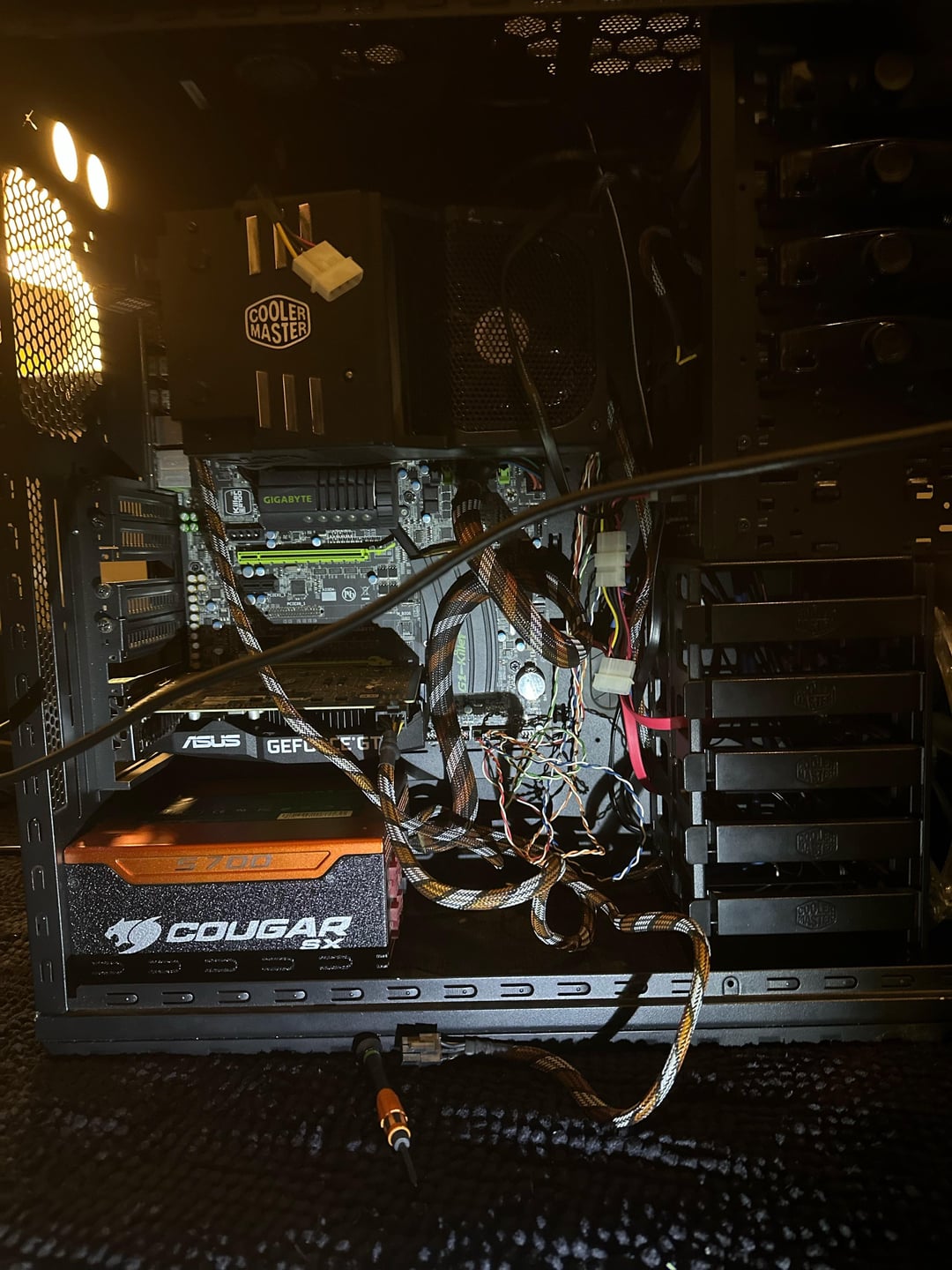
My brother found this pc at work I couldn’t see a problem with it at first but it just kept power cycling. Could this possibly be the issue?

My brother found this pc at work I couldn’t see a problem with it at first but it just kept power cycling. Could this possibly be the issue?
26 Comments
Lord have mercy.
i thought that was a god damn snake at first

separate the pins and it will probably work again
It looks like there are two pins touching the capacitor, that could definitely be part of the problem. Realistically, if you have a pair of flush cutters, I would remove the board and trim them all, then reinstall. Having lost metal shavings inside the PC isn’t ideal (hence cutting them outside the case)
But you could definitely bend them so none touch each other or anything else.
Make sure nothings shorting round that broken pci-e slot and move GPU to slot nearest CPU .
The cougar is feeling it’s age
The last old work computer I revived the thermal paste was completely dried out causing it to overheat and power cycle. I’d give that a check and reapply if the pins don’t end up being the issue.
When I had this issue in the past I found a full disassembly and reassembly to be the best diagnostic. Make sure there’s not extra standoffs left from a previous build then install the mobo, cpu, 1 stick of ram and power supply. If it still doesn’t work swap each of those until it does work.
Clip the pins off with flush cutters and make sure that nothing left is touching.
If you get it running per the other advise, also move your GPU to the top PCIE slot. That’s a PCIEx16 the one you’re in is probably only 8, so depending on the GPU you’re costing free performance
Personally, I would solder out those connectors where the x8 slot once was, to make sure they couldn’t short anything. It looks like one or two of them are touching a capacitor (the one on the right directly above the slot). Who knows, though? Clearly this motherboard was abused pretty badly. I’m not even sure how you wrench an x8 slot out unless it’s on purpose.
Just cut them and use another slot and it will probably be fine
Dan! My heart jumped out of my cheat.
I HAVE found snakes in computers already and yes i shit myself once.
If it’s power cycling turn off your PSU then hold the power on button for a solid 30 seconds. It might blink. Then turn your PSU back on and try starting it.
​
https://i.redd.it/4472hf1nzc2c1.gif
That system looks pretty old so it could just be dying. That slot could definitely be a problem, especially if something is shorting out. Your GPU should probably be in the top slot. And the fact that it’s not even screwed in properly and it’s just hanging there could cause some serious problems too.
Seing the state of the computer it could be many things.
I would start by making sure that none of the ripped PCIe connector pins are touching since it could cause a short and cause other issue(s).
Then I would undo all the cabling and do it again properly ensuring everything is plugged in corretly.
Next step would be to check the thermal paste and clean the ventilation as it could also be heat related.
Once you have checked those I would give it another try and see from there.
Good luck with your troubleshooting!
**edit for typo
Get some flush cutters and cut the remains of the pins off so none are touching.
Or remove them with a soldering iorn.
Ripping out pcie slots is becoming the new “I dropped my glass panel on tile floor” isn’t it
isn’t that cooler master cpu cooler that derbauer made video about ?
That’s not a computer that’s just cables and metal , although we used to play on engines like that. Maybe you’ll find some ancient slow loading program in there .
Bad Ram sticks can sometimes cause this issue
It’s a gigabyte board, that’s the problem! 😆
Is that a sniper G1 killer motherboard?! With 8 phase VRM design and big foot networking?! Maaaaan, I remember getting that bad boy back in 2013!! Had it paired with a gigabyte 680 SOC (with 5 mini fans, sounded like a jet taking off). Playing bf4 with old friends. Thank you for this memory
Ooch, that poor pcie connector, check that first, if the cpu in it has an igpu, take off the gpu and plug your monitor on the mothernoard.
If it’s not the problem, try with one ram, then another kit of ddr3 ram you know that works, if still not just change the power supply, it’s easier to do all that before searching for a replacement motherboard for this socket.