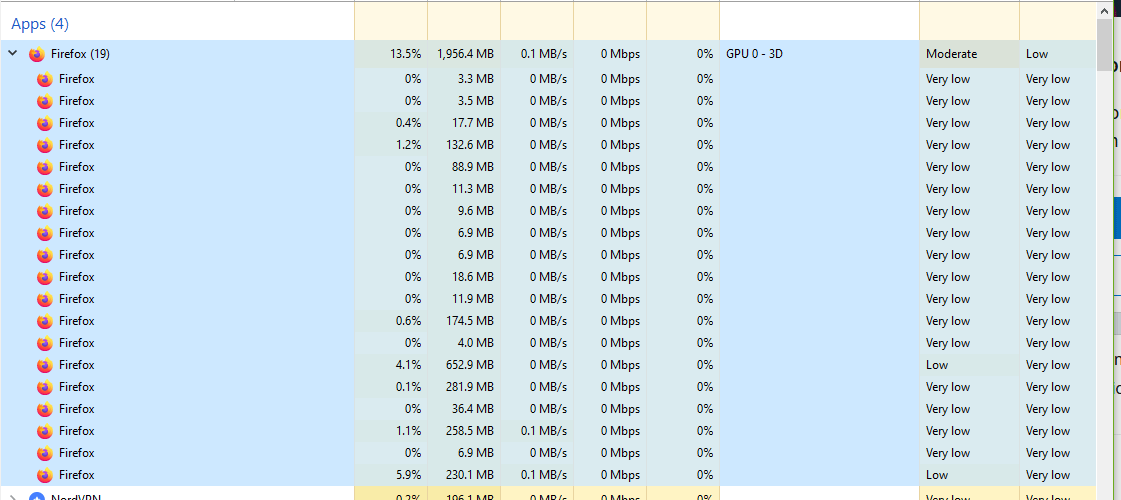
Sorry if this is a stupid question, but why are there 19 Firefox processes if I only have 4 tabs open? Does this have something to do with the computer or the browser?

Sorry if this is a stupid question, but why are there 19 Firefox processes if I only have 4 tabs open? Does this have something to do with the computer or the browser?
10 Comments
I noticed my PC being slow as shit for literally no reason and popped open Task Manager. I noticed this and I don’t think I really get why there’s so much going on there when I’m doing light browsing and watching YouTube videos lol
My guess is that extensions get their own process, so a broken extension task doesn’t kill the whole browser process.
Saw this behavior in the task manager integrated in google chrome.
addons and extensions i think maybe try removing some to increase performance
Stupid Question? How will you know the answer if you don’t ask it?
Not a “stupid question”, just a Question…. Thanks for coming to my TED Talk.
you probably need to ask that in r/firefox or ask firefox developers how their engine works
The browser window has its own process.
A background update checker process.
Each extension have their own process.
Each tab has 2 processes, 1 view process (What you interact with and view) + 1 engine process (used for rendering the page and execute javascript)
Its about safety.
4*4= 16 , 16+3=19
software developer here:
a software may spawn as many processes as it pleases if the developers have a reason for it. (e.g. starting every tab in its separate process prevents the whole browser from crashing – unless the one executable which holds all tabs together crashes )
the paradigm of one process per programm is a thing of the past when resources were sparse and we ran on single cores..
this is nothing special. but it’s also not easy to say for which reasons each process is responsible.
that is developer decision when, how and why to spawn a process.
BUT as with everything .. sometimes its also just garbage or a process hangs while its shutting down etc. nothing is perfect.
when in doubt ,kill all , restart the program 😀
Thanks, for the question, i wanted to know me to, Proof that not a stupid question.
If you go into details on taskmanager and find the firefox ones, you can see their PID listed. In Firefox, type about:processes and see if the PID matches with the ones in the task manager. The PID in firefox:processes look like “(13212)” at the end of whatever the text is. Firefox (2472) for example.