
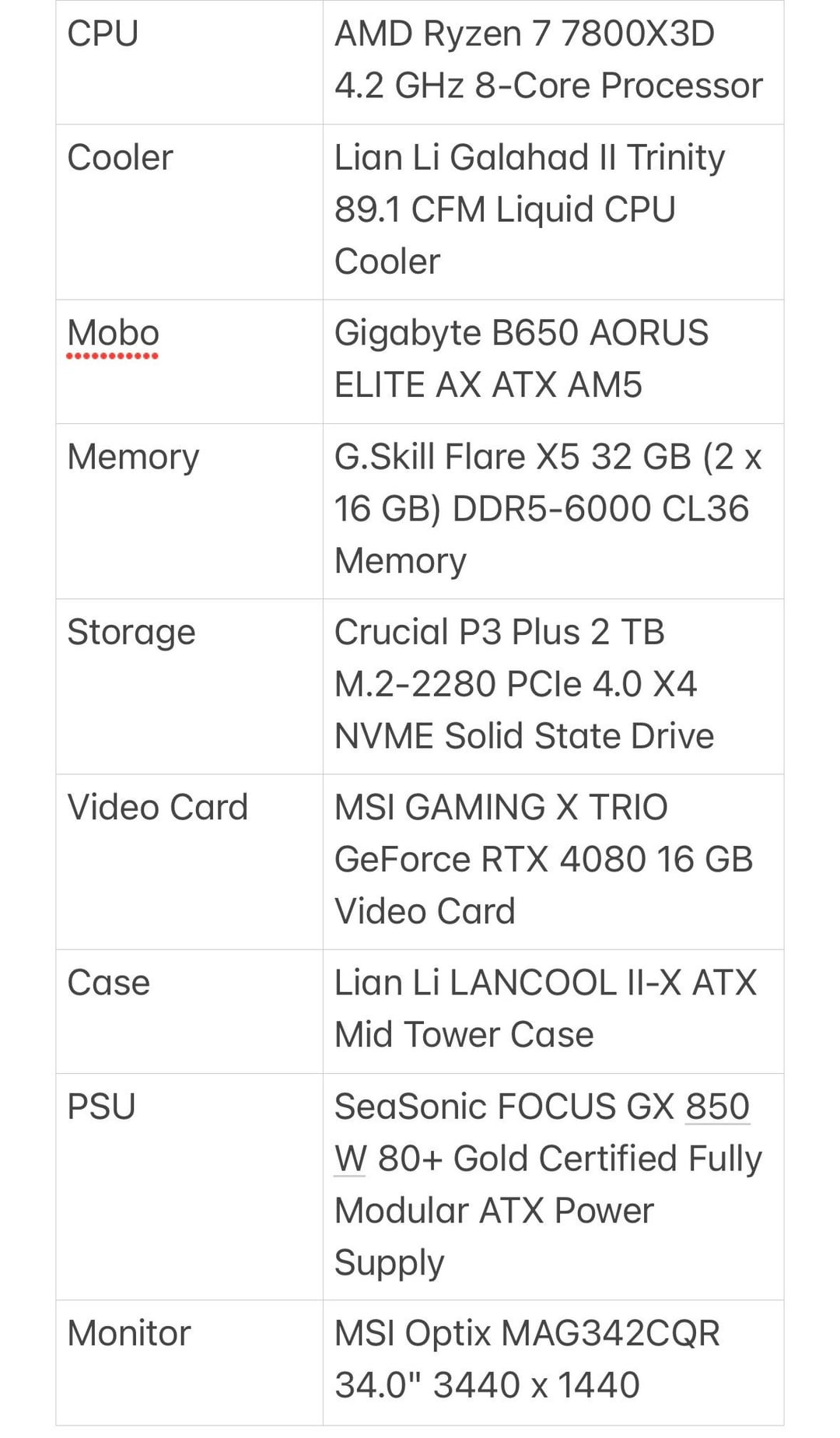
Hey everyone, I’m at the end of my tether so I really hope you can help. My new build is showing the DRAM led debug light in my motherboard. I’ve tried removing one, I’ve tried putting them in 1 & 3 slots, taken out the cmos battery, pressed the reset button.
Also don’t know if it’s related but the AIO fans are working but I don’t hear the radiator working and the led on the pump does not come on.
I’ve added a list of the parts. If I’ve forgotten any details please let me know, I’m pretty brain dead from this!
13 Comments
Let it run. its training the memory. its taking a long time on am5.
after 15min and no boot. well then there can be a problem
[deleted]
That red light on your mobo will tell you what’s wrong if you’re still having problems.
Edit: I see some idiots don’t know where the status lights are on this mobo then lol
Just googling the motherboard it seems to be a common problem with wide variety of potential fixes as far as I can tell.
[here is one thread](https://linustechtips.com/topic/1487363-dram-led-on-with-b650-aorus-elite-ax-gskill-ddr5/)
Best explanation I could find there but didn’t seem to work for OP in that thread though unclear they tried it.
​
>Had same issues, and lost 4-5 h in the process. but in the end they were like 2 problems in one.
>
>First problem was the memory placement. If you use 2 memory slots be aware that it is NOT A1 and B1 but A2 and B2 that needs to be accommodate the first 2 memory sticks. Manual also recommends that, but it didn’t specified that this is mandatory in the end.
>
>Second problem is that you have to reset CMOS every time you change the RAM and /or update the BIOS. Just removing the battery didn’t worked for me until I also used the reset pins on the motherboard (placement near battery check manual for exact location).
>
>And finally the third small issue is with the BIOS update ( if you have F2 version and memory is not recognized you have to go to at least F3/F4b version, as of now). Using the Q-Flash process, you have to watch for the small led activity on the back of the motherboard shield to know when it ends. No shutdown, no reboot, nothing to indicate a success or not.
>
>And just to be sure always watch for the listed RAM compatibility of the MB on the support page.
>
>Hope it helps for anyone out there.
Thank you so much to everyone for your help, it has booted! Aaaand immediately started doing windows updates. I reset the CMOS jumper with a screwdriver and that seemed to do the trick. Now some cable management and I will update you with some pics!
Needs a better GPU probably, yours is underpowered
I have the same motherboard. My bios says FB. I tried looking it up and no one has this version? Mobo rev is 1.2
Give it 5 minutes. Scared the bejesus out of me a month ago.
I’ve decided to try and return the gigabyte board, I should have done more research but the lack of fan control and the truly awful software has put me off.
I made the mistake of RMAing my original board for the same thing. Found out that the RAM I bought was Intel optimized memory, I was losing my mind after a new board, new RAM, and even new CPU and was still getting the same light 9/10 times. Bought AMD optimized RAM and it worked perfectly fine. Never ran into this issue on previous builds but lesson learned I guess
I’ve just built a similar PC. Took about 5/6 mins when powered on train the memory.
I find these discussions fascinating after being in IT for 30 years.
doesn’t a 850W PSU seem a little low for the build, I would’ve spent the extra $20 bucks for 1000 at least…