must have got some part of the inside wet or used too much force
and no, its not fixable
Mr_Disgusting
RIP, you either live with it or look for a new monitor
nopshy
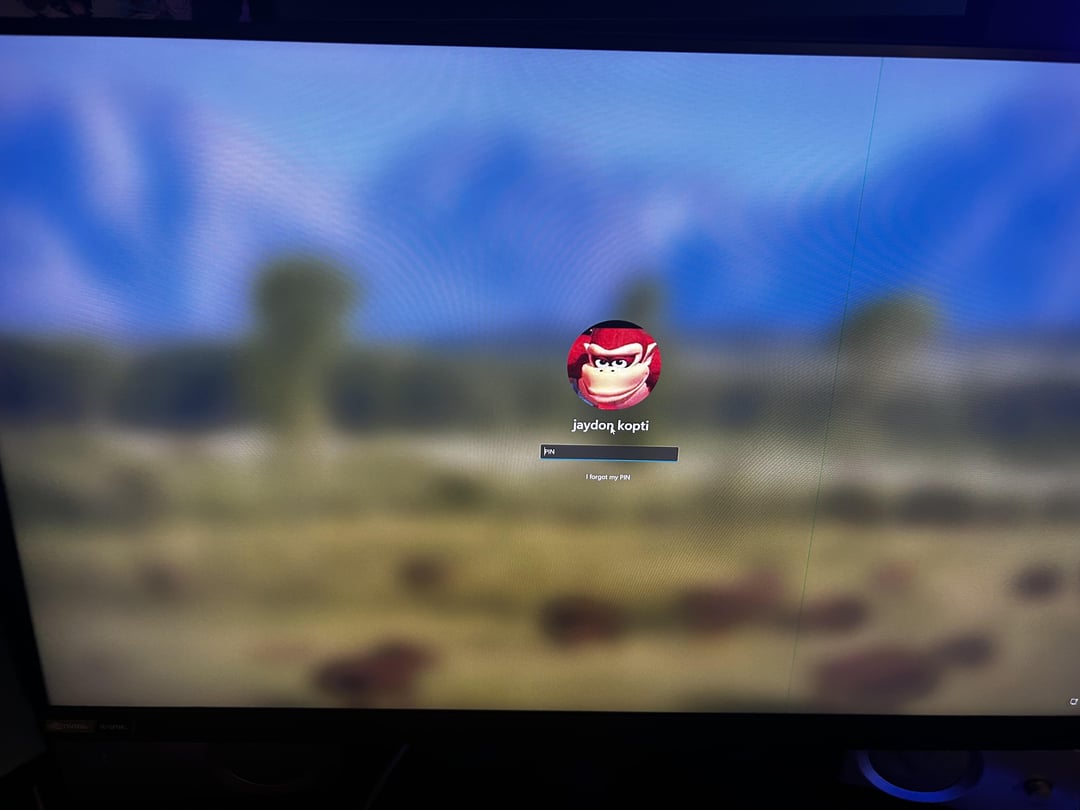
Everytime I see one of these posts I tell myself I’m going to be more careful when I clean my monitor, just a moment of carelessness and boom, monitor ruined.
Mad_Arson
Most likely the ribbon cable from panel that is glued to the controller board. Probably pressure from cleaning caused it to loose contact or something. Teoretically it could be possible to fix but i doubt it as i tried and it didn’t helped at all. So i guess you have to live with that one single colour pixel line or get new display, you can always look on the internet how to fix it or try some pc repair shop.
Rogaar
I had the same problem when I installed my RTX 3080 a few years ago. I thought it was a faulty card. Or perhaps a bad cable. I tried everything. Even reseating the card multiple times.
What fixed it for me was to completely remove the drivers, and I mean using DDU (Display Driver Uninstaller) through safe mode.
After I re-installed the drivers, the problem was gone and has never come back.
Try that and good luck my friend.
Let us know if this fixed it for you. If I know it fixed it for you too, I’ll know to recommend this to others in the future.
El_Basho
If you can live with it, keep it. If you have a “I will try to fix it, if it breaks from that, will get a new one” attitude, you can try “fixing” it with percussive maintenance. Lightly slap it with a dry microfiber cloth around the top and bottom of where the line is. It sounds stupid, and probably is, but it has worked for me twice already, and I’m not ready to accept it as coincidence.
FoldedOne
Fixing it ? If it’s from the monitor main board, it might be possible.
I did the same and had the same problem with my Odyssey G7, cleaned it, got a red line that was going from bottom to top of the screen.
Sent it for repair (said it appeared overnight) and they replaced the panel and mainboard.
If your screen is still under warranty, go for a RMA, say it appeared overnight and you have no idea why.
If not, replacing the panel isn’t always worth it (due to price) either find a replacement panel or use it while it last, it’s « just a line ».
JK-74u
Ok guys I got an idea, I’m thinking it would be a whole lot cheaper and better for me to send it back and pay the fee for the repair. If they can’t do that for me then I will be forced to buy an new one but it’s all ready past warranty but I see if I can still pay for a repair cuz it seems cheap for this level of monitor.
WolvenSpectre
To clean a monitor
Water sprayed on cloth until damp. Wipe.
Your screen might return but it MIGHT come back and you MIGHT be able to get it repaired, but I wouldn’t hold my breath. It could be fluid trapped by capillary action or damage to one of the colour layers in a full line. If may be cheaper to just get another monitor.
ArmoredAngel444
Dun goofed
xXShadowAndrewXx
Did you by any change clean it with a mop and accidentally hit it

12 Comments
RIP screen.
must have got some part of the inside wet or used too much force
and no, its not fixable
RIP, you either live with it or look for a new monitor
Everytime I see one of these posts I tell myself I’m going to be more careful when I clean my monitor, just a moment of carelessness and boom, monitor ruined.
Most likely the ribbon cable from panel that is glued to the controller board. Probably pressure from cleaning caused it to loose contact or something. Teoretically it could be possible to fix but i doubt it as i tried and it didn’t helped at all. So i guess you have to live with that one single colour pixel line or get new display, you can always look on the internet how to fix it or try some pc repair shop.
I had the same problem when I installed my RTX 3080 a few years ago. I thought it was a faulty card. Or perhaps a bad cable. I tried everything. Even reseating the card multiple times.
What fixed it for me was to completely remove the drivers, and I mean using DDU (Display Driver Uninstaller) through safe mode.
After I re-installed the drivers, the problem was gone and has never come back.
Try that and good luck my friend.
Let us know if this fixed it for you. If I know it fixed it for you too, I’ll know to recommend this to others in the future.
If you can live with it, keep it. If you have a “I will try to fix it, if it breaks from that, will get a new one” attitude, you can try “fixing” it with percussive maintenance. Lightly slap it with a dry microfiber cloth around the top and bottom of where the line is. It sounds stupid, and probably is, but it has worked for me twice already, and I’m not ready to accept it as coincidence.
Fixing it ? If it’s from the monitor main board, it might be possible.
I did the same and had the same problem with my Odyssey G7, cleaned it, got a red line that was going from bottom to top of the screen.
Sent it for repair (said it appeared overnight) and they replaced the panel and mainboard.
If your screen is still under warranty, go for a RMA, say it appeared overnight and you have no idea why.
If not, replacing the panel isn’t always worth it (due to price) either find a replacement panel or use it while it last, it’s « just a line ».
Ok guys I got an idea, I’m thinking it would be a whole lot cheaper and better for me to send it back and pay the fee for the repair. If they can’t do that for me then I will be forced to buy an new one but it’s all ready past warranty but I see if I can still pay for a repair cuz it seems cheap for this level of monitor.
To clean a monitor
Water sprayed on cloth until damp. Wipe.
Your screen might return but it MIGHT come back and you MIGHT be able to get it repaired, but I wouldn’t hold my breath. It could be fluid trapped by capillary action or damage to one of the colour layers in a full line. If may be cheaper to just get another monitor.
Dun goofed
Did you by any change clean it with a mop and accidentally hit it
How do you guys even clean your monitors??