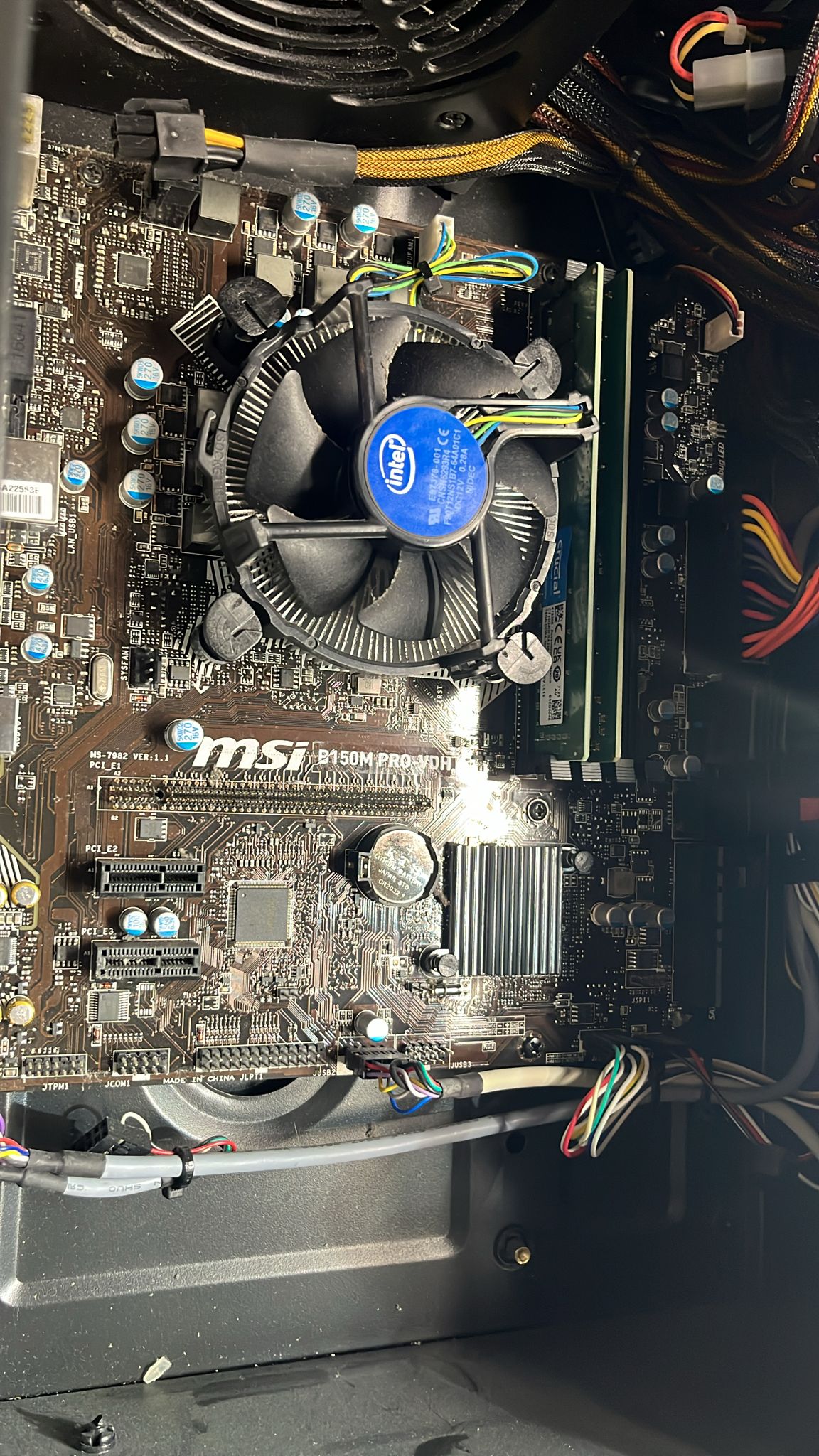
RAM config is wrong. Also, seems like the PCI E slot was excised.
Separate_Block6213
He did the connector delete mod
unabletocomput3
They just upgraded this system to dedicated home server, time for a new build!
Blacklightrising

Fireball694200
There’s no rgb
BlastMode7
Outside of the PCIe slot having been yanked off the board… the RAM is in the wrong slots. Considering the model board, it would be super cheap to replace. That thing is now spare parts.
up_up_and_a_waaaaay

wogolfatthefool
What a weird M.2 slot
GCdotSup
He likes it rough
bert_the_one
You need to build your friends pc for him
Gaming_devil49
The plastic part of the pcie is missing, he’s using value ram or wathever that’s called and his ram sticks are in the wrong slots
VegetableRope8989
PCI e1 is disappeared
Money-Signature2825
shitty stock intel cooler with those plastic pins that always break?
Thrasherop
CMOS battery gets obstructed by the GPU. Quite inconvenient for resetting cmos
meneraing
He didn’t click on “safely remove PCI express device”
Rogue387
A bit of Electrical Tape and some Blu-Tac be good as new.
Anotherthrowawayboye
Sometimes you think the latch is down and its not
Tell him next time dont pull like its your willy
slimjim790
It’s that new Bluetooth pcie slot. No need for bulky graphics cards in the cases anymore
ShaxxAttaxx
Bro pulled a little too hard 😭
Dami_CTB
Many years ago I put my gpu incorrectly and burn the AGP port (pre Pci-e), friend of my just took other agp from a broken mother and solder it in my motherboard.
Works for many years until I give it away.
sommat21
Guessing it didn’t fit the 4090
Jeoshua
Nothing is wrong, this is prime for being upgraded for almost nothing. Literally anything would be an upgrade.
painisnotreal
Put it to rest it needs it
Nike_486DX
The bluetooth device is ready to pair
Expunged23
Hi
JamieDrone

Ludo_IE
Friend will swap motherboard now
VampyreOfNazareth
Release the tab before you Viking pull the card out.
GiantGlock
Not enough woke rainbow rgbt lights to double the fps
Shaneaynay
I noticed something when I connected my gpu, the latch on the pcie slot didn’t come up and close/snap up. Only when I try to take it out does it seem to click and latch to the gpu. Makes for a tough process of uninstalling
Paciorr
PCIe 10.0 (wireless)
ArrivedKnight7
Your friend must be using integrated graphics then.
ClosetGamer19
uhh cpu power cable unplugged? also is the pcie x16 slot torn out entirely?

34 Comments
Missing PCIe 16x plastic portion?
RAM config is wrong. Also, seems like the PCI E slot was excised.
He did the connector delete mod
They just upgraded this system to dedicated home server, time for a new build!

There’s no rgb
Outside of the PCIe slot having been yanked off the board… the RAM is in the wrong slots. Considering the model board, it would be super cheap to replace. That thing is now spare parts.

What a weird M.2 slot
He likes it rough
You need to build your friends pc for him
The plastic part of the pcie is missing, he’s using value ram or wathever that’s called and his ram sticks are in the wrong slots
PCI e1 is disappeared
shitty stock intel cooler with those plastic pins that always break?
CMOS battery gets obstructed by the GPU. Quite inconvenient for resetting cmos
He didn’t click on “safely remove PCI express device”
A bit of Electrical Tape and some Blu-Tac be good as new.
Sometimes you think the latch is down and its not
Tell him next time dont pull like its your willy
It’s that new Bluetooth pcie slot. No need for bulky graphics cards in the cases anymore
Bro pulled a little too hard 😭
Many years ago I put my gpu incorrectly and burn the AGP port (pre Pci-e), friend of my just took other agp from a broken mother and solder it in my motherboard.
Works for many years until I give it away.
Guessing it didn’t fit the 4090
Nothing is wrong, this is prime for being upgraded for almost nothing. Literally anything would be an upgrade.
Put it to rest it needs it
The bluetooth device is ready to pair
Hi

Friend will swap motherboard now
Release the tab before you Viking pull the card out.
Not enough woke rainbow rgbt lights to double the fps
I noticed something when I connected my gpu, the latch on the pcie slot didn’t come up and close/snap up. Only when I try to take it out does it seem to click and latch to the gpu. Makes for a tough process of uninstalling
PCIe 10.0 (wireless)
Your friend must be using integrated graphics then.
uhh cpu power cable unplugged? also is the pcie x16 slot torn out entirely?