Replace it, it’s already down to 70% health in that little of time and that little of writes, it is a cheap drive or faulty or something. Most drives might be down 1 or 2% after a year of hard use, but your amount of writes is low to already be down 30%.
SalamanderStrange329
Driver + PCi
Yahiroz
Is this the Crucial BX500? Pretty sure these are DRAMless which is going to hurt it in performance and life, especially if you’re using it as the OS drive with pagefile enabled.
SirGeorgington
It’s a DRAM-less SATA drive. You get what you pay for.
MadDog00312
It’s also a SATA drive, which is bandwidth limited to the speed of the interface. One of the many reasons why the industry moved to more PCI based solutions.
thegreaterikku
It’s a cheap SSD. It’s meant to fail at some point and it’s already down to 70%. You get what you paid for.
Switch for a good faster NVME if you can, else just a better SSD will suffice.
Ryoohki_360
Dramless drive, there are ok for games install, but for the OS or Work (copying large amount of data), you’re better with a drive with DRAM
marcgii
Your drive seems to be defective. It should be good for much more than 3TB written. Buy a new drive. Mx500 is a good option if you need sata.
Also try making a warranty claim at the same time. But it might not be worth the hassle for a drive this cheap.
sahrul099
Hey OP, if you want to buy a new ssd please refer to SSD tierlist..just search on google “ssd google doc”..
Sinister_Mr_19
DRAMless drive plus it’s full is my bet. Look up what DRAM does for a drive and you’ll have your answer.
f8Negative
Cable? Port?
Bright-Telephone-558
I love all these scientists forcing dram into this. Lol.
Hey scientists: Why does my OG Intel v40 40gb SSD from 2009 still work? 88 percent. It was a systemos drive from 2009-2018, on 16 hours every day.
Aftershock416
“I went for the cheapest and worst possible drive money could buy, why did I get what I paid for?”
h1dekikun
yall down below need to chill, i have a dramless pos wd blue (it was like literally $20) i use as a download cache and os drive on my server and its way faster than this and still healthy. this thing is just faulty
firestar268
Cause you bought a shitty cheap drive that is down to 79% health after 3TB of writes
SuperVidak64
Try to disable bitlocker
Alexandratta
watch out for DRam-less devices, their lifespan is shortened due to the additional read/writes to the memory, which SSDs only have so much of.
tbh if you’re got an even half-way modern system, you should be able to slap an M.2 drive into your system and do a full drive copy over to that, then remove the old 2.5″ SSD.
Samsung makes it easiest as they have a full-on “Migration Tool” that works very well (only with Samsung drives as the destination…) but still good.
LataKatten
I’d see if I can get it replaced.. Do you have warranty?
Sakkeidon
you call that slow? I have a wifi of about 200mbps and my laptop is usually at 10mbps and at max maybe 80mbps
Infinity2437
Its a qlc drive, less endurance + generally slower
Starkzy7
How do you get that second page with drive health? Does that just appear after the benchmark/test is done? Or is it in the settings? I’m kind of new to using Crystal Mark, so I’m still learning it.
CommercialBreadLoaf
the 70% health is more concerning for only 3tb of writes. For reference, my 870 QVO has written 11tb+ and still has 98% health
Kougeru
You have to use the waifu skin if you want better speeds
eatingdonuts44
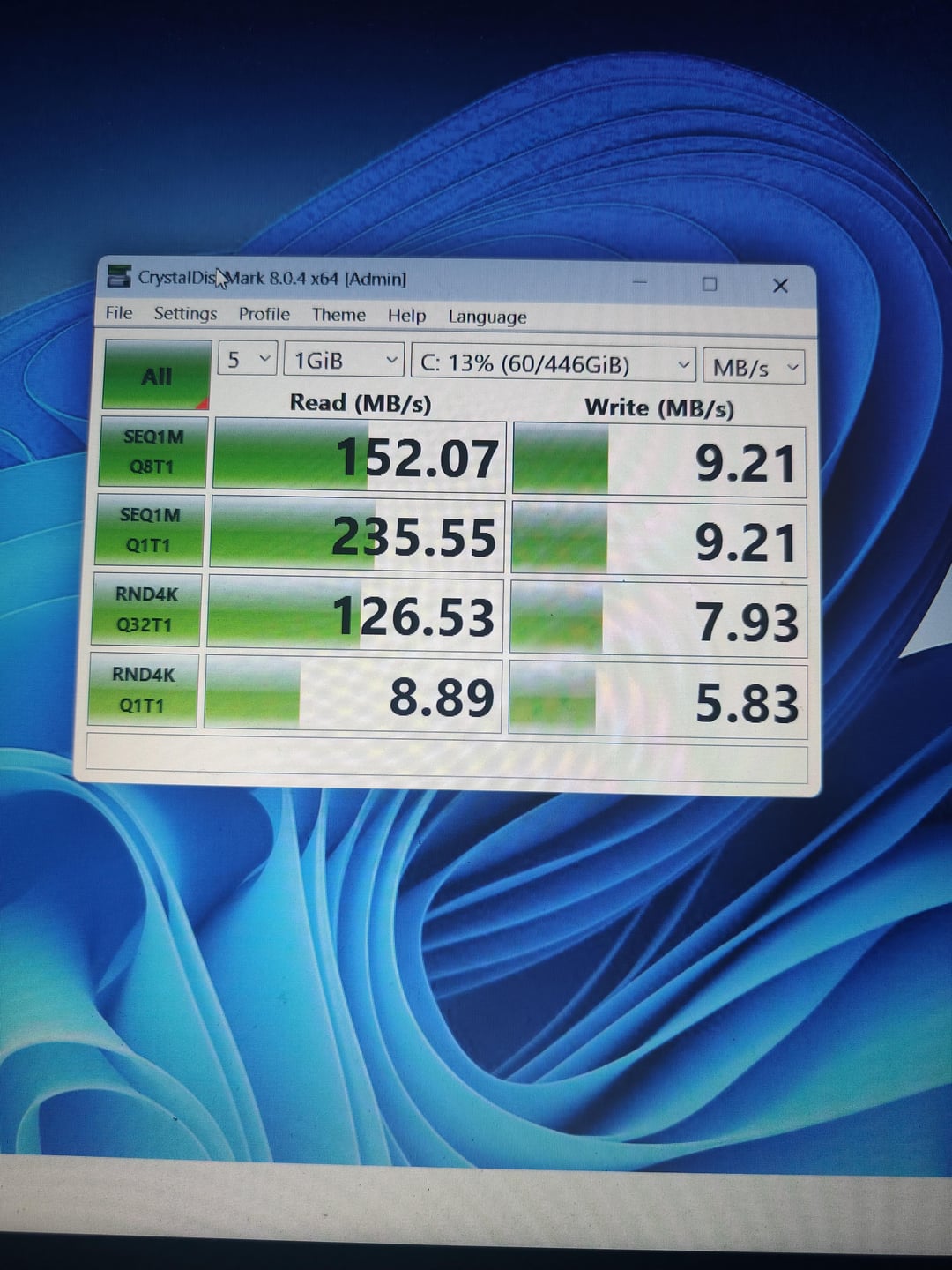
Damm thats like HDD read speeds and stupid slow write speeds, is this even usable for anything other than very light work and browsing?
Hattix
The slow performance is probably down to it needing a TRIM. Run “Optimize Drives” over it.
The health status is from attribute CA, which Crystal is not reading correctly. The raw data here is 0x1E, or 15. This means that 15% of the drive’s endurance has been used, not 30%. I have no idea why Crystal is doubling it and this is still higher than I’d expect it to be. An MX100 I have here with 8.22 TB of writes has 0x02 in attribute CA and a much higher value in B4 (4401).
No NAND blocks have been retired yet (05 and C4) and 44 unused NAND blocks are remaining spare (this is extremely low for a drive which hasn’t used any of them, and suspicious).
I would distrust the data from Crystal here.
Xaniss
Cheap SSDs without a DRAM cache can actually be slower than hard drives sometimes.
Mastasmoker
Total system specs? Are you using 30 pcie lanes on a desktop cpu? There is a lot of factors thab can go into this
datalight0
first psu, second cable.
Lewinator56
It’s a BX500, yeah it’s a cheap drive but it’s from a reputable manufacturer and should not be failing this early. 120TBW on the 480GB drive – so you are at 10% wear not 30. Warranty replace it.
JmTrad
Weird. Looks faulty.
DanInfernoK
Crucial BX drives dont have a DRAM cache. So that may be a factor, but not the sole reason.
kyee-97
Thermal throttling?
2c1a
Lack of DRAM has nothing to do with this. It’s just a faulty drive.
Immortal_Tuttle
Your drive is faulty. Being QLC and dramless has nothing to do. You can try TRIM event trigger, but honestly I would just send it on warranty claim.

35 Comments
Replace it, it’s already down to 70% health in that little of time and that little of writes, it is a cheap drive or faulty or something. Most drives might be down 1 or 2% after a year of hard use, but your amount of writes is low to already be down 30%.
Driver + PCi
Is this the Crucial BX500? Pretty sure these are DRAMless which is going to hurt it in performance and life, especially if you’re using it as the OS drive with pagefile enabled.
It’s a DRAM-less SATA drive. You get what you pay for.
It’s also a SATA drive, which is bandwidth limited to the speed of the interface. One of the many reasons why the industry moved to more PCI based solutions.
It’s a cheap SSD. It’s meant to fail at some point and it’s already down to 70%. You get what you paid for.
Switch for a good faster NVME if you can, else just a better SSD will suffice.
Dramless drive, there are ok for games install, but for the OS or Work (copying large amount of data), you’re better with a drive with DRAM
Your drive seems to be defective. It should be good for much more than 3TB written. Buy a new drive. Mx500 is a good option if you need sata.
Also try making a warranty claim at the same time. But it might not be worth the hassle for a drive this cheap.
Hey OP, if you want to buy a new ssd please refer to SSD tierlist..just search on google “ssd google doc”..
DRAMless drive plus it’s full is my bet. Look up what DRAM does for a drive and you’ll have your answer.
Cable? Port?
I love all these scientists forcing dram into this. Lol.
Hey scientists: Why does my OG Intel v40 40gb SSD from 2009 still work? 88 percent. It was a systemos drive from 2009-2018, on 16 hours every day.
“I went for the cheapest and worst possible drive money could buy, why did I get what I paid for?”
yall down below need to chill, i have a dramless pos wd blue (it was like literally $20) i use as a download cache and os drive on my server and its way faster than this and still healthy. this thing is just faulty
Cause you bought a shitty cheap drive that is down to 79% health after 3TB of writes
Try to disable bitlocker
watch out for DRam-less devices, their lifespan is shortened due to the additional read/writes to the memory, which SSDs only have so much of.
tbh if you’re got an even half-way modern system, you should be able to slap an M.2 drive into your system and do a full drive copy over to that, then remove the old 2.5″ SSD.
Samsung makes it easiest as they have a full-on “Migration Tool” that works very well (only with Samsung drives as the destination…) but still good.
I’d see if I can get it replaced.. Do you have warranty?
you call that slow? I have a wifi of about 200mbps and my laptop is usually at 10mbps and at max maybe 80mbps
Its a qlc drive, less endurance + generally slower
How do you get that second page with drive health? Does that just appear after the benchmark/test is done? Or is it in the settings? I’m kind of new to using Crystal Mark, so I’m still learning it.
the 70% health is more concerning for only 3tb of writes. For reference, my 870 QVO has written 11tb+ and still has 98% health
You have to use the waifu skin if you want better speeds
Damm thats like HDD read speeds and stupid slow write speeds, is this even usable for anything other than very light work and browsing?
The slow performance is probably down to it needing a TRIM. Run “Optimize Drives” over it.
The health status is from attribute CA, which Crystal is not reading correctly. The raw data here is 0x1E, or 15. This means that 15% of the drive’s endurance has been used, not 30%. I have no idea why Crystal is doubling it and this is still higher than I’d expect it to be. An MX100 I have here with 8.22 TB of writes has 0x02 in attribute CA and a much higher value in B4 (4401).
No NAND blocks have been retired yet (05 and C4) and 44 unused NAND blocks are remaining spare (this is extremely low for a drive which hasn’t used any of them, and suspicious).
I would distrust the data from Crystal here.
Cheap SSDs without a DRAM cache can actually be slower than hard drives sometimes.
Total system specs? Are you using 30 pcie lanes on a desktop cpu? There is a lot of factors thab can go into this
first psu, second cable.
It’s a BX500, yeah it’s a cheap drive but it’s from a reputable manufacturer and should not be failing this early. 120TBW on the 480GB drive – so you are at 10% wear not 30. Warranty replace it.
Weird. Looks faulty.
Crucial BX drives dont have a DRAM cache. So that may be a factor, but not the sole reason.
Thermal throttling?
Lack of DRAM has nothing to do with this. It’s just a faulty drive.
Your drive is faulty. Being QLC and dramless has nothing to do. You can try TRIM event trigger, but honestly I would just send it on warranty claim.
because it is the cheapest crushial)