Lul, windows 10 do be malware.
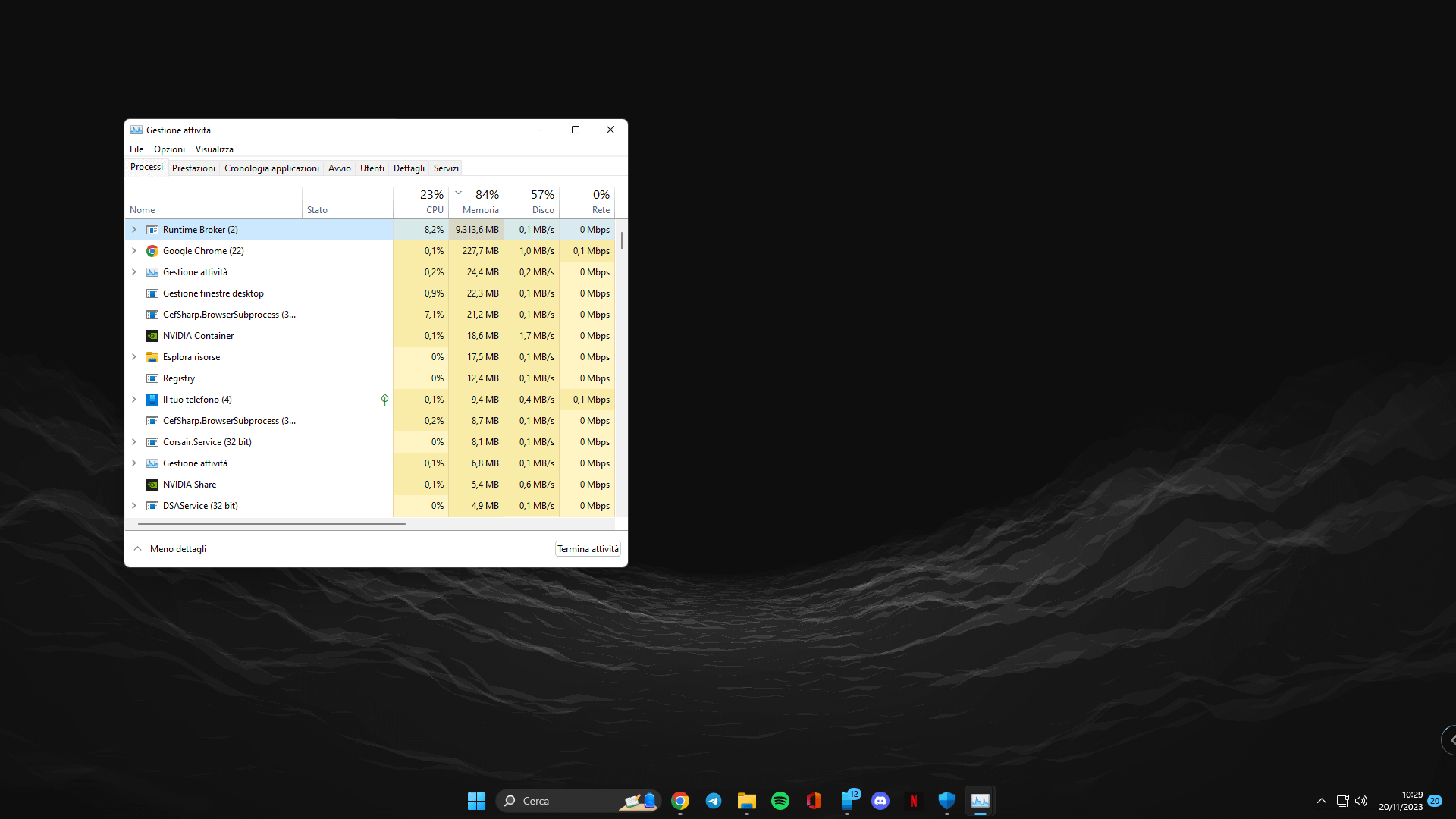
Glad I don’t have to deal with this shit. Someone else posted a solution. (It’s also on microsoft’s forums)
Covid-CAT01
Nah that’s just taskmgr
Scorpius202
You pc seems to be selling your runtime. Hopefully it negotiates good deals.
turboMXDX
as sketchy as it sounds, always keep one of “memory cleaner” apps (ideally a trustworthy one).
Sometimes some programs or even windows can end up in a memory leak situation and not clean it up so manually flushing it once fixes it. Happens sometimes when I’m using Photoshop and the usage skyrockets where closing everything doesn’t help.
My laptop has msi dragon center which has one built in. I used to have a program for it long time, but I’ve forgotten its name
Edit: Read clarification below
I’m not saying constantly flush it which is what many might be infering. **Do not do that**. **You should do it only and only** when there is clearly a particular program misbehaving and raking up ridiculous amounts of RAM for no reason.
**Ofcourse restarting the program is a better way of going about it but in some scenarios that might not be the option. For example if its a windows process which can’t be ended. **Its also not a guaranteed fix** but It has worked for me in many scenarios with programs like Windows’ Game DVR, GTA 5(had a bug back in the early days when it would randomly forget to clear up), Photoshop (maybe happens once a year, can’t really pinpoint what causes it)
Please do not downvote without fully understanding the situation. Perhaps also my fault for not making it very clear.
Bloodduty
Windows LTSC N is the way, with the home or pro editions is just full of useless nonsense that we don’t use or need, and it’s mostly telemetry and broken programs like the one your seeing.
Clean slate is the way, worth the cost as well no headache.
skrak1122
just delete the “system 34 folder”
babis8142
Honestly no virus would just allow itself to be seen in the task manager being a nuisance
amkbedevisi
Windows is a spyware, come along to Penguins Palace

amigo_samurai
Op i had a similar issue for the first time that too on my work laptop which i dont use for anything apart from work. So its definitely not a virus, must be something about windows
Turbulent_Career8973
Wtf are some of these comments. Jesus wept. Always have a hitman pro flash drive handy just Incase, op I don’t know what that is but gl
Softandcoward
Its not virus but its like something in your pc is running something that binds runtime broker with it . It may as be a virus but not runtime broker ..
gomlum
I say disco, you say party
flavicent
Are u using docker, WSL, virtualbox or something?
zozodj2
Check if the MS store is downloading or updating something.
uns3en
You ‘re on Windows. Use the Snipping Tool ffs. Only 10% (if that) of the screenshot is relevant information. Win + Shift +S is all it takes.
TheStarWanderer-235
My god, I use Linux and prefer it over windows but what the hell are these Linux trolls

19 Comments
[https://support.microsoft.com/en-us/windows/runtime-broker-is-using-too-much-memory-ca6ed4e3-2a36-964c-4d2e-8c93980d8a98](https://support.microsoft.com/en-us/windows/runtime-broker-is-using-too-much-memory-ca6ed4e3-2a36-964c-4d2e-8c93980d8a98)
https://preview.redd.it/11589ecg3h1c1.png?width=2373&format=png&auto=webp&s=63f0bc4ea73ee4b86acc80c9010f3ce80e4e8bfb
Lul, windows 10 do be malware.
Glad I don’t have to deal with this shit. Someone else posted a solution. (It’s also on microsoft’s forums)
Nah that’s just taskmgr
You pc seems to be selling your runtime. Hopefully it negotiates good deals.
as sketchy as it sounds, always keep one of “memory cleaner” apps (ideally a trustworthy one).
Sometimes some programs or even windows can end up in a memory leak situation and not clean it up so manually flushing it once fixes it. Happens sometimes when I’m using Photoshop and the usage skyrockets where closing everything doesn’t help.
My laptop has msi dragon center which has one built in. I used to have a program for it long time, but I’ve forgotten its name
Edit: Read clarification below
I’m not saying constantly flush it which is what many might be infering. **Do not do that**. **You should do it only and only** when there is clearly a particular program misbehaving and raking up ridiculous amounts of RAM for no reason.
**Ofcourse restarting the program is a better way of going about it but in some scenarios that might not be the option. For example if its a windows process which can’t be ended. **Its also not a guaranteed fix** but It has worked for me in many scenarios with programs like Windows’ Game DVR, GTA 5(had a bug back in the early days when it would randomly forget to clear up), Photoshop (maybe happens once a year, can’t really pinpoint what causes it)
Please do not downvote without fully understanding the situation. Perhaps also my fault for not making it very clear.
Windows LTSC N is the way, with the home or pro editions is just full of useless nonsense that we don’t use or need, and it’s mostly telemetry and broken programs like the one your seeing.
Clean slate is the way, worth the cost as well no headache.
just delete the “system 34 folder”
Honestly no virus would just allow itself to be seen in the task manager being a nuisance
Windows is a spyware, come along to Penguins Palace

Op i had a similar issue for the first time that too on my work laptop which i dont use for anything apart from work. So its definitely not a virus, must be something about windows
Wtf are some of these comments. Jesus wept. Always have a hitman pro flash drive handy just Incase, op I don’t know what that is but gl
Its not virus but its like something in your pc is running something that binds runtime broker with it . It may as be a virus but not runtime broker ..
I say disco, you say party
Are u using docker, WSL, virtualbox or something?
Check if the MS store is downloading or updating something.
You ‘re on Windows. Use the Snipping Tool ffs. Only 10% (if that) of the screenshot is relevant information. Win + Shift +S is all it takes.
My god, I use Linux and prefer it over windows but what the hell are these Linux trolls
Get a grip, it’s just an operating system
​
https://preview.redd.it/nvad16jdki1c1.jpeg?width=420&format=pjpg&auto=webp&s=00c1b35ee028326e6471e9ebee1f5d05ba56072c
its a windows process i think.