
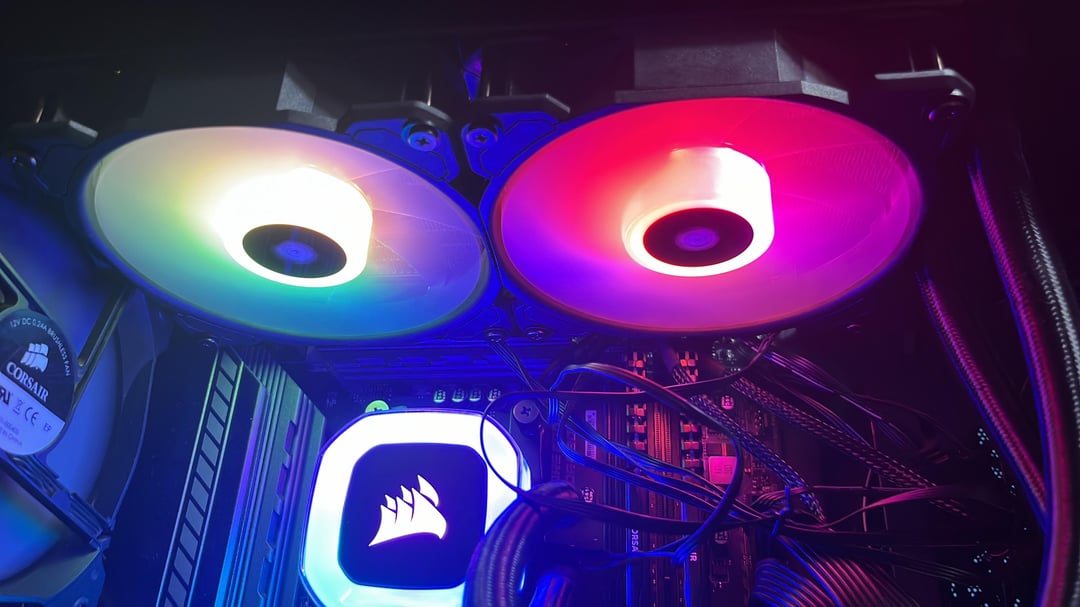
Hello! Im in need of someone who can help me solve this issue Im going through, Im new into Pc building and I cant seem to get under 60c sometimes even higher to 80c with the H100RGB, My system is a Ryzen 9 5900x that I just got today, I used to have it with the R7 3700, I also updated the latest version of bios as well as Win11 recently, also idk if it’s relevant but the Motherboard is a b550 tomahawk, hopefully someone can help me also feel free to ask anything regarding the pc, As soon as I booted the pc I got 90c which is incredible high and Im scared to damage it, it eventually dropped to 60 but its still pretty high.
13 Comments
Hi, what case do you have ? Can we have a picture. If the airflow is shit with a 5900x the temps will be high, no way around it.
90 is crazy, hope you get the answer you’re looking for
Check your mounting on the cpu and paste
​
Those fans hard to tell are they exhausting?
​
Most import feel your aio tubes at those temps they should be warm after awhile make sure your pump is actually working.
You’re fan are all in the wrong direction 🙂
Swap the front to intake, back and top as exhaust. Remove the air filter at the top, it’s too restrictive after an aio.
Pump should be plugged in a fan plug labeled aio or pump of switched to similar mode in bios (in order to not run under 9v).
Do that and check temps again 🙂
There are good suggestions here already but I also wonder if you removed any protective wrap/film on the surface that sits on the CPU
Your cooler is not working or it isnt installed properly.
Temps in the 60’s on a idling cpu is way too high
What in the cable…!?
Can you see the liquid temperature from hwinfo64?
I’d say, put the AIO fans in front to drag in air. Then two fans up pushing air out and one fan in the rear pushing air out.
Try testing your setup without the glass, leave it open. Remove the dust filter where the exhaust for the aio is blowing too. If it’s cooler then it’s an airflow issue. If it’s still running hot then either your cooler isn’t working properly or something’s wrong with the installation of the cooler. You could also try undervolting.
I have a 5800x3d and undervolt it, I average 69c when gaming on my $35 air cooler. Highest I reached was 82c on Cinebench after 30 min.
This might be a stupid question but I’ll just ask to make sure – did you remove the sticker from the AIO heatsink?
Not exactly sure what your issue is, but my x73 kraken consistently cools my 5900x to around 37 degrees idle.
When I built my PC last year I had a similar problem where I had a constant 90C temp. Later I found out that my motherboard was overvolting my cpu, try checking your bios to see if you have the same problem.