I just wanna make sure I don’t get a card and it will break my NVME SSDs
I might probably use Raid-0.
I wanna ask if this card itself has hardware Raid chip?
Nick_Sanchez124
Ok so in general safe to use, but not really worth it most of the time. There are cards like this that have their own controller and cards that dont, with a huge difference in price. Cards without their own controller require your mainboard to support something called bifurcation, which essentially splits up one pcie slot into multiple smaller ones, e.g. x16 to 4 x4 pcie slots. Most boards don’t support this, you’ll have to look into your motherboards manual or bios to see if it’s supported, also it needs to be enabled there. Pcie slots below the first one are wired to the chipset on consumer boards, so even if the slot and card have the correct bandwidth and pcie gen, you’ll not have the maximum speed advertised.
All in all, at least imo, it’s more worth to go for a sata RAID, if that’s your goal
Reddit_blows_now
Safe to use, but complete garbage. Learn about connection types, their speed, and bandwidth to fully understand why you wouldn’t want to do this.
corylulu
I have one but I think a different model. It works fine, but once I swapped the order of 2 of my M.2s but it caused the file systems to swap with each other somehow.
I found nothing online explaining this, but it broke everything. They said they had enough others file systems, but still had the original data. Found no way to unfuck it.
Worried-Explorer-102
Typical reddit, everyone here is shitting on this and then people like Wendell from level 1 techs that helps linus and gamersnexus setup their shit recommends these all the time.
minefarmbuy
Not worth it imo. Will get better speeds and raid function with 2.5” sata.
NuSpirit_
If you want to use those SSDs for storage (instead of OS drive) option then it’s alright. I have myself 1TB NVMe SSD like that because my board has only 1 slot on board.
off-a-cough
The boards I’ve used were for forensic purposes, and we’re able to image M.2 drives at a rate in the same neighborhood as mobo-mounted.
This was a single M.2 drive, and 100% read due to hardware write-blockers. An earlier r/w version performed just as well, though – although again, we just read.
I’ve also used one in an older gaming PC, definitely much faster than SATA.
Moparian714
These expansion cards are good to go. Highly recommend a good quality one if you need more m.2s
nzvemnvz
Would be nice if these thing have their own storage controller including its jumper on their board so it can be portable across the mainboard if the mainboard fails.
External_Try_7923
Are we comparing safety to the 4090s?
theatomicflounder333
I remember a while ago I bought an Asus card that combined 4 nvme ssd. It was a massive headache trying to get everything to work. I had to deal with various Bifurcation issues and I eventually got it where it split 1 x16 to 4 4x lanes but spent a week troubleshooting with Asus as they sent me various custom drivers to do so. 😵💫
LastKilobyte
If you intend to go that route, i suggest PCIE RAID cards. Several support 6-8 NVME drives with various levels of RAID, JBOD, or seperate disks. RAID cards have their orn cpu, ram, and cache that handle the overhead, lane splitting, and data distribution.
I run ARECA SAS/SATA cards in my editing machines as they have been super reliable, though i have yet to switch to NVME RAID cards.
Unless you have a need for extreme speeds, i suggest populating your mobo instead, and supplementing with 2.5″ ssd’s and hdd’s for stuff that doesnt need such speeds.
RAID is not a substitute for backups.
TheCh0rt
It says “Above 6000GB/s” — you should look at how fast it can actually go, because this card could be a major bottleneck.
DigiQuip
You can get a 4tb nvme for price of one of these.
If you need more than 4tb for storage then I think you’d be more interested in a dedicated high capacity storage device.
Hattix
Wow. So muich misinformation. Insert doge meme.
There are *three* types of these cards, and I’ll cover all three for you.
The first is the simplest. It’s just a PCIe to M.2 adapter, just a wire adapter. The PCIe lanes on the M.2 slot are wired to the PCIe slot on your motherboard. Usually completely passive, but some have a VRM on them to actually pay more than lip service to the M.2 specification. They typically wire in 1, 2 or 4 PCIe lanes. One I have here does four, and they’re the most common. These guys are simple and will, if in a PCIe x4 slot, give full speed.
M.2 does not guarantee all four PCIe lanes will be available! A, B, and E keys only offer two lanes. Only M-key gives all four lanes, and devices are required (with a capital “R”) to work with two or only one lane available.
The second is where nearly all the confusion comes from. They also are just PCIe to M.2 adapters, but they wire in two or four M.2 slots to a number of lanes on the motherboard. It can be one lane per slot, two, [or four](https://www.amazon.com/Supermicro-AOC-SLG3-2M2-PCIe-Add-Card/dp/B071S3ZY8P/). **These need bifurcation support.** No other type does. They’re best avoided really.
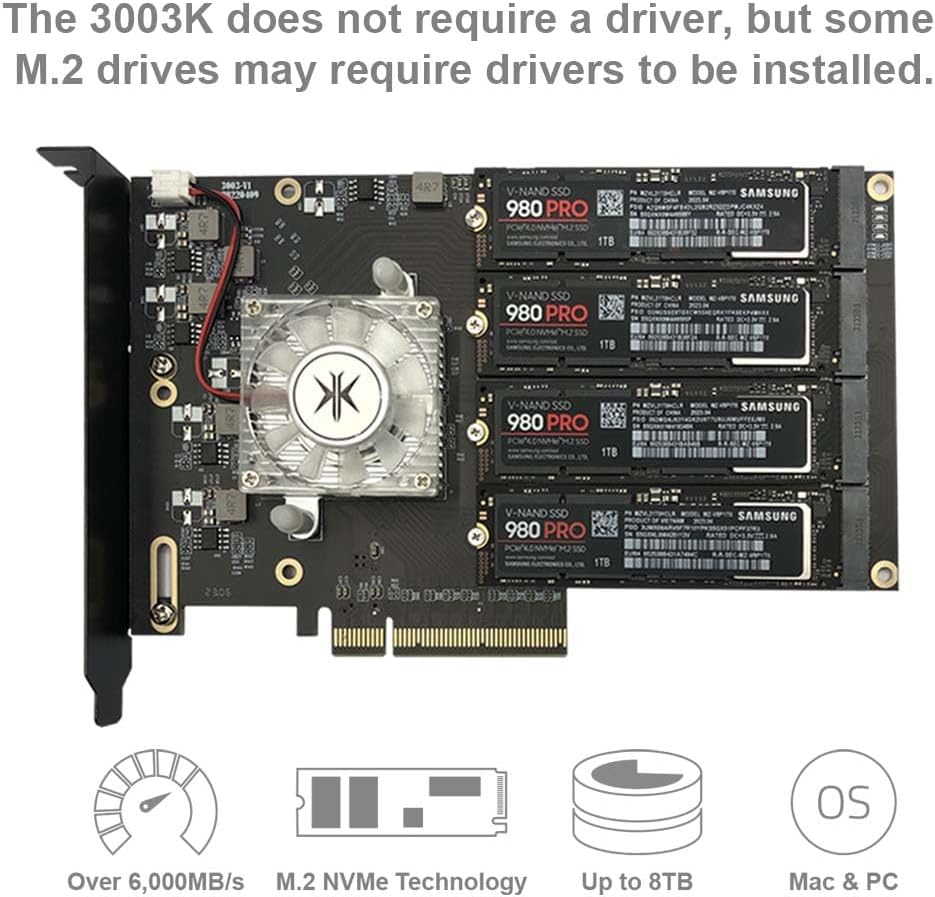
The third type is the type in the picture. **These are the best**. They take 4, 8, or 16 PCIe lanes and switch them between the M.2 slots, allowing any single M.2 device to have full PCIe x4 bandwidth. In this case, it is eight lanes being switched between the four M.2 slots, which appear to be wired in x4 mode. For the attentive, AMD’s Promontory chipsets do this exact same thing. All the slots share the bandwidth on an as-needed basis, very much like a network switch, or a motherboard. If you try to use all four devices at the same time, you’ll saturate the bus. This isn’t a bad thing, it just is. This one in particular uses an ASMedia ASM2824 PCIe switch… which is the core building block of AMD Promontory (B450/B550/B650, etc.)!
One thing to be aware of, but you probably won’t care about, is that *all of these are mis-keyed.* M-Key, which they seem to be, says you should have SATA and SMBus. They never, ever do.
*Most storage controllers are bus limited.* My Dell PERC SAS HBA is a PCIe x4 device and will often become bus limited. This is not a great thing, but it isn’t bad. So long as one or two devices, so 99% of every use case, can run at full speed, you’re absolutely fine!
jsbdrumming
Highly addictive not safe
sIeepai
Not safe for your eyes jesus that’s hideous
leonardob0880
Why they wouldn’t?
Bytepond
They are absolutely safe. That one looks like a pretty decent one since it’s got a controller.
alaingames
Usually yes but not really usefull, it’s usefull to have several drives but it’s hard af to get working for booting and need specific mobos for it, get SSDs with sata if you want more space and use the one built in m.2 for a drive that you use for system and heavy games
MetalHeadJoe
I use one that has two m.2 slots one of which is nVME and it has a 3rd slot for an msata. I chose the one I got because of the msata slot. Works great, have had it for a couple years now. I just use this for redundant storage really.
GoodOutcome
I am using 2 expansion cards, each holding 4 m.2 drives.

23 Comments
[Amazon link](https://www.amazon.com/gp/product/B0CBRCFY69/ref=ppx_yo_dt_b_asin_title_o00_s00?ie=UTF8&th=1)
I just wanna make sure I don’t get a card and it will break my NVME SSDs
I might probably use Raid-0.
I wanna ask if this card itself has hardware Raid chip?
Ok so in general safe to use, but not really worth it most of the time. There are cards like this that have their own controller and cards that dont, with a huge difference in price. Cards without their own controller require your mainboard to support something called bifurcation, which essentially splits up one pcie slot into multiple smaller ones, e.g. x16 to 4 x4 pcie slots. Most boards don’t support this, you’ll have to look into your motherboards manual or bios to see if it’s supported, also it needs to be enabled there. Pcie slots below the first one are wired to the chipset on consumer boards, so even if the slot and card have the correct bandwidth and pcie gen, you’ll not have the maximum speed advertised.
All in all, at least imo, it’s more worth to go for a sata RAID, if that’s your goal
Safe to use, but complete garbage. Learn about connection types, their speed, and bandwidth to fully understand why you wouldn’t want to do this.
I have one but I think a different model. It works fine, but once I swapped the order of 2 of my M.2s but it caused the file systems to swap with each other somehow.
I found nothing online explaining this, but it broke everything. They said they had enough others file systems, but still had the original data. Found no way to unfuck it.
Typical reddit, everyone here is shitting on this and then people like Wendell from level 1 techs that helps linus and gamersnexus setup their shit recommends these all the time.
Not worth it imo. Will get better speeds and raid function with 2.5” sata.
If you want to use those SSDs for storage (instead of OS drive) option then it’s alright. I have myself 1TB NVMe SSD like that because my board has only 1 slot on board.
The boards I’ve used were for forensic purposes, and we’re able to image M.2 drives at a rate in the same neighborhood as mobo-mounted.
This was a single M.2 drive, and 100% read due to hardware write-blockers. An earlier r/w version performed just as well, though – although again, we just read.
I’ve also used one in an older gaming PC, definitely much faster than SATA.
These expansion cards are good to go. Highly recommend a good quality one if you need more m.2s
Would be nice if these thing have their own storage controller including its jumper on their board so it can be portable across the mainboard if the mainboard fails.
Are we comparing safety to the 4090s?
I remember a while ago I bought an Asus card that combined 4 nvme ssd. It was a massive headache trying to get everything to work. I had to deal with various Bifurcation issues and I eventually got it where it split 1 x16 to 4 4x lanes but spent a week troubleshooting with Asus as they sent me various custom drivers to do so. 😵💫
If you intend to go that route, i suggest PCIE RAID cards. Several support 6-8 NVME drives with various levels of RAID, JBOD, or seperate disks. RAID cards have their orn cpu, ram, and cache that handle the overhead, lane splitting, and data distribution.
I run ARECA SAS/SATA cards in my editing machines as they have been super reliable, though i have yet to switch to NVME RAID cards.
Unless you have a need for extreme speeds, i suggest populating your mobo instead, and supplementing with 2.5″ ssd’s and hdd’s for stuff that doesnt need such speeds.
RAID is not a substitute for backups.
It says “Above 6000GB/s” — you should look at how fast it can actually go, because this card could be a major bottleneck.
You can get a 4tb nvme for price of one of these.
If you need more than 4tb for storage then I think you’d be more interested in a dedicated high capacity storage device.
Wow. So muich misinformation. Insert doge meme.
There are *three* types of these cards, and I’ll cover all three for you.
The first is the simplest. It’s just a PCIe to M.2 adapter, just a wire adapter. The PCIe lanes on the M.2 slot are wired to the PCIe slot on your motherboard. Usually completely passive, but some have a VRM on them to actually pay more than lip service to the M.2 specification. They typically wire in 1, 2 or 4 PCIe lanes. One I have here does four, and they’re the most common. These guys are simple and will, if in a PCIe x4 slot, give full speed.
M.2 does not guarantee all four PCIe lanes will be available! A, B, and E keys only offer two lanes. Only M-key gives all four lanes, and devices are required (with a capital “R”) to work with two or only one lane available.
The second is where nearly all the confusion comes from. They also are just PCIe to M.2 adapters, but they wire in two or four M.2 slots to a number of lanes on the motherboard. It can be one lane per slot, two, [or four](https://www.amazon.com/Supermicro-AOC-SLG3-2M2-PCIe-Add-Card/dp/B071S3ZY8P/). **These need bifurcation support.** No other type does. They’re best avoided really.
The third type is the type in the picture. **These are the best**. They take 4, 8, or 16 PCIe lanes and switch them between the M.2 slots, allowing any single M.2 device to have full PCIe x4 bandwidth. In this case, it is eight lanes being switched between the four M.2 slots, which appear to be wired in x4 mode. For the attentive, AMD’s Promontory chipsets do this exact same thing. All the slots share the bandwidth on an as-needed basis, very much like a network switch, or a motherboard. If you try to use all four devices at the same time, you’ll saturate the bus. This isn’t a bad thing, it just is. This one in particular uses an ASMedia ASM2824 PCIe switch… which is the core building block of AMD Promontory (B450/B550/B650, etc.)!
One thing to be aware of, but you probably won’t care about, is that *all of these are mis-keyed.* M-Key, which they seem to be, says you should have SATA and SMBus. They never, ever do.
*Most storage controllers are bus limited.* My Dell PERC SAS HBA is a PCIe x4 device and will often become bus limited. This is not a great thing, but it isn’t bad. So long as one or two devices, so 99% of every use case, can run at full speed, you’re absolutely fine!
Highly addictive not safe
Not safe for your eyes jesus that’s hideous
Why they wouldn’t?
They are absolutely safe. That one looks like a pretty decent one since it’s got a controller.
Usually yes but not really usefull, it’s usefull to have several drives but it’s hard af to get working for booting and need specific mobos for it, get SSDs with sata if you want more space and use the one built in m.2 for a drive that you use for system and heavy games
I use one that has two m.2 slots one of which is nVME and it has a 3rd slot for an msata. I chose the one I got because of the msata slot. Works great, have had it for a couple years now. I just use this for redundant storage really.
I am using 2 expansion cards, each holding 4 m.2 drives.
Works great.