
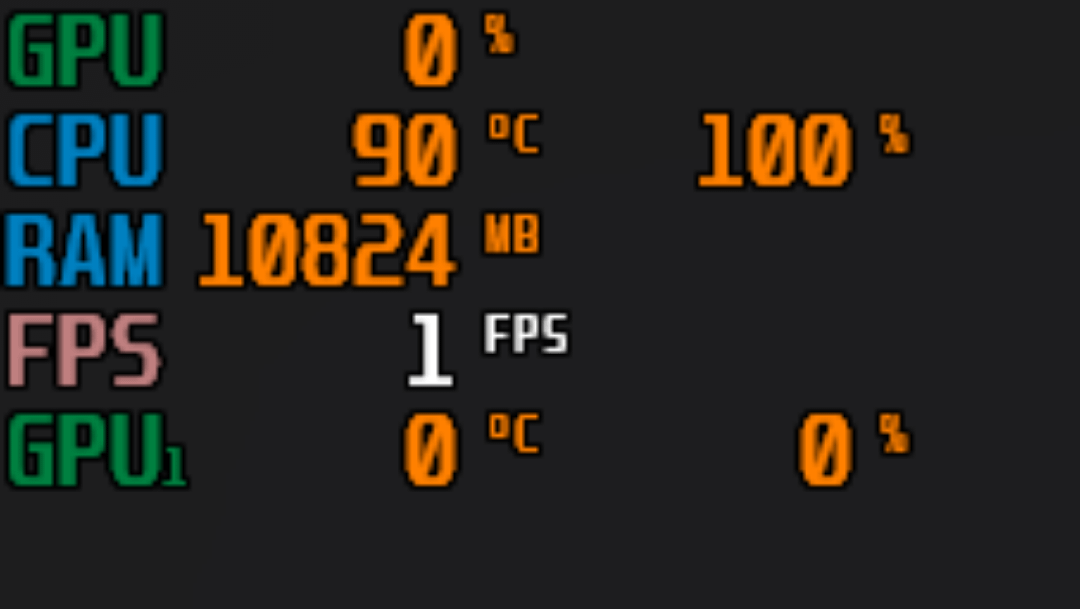
**hi, so i got pubg a week ago and for the first 2 days it was fine and normal, then on day 3 and out of the blue the game started to use the CPU alone without either GPU (integrated and dedicated).**
**i tried everything on the internet and youtube and it didnt work, i also tried uninstalling it and reinstalling it but that too didnt work…**
**so this is pretty much my last hope**
**\*specs:**
**i7 10700k**
**RTX 3070**
**16GB DDR4 RAM**
**700w PSU**
**\*\*all drivers are up to date, and the PC works perfectly fine, its just a PUBG problem**
18 Comments
It’s only pubg having this issue? Not any other games?
Bro playing pubg on power point presentation 💀
Looks like it’s software rendering.
90c cpu temp…
Cpu goes brrrrrrrrrrrrr
How the hell have you managed to get software rendering on PUBG
also, i dont know why im getting downvoted every time i comment, im new here, go easy on me ):
Is your monitor plugged into the motherboard or GPU?
You are not taxing the GPU hard enough… so it’s taking a nap.. Turn the settings to max (ULTRA) with 16 AA .. (no Ray tracing if pubg has that)
Can you get to the main screen of the game? Yo get to the settings.
This is going to be the least useful answer ever, but I also had this issue when I was messing around in the settings a few weeks back. I have no idea what caused it, or fixed it, but messing in the settings more caused the gpu to kick back in. Which for the record, I reverted the settings back to the original ones where the gpu wasn’t doing anything, and then all of a sudden the gpu was working.
This game makes zero sense.
You’d think a 10 year old game would have better optimizations at this point but noooo.
How is your GPU at 0degC? Is your room sub freezing temperatures?
i will try
GAME IS BACK TO NORMAL FOLKS!!
THANKS TO u/zenosfire258
edit for future visitors: I don’t recall changing many graphics settings besides Vsync, motion blur, and DirectX version from 11 to 12, I’m 90% certain that it was the DirectX12 that caused the problem since the game tells you that it may cause problems
what i did was change the res from 1440p to 1080p and hit the default settings button in the “advanced” section
Have you tried uninstalling and reinstalling PUBG? If it gives an option to delete configuration files while uninstalling do that too. Hopefully that will result in you being back to default settings and will clear out whatever is being funky
Same thing was happening to me in Minecraft . The gbu work fine like 30 to 50% for serval mins then the use go down hill to 1% but the cpu was fine like 50%
R5700
I5 9400f

OP’s gpu
Go to windows config and config the GPU to be used in that program, I don’t remember how but you should search on YouTube “how to configure heavy use GPU on windows”
Your cpu is cooking, literally