I have that, it’s for gaming mostly. That’s what I use it for. This one is the “mecha membrane” one that’s extremely clicky-sounding AKA it’s LOUD. I went with the mechanical one that’s much quieter.
SpartanPHA
Your thumb is dedicated to movement, and your other four fingers are able to reach a wide amount of buttons easily without taking them off the movement button.
It’s like back paddles on a controller.
ContactIcy3963
It’s pretty useful since you can remap alot of keys without mucking up your keyboard. The thumb D-pad and extra thumb buttons adds a lot of utility as well.
BoozeJunky
I assume it’s mostly for games and programs that have a lot of programmable shortcuts, like MMOs and Simulators.
Itstarantula3
Its supposed to be that you use the thumbstick/dpad for movement and the rest as easily accessible hotkeys, but in practice it doesnt work very well.
Depending on the size of your hand it could mean that you arent able to easily use all the keys because the palm rest gets in the way a bit.
The dpad just feels really mushy and although you can set it to be 8 directional its horrible because the mushiness causes mispresses so i personally just have it always set to 4 directional.
If you are lucky enough to not experience these issues then you still have to deal with razer synapse which in itself is quite irritating because of it being cloud based, but the keypad’s settings themselves are really irritating to change since there is no way to quickly bind keys (which you have to do alot if you want to customise the keypad to suit each game)
Synapse is also not very good at changing the keypad profile for the game/software you have it connected to. it only uses the profile when tabbed into its respective game and sometimes it just wont switch profile.
Ultimately its up to you whether or not you want to buy it, i personally just use it as a macro pad for photoshop and premiere pro now since its uncomfortable for me to use it to game over just using a keyboard, but you might find it more usable for playing games or whatever use case you decide
ElLobo138
I’ve never used a Razer brand one but an older Logitech. I always liked it to set up macros for gaming (MMOs in my case back then). I also had fun setting them up for gags on roommates, like opening Microsoft Sam and have it say “hello X roommate, I’ve been waiting for you” kinda thing.
AllMyFrendsArePixels
What you’re planning on using it for defines whether or not it’s better than using an actual keyboard. It absolutely definitely would not be better than using an actual keyboard if you were planning to write a novel, for example.
I have the one with optical switches and it’s very niche but would be a decent replacement for a controller/steering wheel/joystick etc because the optical switches can be set as analog controls, with a range input depending on how far down the switch is pressed (think of similar to the L/R triggers on a controller, but you get 19 of them on each of 3 keymaps, instead of just 2) instead of just the 0/1 input of a normal keyboard.
TheAdsAreHere
They generally end up being clunky in the long run
wogolfatthefool
G13 is where it’s at
DkoyOctopus
dont get the razer version its a pain in the ass. its mostly for mmos… its good for photoshop too actually.
creativename111111
Aren’t they mostly used for RTS? I’ve only ever seen picture of them never considered buying one
Jaded-Statistician87
I was going to guess soap dispenser but guess it’s a keyboard for games
PetitesFucker
Its not “better”. its just different. For Gaming its better, because you have more keys reachable with one hand. But you also have to rebind everything for every Game.
Also for most Games you likely dont need that Many Keys.
Sea-Entertainer7778
I have one, liked it for a while but went back to a keyboard. Used it for apex
ketamarine
Razer tartarus. Basically just a super customizable desktop controller.
A lot of people use them for MMOs or any game with complex controls where you want everything perfectly in reach. Also a way of having a joystick like a console for PC, while still having mouse and keyboard style controls for aiming.
Character_Hope_5180
I have an older version of this. Razor Orbweaver chroma. I use it just like a half of a keyboard. I use wsad for movement, not the thumb pad. I do assign keys to the different thumbpad directions and it is great for quick access to things like inventory and maps. I play COD with it. Because mine is mechanical keys it is a good experience. I use it 100% for the ergonomics. I can play for hours without my wrist hurting. If I try that on a normal keyboard my wrist will hurt in less than an hour. Never even considered using the thumbpad for movement. Not the best way to use it for me.
DarkAlatreon
It’s a godsend for MOBAs, you can control the camera with your thumb so you can both be in control of the camera and keep your cursor where it needs to be
Dizman7
A friend of mine has one of these and loves it! He replaced a dual joystick setup for a sim game with this and mouse.
I will say it’s annoying to play a new coop game with him though, because he has to set it all up from scratch for each new game. Be he says it’s worth it.
ReadABookandShutUp
It’s all I use for gaming. It’s so much better than a regular keyboard, especially if you’re coming to pc from consoles.
Apollo_3_14
I thumb stick can really do everything I need wasd to do.
MrStealYoBichonFrise
I’ve used a version of that thing for the past decade. The pros are it’s ergonomic, can fit next to a mouse on one of those keyboard trays (that’s why I bought the first one #TinyDesk), and you’re unlikely to miskey since your hand basically never moves position. The analog stick is nice for strafing while hitting buttons. I found it very useful in FPS games and WoW due to the strafing alone. The negatives are they all seemed to wear out pretty quickly, typing in chat requires you to take your hand off the device and move it to the keyboard (not ideal for team chat during a boss fight), you have to use modifiers in a lot of games due to the limited about of keys, and when you get used to it it’s hard to play with a normal keyboard. I have to decide if playing a new game is worth the 30 minutes if keybindings I have to do to get it to work how I want on the device. My recommendation is to avoid them to avoid these pain points unless you have wrist pain or something where the ergonomics help.
FRENCHZORRR
Ohh man i had one similar when i first started playing cod4 on pc because i wasnt good enough at first with keyboard.for me it was good for the leaning mechanic.(normaly e and q but i had it binded with the joystick).had 3.3k hours on it,never failed me once.(mine was a belkin n52).Promod was the best mod/fps for me,i dont think a game will beat that feeling from those times.
moonflower_C16H17N3O
It’s not better than an actual keyboard. You can get a split mechanical keyboard that will do whatever this thing can do and more. Joystick, rotary encoder, trackball, or just a split keyboard. The best parts come in programming the layers, macros, and combos of keys.
_Ev4n_
I had one that I used for a while, loved it. I played all sorts of games on it, but mostly COD. Only reason I sold it was cause I wanted a wireless solution, which doesn’t exist.
ThanaTess
I have one of those. It helps with my wrist pain from a work injury. I love it and having the joystick makes keybinding way better for me.
Minions-overlord
I played most of my life as a cosole gamer and have never gotten used to wasd as much as joystick.. this bridges the gap for me and i use it alot
Mean_Ass_Dumbledore
I still use this as I was a console gamer for decades. Having left thumb for movement is engrained in my mind. This allows for that, to a point.
itsToTheMAX
I used things like this a long time ago, I liked it for various reasons but the muscle memory of the keys being so aligned was weird to get over.
David809
I have the reddragon one handed keyboard and its great for fps games and other games alot more comfortable thana. Whole keyboard
Busy-Philosopher-861
It’s actually pretty nice in mmo games as has been stated but I also use it for video editing. Takes some getting used to but it’s good.
txivotv
I was looking for a “half keyboard” to play shooters, because I like full keyboard setups for writing and working.
This was one of the candidates, but finally decided to get a cheaper one and bought the Red Dragon K585 and I’m happy with it.
I would like to have the joystick in the razer one but just for space simulators or so, otherwise, is not usefull.
h3xist
Non gameing: these make GREAT macro pads. You can set them up to be short cuts in photoshop, have act as an alternative to a stream deck, you just use it for any macro you want if you put the time in to set it up right.
Gaming: takes some getting use to but these are great for Tab Target MMOs that use a lot of abilities like WWO or FFXIV. You use the thumb stick to move around, the button/tab below the thumb stick for targeting, and the face buttons for your in game Hot bars, and the small button above the thumb pad can be used as a modifier key so you have double the number buttons on the face
The one in the picture here is the Tartarua v2. It’s more focused to an FPS due to the scroll wheel and the key bellow the thumb stick being more like a space bar and has a LOT of travel to it.
I would recommend looking at find a tartarus v1 or Orb-weaver on ebay if you want one of these. The V1 is only 3 rows instead of 4, doesn’t have the scroll wheel, and has a metal tab the is easier to use rather than that space bar. The Orb-weaver has the same number of rows as the v2, no scroll wheel so you get an extra button, the same tab as the v1, and has an extreamly customizable palm and wrist rest.
Avoid the v2 if you can help it.
AZNdude86
If you want to game and you’re coming from a controller, get an Azeron, I swear by it; learning curve isn’t as high if you’ve never used MnK
martynpd
Very steep learning curve from a keyboard. I never got used to mine and gave up
Michael_Spark
I’ve been using a gam pad for over 20 years. there great at MMOs or other games with an absurd number of key commands. In WOW i would have the 2 buttons on the thumb set up for shift and ctrl. I would then set up my action bar with 12 buttons. with the 2 modifier keys, this would give me 36 possible buttons under my left hand.
I have used this for FPS games, but that’s more so i could remove my keyboard from my desk to give my mouse more space. if your a high sense player, its probably not something you need… my current set up uses my thumb for both crouch and jump, but the standard WASD under my fingers.
the game pad also allows for multiple profiles, allowing you to switch between games after an initial set up. this way, no matter how the game was set up, I could always the thumb control crouch, no mater if the game wanted Ctrl or C or some other button. it was always under my thumb.
I’ve sense ditched the razer game pad in favor of a custom split keyboard design, but that’s mostly because I was tired of the mandatory razer software… I shouldn’t have to log in to an app to use a computer peripheral.
cyb3rofficial
i love mine, i use it for flight sim games since all other 100% of my keyboard is in used with CTRL ALT and SHIFT all being bound over thrice.
Scroto_Saggin
I guess it’s pretty awesome when you get used to it… but the downside: You have to get used to it and suck for a while.
FishinNFarmin
I would use this on my farm sim setup
HollaDatchaBoi
I’d recommend the Azeron Cyborg or one of its variants. It’s way more ergonomic because it’s insanely adjustable plus there are more buttons that can be mapped to whatever keys you want.

39 Comments
I have that, it’s for gaming mostly. That’s what I use it for. This one is the “mecha membrane” one that’s extremely clicky-sounding AKA it’s LOUD. I went with the mechanical one that’s much quieter.
Your thumb is dedicated to movement, and your other four fingers are able to reach a wide amount of buttons easily without taking them off the movement button.
It’s like back paddles on a controller.
It’s pretty useful since you can remap alot of keys without mucking up your keyboard. The thumb D-pad and extra thumb buttons adds a lot of utility as well.
I assume it’s mostly for games and programs that have a lot of programmable shortcuts, like MMOs and Simulators.
Its supposed to be that you use the thumbstick/dpad for movement and the rest as easily accessible hotkeys, but in practice it doesnt work very well.
Depending on the size of your hand it could mean that you arent able to easily use all the keys because the palm rest gets in the way a bit.
The dpad just feels really mushy and although you can set it to be 8 directional its horrible because the mushiness causes mispresses so i personally just have it always set to 4 directional.
If you are lucky enough to not experience these issues then you still have to deal with razer synapse which in itself is quite irritating because of it being cloud based, but the keypad’s settings themselves are really irritating to change since there is no way to quickly bind keys (which you have to do alot if you want to customise the keypad to suit each game)
Synapse is also not very good at changing the keypad profile for the game/software you have it connected to. it only uses the profile when tabbed into its respective game and sometimes it just wont switch profile.
Ultimately its up to you whether or not you want to buy it, i personally just use it as a macro pad for photoshop and premiere pro now since its uncomfortable for me to use it to game over just using a keyboard, but you might find it more usable for playing games or whatever use case you decide
I’ve never used a Razer brand one but an older Logitech. I always liked it to set up macros for gaming (MMOs in my case back then). I also had fun setting them up for gags on roommates, like opening Microsoft Sam and have it say “hello X roommate, I’ve been waiting for you” kinda thing.
What you’re planning on using it for defines whether or not it’s better than using an actual keyboard. It absolutely definitely would not be better than using an actual keyboard if you were planning to write a novel, for example.
I have the one with optical switches and it’s very niche but would be a decent replacement for a controller/steering wheel/joystick etc because the optical switches can be set as analog controls, with a range input depending on how far down the switch is pressed (think of similar to the L/R triggers on a controller, but you get 19 of them on each of 3 keymaps, instead of just 2) instead of just the 0/1 input of a normal keyboard.
They generally end up being clunky in the long run
G13 is where it’s at
dont get the razer version its a pain in the ass. its mostly for mmos… its good for photoshop too actually.
Aren’t they mostly used for RTS? I’ve only ever seen picture of them never considered buying one
I was going to guess soap dispenser but guess it’s a keyboard for games
Its not “better”. its just different. For Gaming its better, because you have more keys reachable with one hand. But you also have to rebind everything for every Game.
Also for most Games you likely dont need that Many Keys.
I have one, liked it for a while but went back to a keyboard. Used it for apex
Razer tartarus. Basically just a super customizable desktop controller.
A lot of people use them for MMOs or any game with complex controls where you want everything perfectly in reach. Also a way of having a joystick like a console for PC, while still having mouse and keyboard style controls for aiming.
I have an older version of this. Razor Orbweaver chroma. I use it just like a half of a keyboard. I use wsad for movement, not the thumb pad. I do assign keys to the different thumbpad directions and it is great for quick access to things like inventory and maps. I play COD with it. Because mine is mechanical keys it is a good experience. I use it 100% for the ergonomics. I can play for hours without my wrist hurting. If I try that on a normal keyboard my wrist will hurt in less than an hour. Never even considered using the thumbpad for movement. Not the best way to use it for me.
It’s a godsend for MOBAs, you can control the camera with your thumb so you can both be in control of the camera and keep your cursor where it needs to be
A friend of mine has one of these and loves it! He replaced a dual joystick setup for a sim game with this and mouse.
I will say it’s annoying to play a new coop game with him though, because he has to set it all up from scratch for each new game. Be he says it’s worth it.
It’s all I use for gaming. It’s so much better than a regular keyboard, especially if you’re coming to pc from consoles.
I thumb stick can really do everything I need wasd to do.
I’ve used a version of that thing for the past decade. The pros are it’s ergonomic, can fit next to a mouse on one of those keyboard trays (that’s why I bought the first one #TinyDesk), and you’re unlikely to miskey since your hand basically never moves position. The analog stick is nice for strafing while hitting buttons. I found it very useful in FPS games and WoW due to the strafing alone. The negatives are they all seemed to wear out pretty quickly, typing in chat requires you to take your hand off the device and move it to the keyboard (not ideal for team chat during a boss fight), you have to use modifiers in a lot of games due to the limited about of keys, and when you get used to it it’s hard to play with a normal keyboard. I have to decide if playing a new game is worth the 30 minutes if keybindings I have to do to get it to work how I want on the device. My recommendation is to avoid them to avoid these pain points unless you have wrist pain or something where the ergonomics help.
Ohh man i had one similar when i first started playing cod4 on pc because i wasnt good enough at first with keyboard.for me it was good for the leaning mechanic.(normaly e and q but i had it binded with the joystick).had 3.3k hours on it,never failed me once.(mine was a belkin n52).Promod was the best mod/fps for me,i dont think a game will beat that feeling from those times.
It’s not better than an actual keyboard. You can get a split mechanical keyboard that will do whatever this thing can do and more. Joystick, rotary encoder, trackball, or just a split keyboard. The best parts come in programming the layers, macros, and combos of keys.
I had one that I used for a while, loved it. I played all sorts of games on it, but mostly COD. Only reason I sold it was cause I wanted a wireless solution, which doesn’t exist.
I have one of those. It helps with my wrist pain from a work injury. I love it and having the joystick makes keybinding way better for me.
I played most of my life as a cosole gamer and have never gotten used to wasd as much as joystick.. this bridges the gap for me and i use it alot
I still use this as I was a console gamer for decades. Having left thumb for movement is engrained in my mind. This allows for that, to a point.
I used things like this a long time ago, I liked it for various reasons but the muscle memory of the keys being so aligned was weird to get over.
I have the reddragon one handed keyboard and its great for fps games and other games alot more comfortable thana. Whole keyboard
It’s actually pretty nice in mmo games as has been stated but I also use it for video editing. Takes some getting used to but it’s good.
I was looking for a “half keyboard” to play shooters, because I like full keyboard setups for writing and working.
This was one of the candidates, but finally decided to get a cheaper one and bought the Red Dragon K585 and I’m happy with it.
I would like to have the joystick in the razer one but just for space simulators or so, otherwise, is not usefull.
Non gameing: these make GREAT macro pads. You can set them up to be short cuts in photoshop, have act as an alternative to a stream deck, you just use it for any macro you want if you put the time in to set it up right.
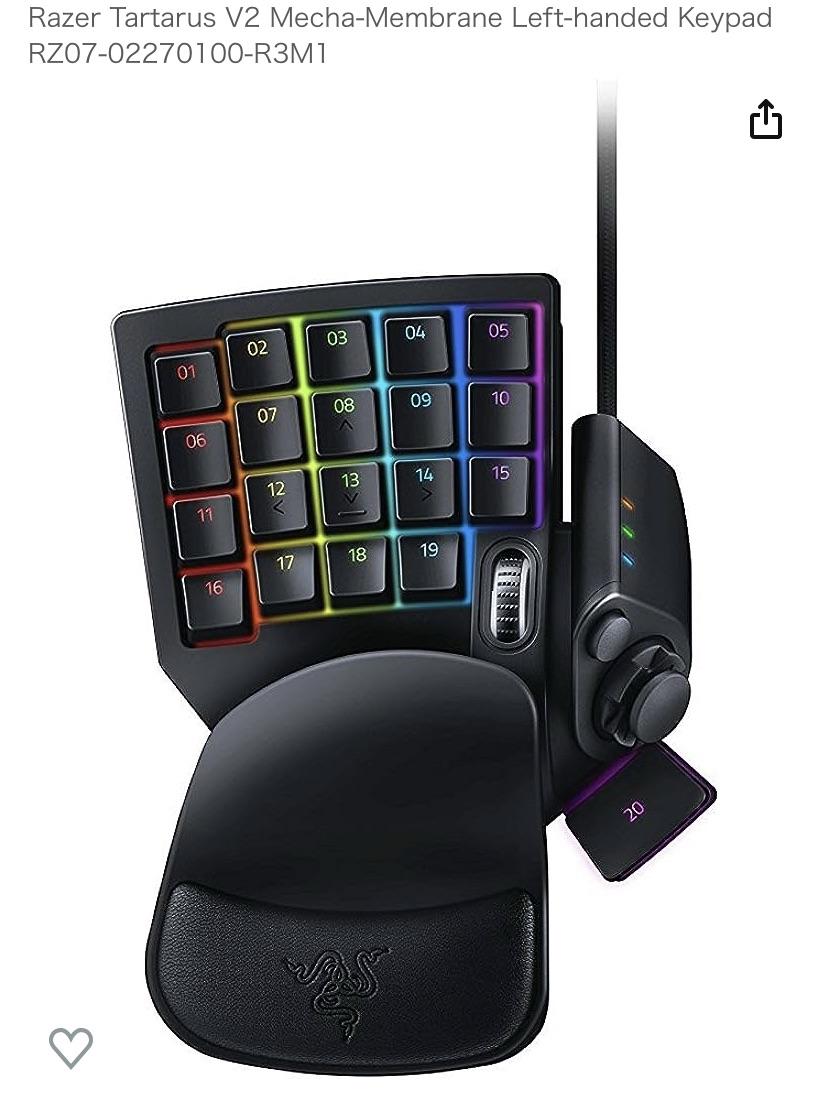
Gaming: takes some getting use to but these are great for Tab Target MMOs that use a lot of abilities like WWO or FFXIV. You use the thumb stick to move around, the button/tab below the thumb stick for targeting, and the face buttons for your in game Hot bars, and the small button above the thumb pad can be used as a modifier key so you have double the number buttons on the face
The one in the picture here is the Tartarua v2. It’s more focused to an FPS due to the scroll wheel and the key bellow the thumb stick being more like a space bar and has a LOT of travel to it.
I would recommend looking at find a tartarus v1 or Orb-weaver on ebay if you want one of these. The V1 is only 3 rows instead of 4, doesn’t have the scroll wheel, and has a metal tab the is easier to use rather than that space bar. The Orb-weaver has the same number of rows as the v2, no scroll wheel so you get an extra button, the same tab as the v1, and has an extreamly customizable palm and wrist rest.
Avoid the v2 if you can help it.
If you want to game and you’re coming from a controller, get an Azeron, I swear by it; learning curve isn’t as high if you’ve never used MnK
Very steep learning curve from a keyboard. I never got used to mine and gave up
I’ve been using a gam pad for over 20 years. there great at MMOs or other games with an absurd number of key commands. In WOW i would have the 2 buttons on the thumb set up for shift and ctrl. I would then set up my action bar with 12 buttons. with the 2 modifier keys, this would give me 36 possible buttons under my left hand.
I have used this for FPS games, but that’s more so i could remove my keyboard from my desk to give my mouse more space. if your a high sense player, its probably not something you need… my current set up uses my thumb for both crouch and jump, but the standard WASD under my fingers.
the game pad also allows for multiple profiles, allowing you to switch between games after an initial set up. this way, no matter how the game was set up, I could always the thumb control crouch, no mater if the game wanted Ctrl or C or some other button. it was always under my thumb.
I’ve sense ditched the razer game pad in favor of a custom split keyboard design, but that’s mostly because I was tired of the mandatory razer software… I shouldn’t have to log in to an app to use a computer peripheral.
i love mine, i use it for flight sim games since all other 100% of my keyboard is in used with CTRL ALT and SHIFT all being bound over thrice.
I guess it’s pretty awesome when you get used to it… but the downside: You have to get used to it and suck for a while.
I would use this on my farm sim setup
I’d recommend the Azeron Cyborg or one of its variants. It’s way more ergonomic because it’s insanely adjustable plus there are more buttons that can be mapped to whatever keys you want.