Similar thing was happening to me on gta IV, I had to increase its VRAM limit or something
L0veToReddit
Gta 6 trailer mext month, wooo
Rhythm_and_Brews
Time for a new PC! Lol
GateOPssss
Had this issue when i had been on 8GB of RAM, and an athlon quad core processor. When i upgraded those two, i was good, hard disk drive was not an issue.
Thicccchungus
Just gta bein gta
H-Man991
Weak cpu does that, it stopped once I bought a new PC with a better cpu, I played on my HDD that was in my old PC and on which I experienced issues but it stopped on new cpu so it’s probably that
RentonZero
Considering your specs I’m guessing it’s on a hard drive or a old SSD. Probably that issue
Few_Editor5053
I heard the game freaks out if your fps is too high, in the 180s or whatever. Lock it to a lower fps and it’ll be fine i think.
Fireball694200
its a ram issue i think, whats casuing it, no idea
Randomizer23
They deleting GTA 5 to make room for GTA 6 😉
EnzymeX
There’s a setting that reduces/removes this but it’s been a very long time and I don’t know which one it is. Had to reduce it from ultra/high to medium I believe.
Dj_nOCid3
Vram? Gta V does pretty well on hdd’s given you got sufficient write read speeds, so im supposing its more of a ram issue
I_think_Im_hollow
Low memory speed.
Nicalay2
Bro enabled potato mode.
Digag
That happened to me in gta v when my cpu ran to hot – forgot the thermal paste lol
No-Following-3834
its a show drive or a lowend cpu
lost_reason_22
Verify game files
LEO7039
Low ram, low V-ram, slow/dying HDD are the possible reasons.
absentfromreality
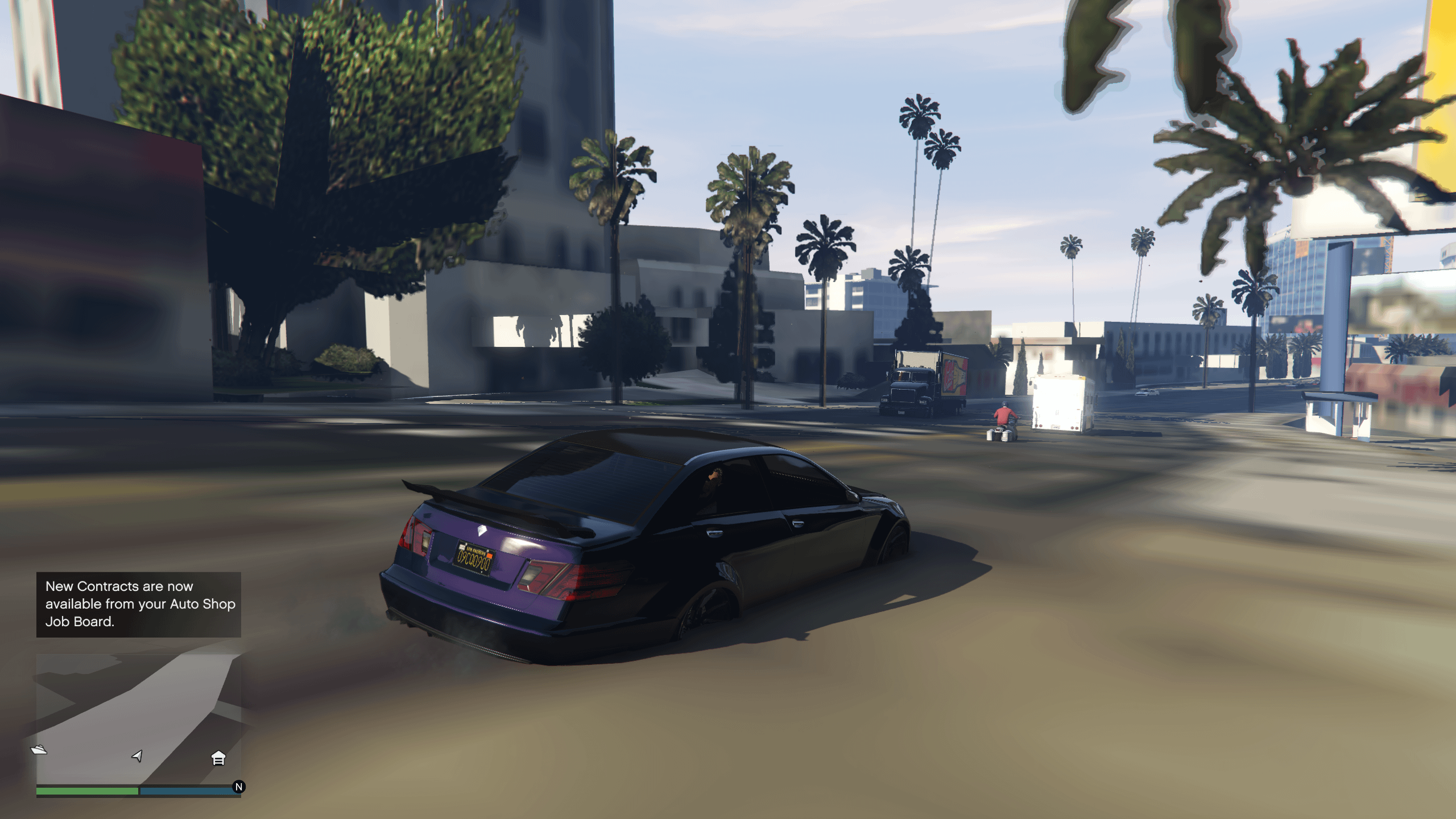
It’s textures. Set them to normal and restart. I had this happen to me in fivem all the time until someone in game told me to set it to normal. Never had it happen again.
Lieutenant_Petaa
Looks like not enough memory. Probably VRAM, but also RAM could be the problem.
I would not say it is the harddrive as others have suggested.
It’s probably easiest to look into taskmanager to look for your RAM and VRAM usage and also reduce the graphics settings in the game significantly to see, whether the problems will vanish.
Reducing the graphics settings will reduce the amount of video memory needed for the game to run and all textures will be available for the GPU when it needs them
ItsBitly
Had a similar thing when I had a bad CPU that should not have been running this game.
Interloper_Mango
My guess is that your GPU is lacking VRAM
Meddlingmonster
Hdd or not enough vram
Pure-Experience-6531
Disc is probably scratched…
mvreee
Time to change pc
Jdogg4089
PS2 version of GTA 5
BENJID4NGER
If there is an extended texture budget, make sure you up it
DingoKis
This happened to me before switching to SSD
If storage and RAM are fast enough, you’re probably running out of VRAM
Wibiz9000
Have HWinfo open while you play the game and check it when this happens the next time around. It’s mostly likely a RAM issue so that should technically clear some suspicions about it.
Olbrish
I’ve only ever experienced this on fivem. I have gta AND fivem installed on an SSD, 12 gb of VRAM, and 32 gb of ram. It’s certainly got something to do with distance scaling and your textures.
Kekeripo
I’ve had than on PS3, PS4 and PC happen. Didn’t happen often, but it did happen.
Saintjimmy119
Extend your texture budget (its in the in game settings somewhere)
It’s pretty common for GTA to not like loading textures
AsiaArgentoSimp
If ur on pc did u add music to the custom radio station?
zyl15
Is it only GTA Online? Do you have similar issue with story mode?
Argon288
I had this happen when playing on a HDD and using custom music in game. SSD + custom music it didn’t happen.
Otherwise_Clock3133
Turn up the texture cache in the game fix that
HalanoSiblee
it’s not the same rage engine from 2013 anymore 🙁
ExpressReflection967
I have no idea what I’m talking about, but from the replies, that doesn’t seem to matter.
I’m going to throw out a wild guess and say you need to install more SSD routers on the HDD VRAM and maybe add more RAM and also upgrade to fiber.
Don’t be afraid to ask me for more advice, you are welcome.
metamalicious
Assets are depreciating
Alpoll01
Popular problem with gta v, especially in fivem. Turn the extended texture budget up iirc. Should be in graphics or additional graphics settings

42 Comments
Install on ssd
Could be harddrive failure
Similar thing was happening to me on gta IV, I had to increase its VRAM limit or something
Gta 6 trailer mext month, wooo
Time for a new PC! Lol
Had this issue when i had been on 8GB of RAM, and an athlon quad core processor. When i upgraded those two, i was good, hard disk drive was not an issue.
Just gta bein gta
Weak cpu does that, it stopped once I bought a new PC with a better cpu, I played on my HDD that was in my old PC and on which I experienced issues but it stopped on new cpu so it’s probably that
Considering your specs I’m guessing it’s on a hard drive or a old SSD. Probably that issue
I heard the game freaks out if your fps is too high, in the 180s or whatever. Lock it to a lower fps and it’ll be fine i think.
its a ram issue i think, whats casuing it, no idea
They deleting GTA 5 to make room for GTA 6 😉
There’s a setting that reduces/removes this but it’s been a very long time and I don’t know which one it is. Had to reduce it from ultra/high to medium I believe.
Vram? Gta V does pretty well on hdd’s given you got sufficient write read speeds, so im supposing its more of a ram issue
Low memory speed.
Bro enabled potato mode.
That happened to me in gta v when my cpu ran to hot – forgot the thermal paste lol
its a show drive or a lowend cpu
Verify game files
Low ram, low V-ram, slow/dying HDD are the possible reasons.
It’s textures. Set them to normal and restart. I had this happen to me in fivem all the time until someone in game told me to set it to normal. Never had it happen again.
Looks like not enough memory. Probably VRAM, but also RAM could be the problem.
I would not say it is the harddrive as others have suggested.
It’s probably easiest to look into taskmanager to look for your RAM and VRAM usage and also reduce the graphics settings in the game significantly to see, whether the problems will vanish.
Reducing the graphics settings will reduce the amount of video memory needed for the game to run and all textures will be available for the GPU when it needs them
Had a similar thing when I had a bad CPU that should not have been running this game.
My guess is that your GPU is lacking VRAM
Hdd or not enough vram
Disc is probably scratched…
Time to change pc
PS2 version of GTA 5
If there is an extended texture budget, make sure you up it
This happened to me before switching to SSD
If storage and RAM are fast enough, you’re probably running out of VRAM
Have HWinfo open while you play the game and check it when this happens the next time around. It’s mostly likely a RAM issue so that should technically clear some suspicions about it.
I’ve only ever experienced this on fivem. I have gta AND fivem installed on an SSD, 12 gb of VRAM, and 32 gb of ram. It’s certainly got something to do with distance scaling and your textures.
I’ve had than on PS3, PS4 and PC happen. Didn’t happen often, but it did happen.
Extend your texture budget (its in the in game settings somewhere)
It’s pretty common for GTA to not like loading textures
If ur on pc did u add music to the custom radio station?
Is it only GTA Online? Do you have similar issue with story mode?
I had this happen when playing on a HDD and using custom music in game. SSD + custom music it didn’t happen.
Turn up the texture cache in the game fix that
it’s not the same rage engine from 2013 anymore 🙁
I have no idea what I’m talking about, but from the replies, that doesn’t seem to matter.
I’m going to throw out a wild guess and say you need to install more SSD routers on the HDD VRAM and maybe add more RAM and also upgrade to fiber.
Don’t be afraid to ask me for more advice, you are welcome.
Assets are depreciating
Popular problem with gta v, especially in fivem. Turn the extended texture budget up iirc. Should be in graphics or additional graphics settings