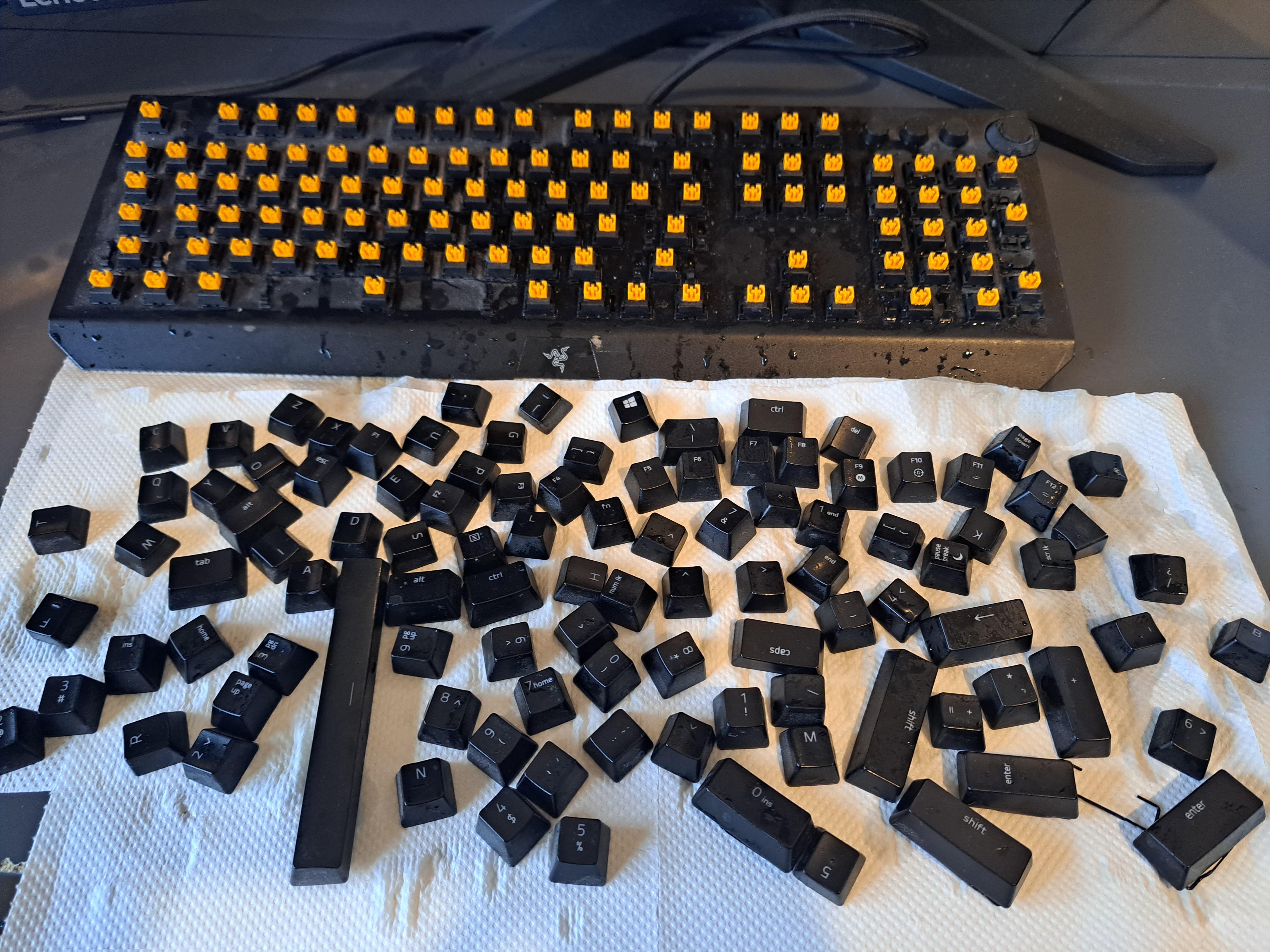
Just to add: I disconnected it as fast as I could, tipped it over and poured what I could out. Is cleanup still possible or do I need a new keyboard?
kullehh
try orange juice next time,
throwawayoregon81
r/boneaplletea?
Edit; misspelled intentionally to copy ops misspelling
Sea_Doctor3172
Don’t do it again
C4llech
Yeah. Use a straw. 😉
basddo
did this to mine but with a coke, cleaned it asap and it’s fine.
RentonZero
Besides using alcohol just hope it’s not got into the switches or boards
JPro1155
Throw it in the dishwasher, best way to get rid of any residual stickiness./s
MHWGamer
don’t spill apple juice on your keyboard. Works fine for me
More_Shift61
Spilt tea all over my laptop, i just let it dry and it came back alive i dont think theres much else to do just make sure theres no small holes that mightve filled up
rimakan
Don’t spill it next time. Try coke and mentos instead
Comfortable_Pace_965
Don’t worry, it happens to everybody.
Next time have a box of tissue nearby, so you can clean it as soon as it happens.
marsteroid
are expensive keyboard pointless? anyway i suggest you to use a warm microfiber cloth qnd a paper towel after.
_Grimo_
Fully disassemble and use electronics cleaner / alcohol. Clean thoroughly, let dry (repeat as needed)
I’ve done the exact same with a bottle of grape juice (‘:
Edit: I used a pack of multi-sized cotton sticks (? Q-tips essentially) to get in the nooks and crannies
0TheNinja0
Next time you better watch out
Nahassa
best excuse to get a wooting 60 HE <3
dobi425
My advice, spill check your juice.
Beginning_Bear7204
“spilled”
Weidz_
1. Unscew plactic casing, pry it appart, be careful of flat ribbon cables,
2. Rince everything in your shower, PCB included.
3. Let it dry ~12h.
4. Use sticky side of duct tape pieces to remove stuck hairs.
5. Optionally if you have a can of Contact Cleaner, spray some inside the switches while holding pressed.
* Do not use IPA Alcool, it will tun the plastic into dust.
* Make sure to press the switches a couple time when rincing them/spraying with CC,
SimbaXp
isopropyl alcohol. lots of it, flood it with it then dry it.
Own_Initiative396
You can try to humidize all the surface with a towel to remove the sugar.
You can also use isopropyl next but i don’t if it could potentially harms the polymer.
Are you able to remove the switches too?
xUnionBuster
Let ants loose on it, they’ll clean up
XSharkonmyheadX
Put it in the dishwasher
B3owul7
Buy new keyboard.
NervousMission7644
Don’t spill any next time
Android25SFW
Q, that’s my tips for you
VNG_Wkey
Step 1: don’t spill apple juice on keyboard
Step 2: don’t buy crappy Razer keyboards.
chad_
Ritual suicide?
​
Kidding. If the switches are removable, I would take them out and clean the board and case as well as possible with 90+% isopropyl alcohol. I’d probably just get a bowl and dip each keycap and switch in ISO then take them out and let them dry completely. If the switches are NOT removable, I’d use a dropper or a cotton swab to drip some iso into the switch mechanisms and plunge them up and down, then let them dry. The sugar is going to be your issue for a long time if you can’t clean the switches out.
fluffy_bottoms
RIP keyboard. You can cover it in jazz just fine, it’ll be a little sticky but aplle juice is a death sentence.
anatomiska_kretsar
Holy shit the comments here are so unfunny. Dump the key caps in a bucket with soap and water, let them dry, then just clean your keyboards and inbrtween the switches with a cloth
CuteDaisyPinkDress
Sugary. Uh oh. Good luck!! I did a can of lager and it was never the same again.
Working_Chipmunk_666
Go to an auto parts store and buy a can of electronics cleaner, it should be a compressed air can, stand your board at an angle with the keys down and spray it, best bet of getting out all the stickiness
Vincent55551
Don’t do that
RETIXXITER
Windows sticky keys is fucking annoying!!
Conceptualized-me
Well at least no doctors will be coming near your keyboard so…
AtrioxsSon
You just got yourself an Apple keyboard
Nipplesniffer500
Drink the applejuice
TTYY200
Clean eat key with warm water individually…..
I learned the hard way …. If you throw all of them in a bowl of hot water at the same time you’ll damage the finish on the keys lol.
Warm water not hot.
One key at a time….
I’d be really careful with soaps…. Dish soap has bleach in it, so avoid dish soap, I’d also avoid rubbing alcohol, it might affect the finish…. Just use warm water.
As for the keyboard itself. Compressed air. Damp Microfibre cloth.
CurvedStripe
That’s quite an orchideal…
I’ll see myself out.
itsAJayyee
grab a straw
ElfrahamLincoln
Don’t drink fluids next to your electronics. I say as I drink coffee at my PC.
UnderLook150
Open it up, wash down the PCB with soapy water, rinse with clear water, then rinse with 99% iso to help speed up drying, or just dry for a day or two in front of a fan.
Liquids and electronics don’t mean death. Liquids, electronics plus electricity does.
There is a chance it will work without cleaning the pcb, but with that much liquid spilled, it likely seeped further down onto the pcb.
I’ve spilled drinks on my board once, simply letting it dry after wiping the outside down did not fix it. Just kept sending random keypresses.
Opened it up, washed the pcb down, dried it out. Works fine even years later.
JaguarYT1
Things people recomment that I dont have: microfiber cloth, isopropyl alcohol, compressed air can, dishwasher, orange juice.
JaguarYT1
Thank you everyone that commented. I got my questions answered and the answers are starting to repeat. I asked the mods to lock my post, just too many notifications.

44 Comments
Just to add: I disconnected it as fast as I could, tipped it over and poured what I could out. Is cleanup still possible or do I need a new keyboard?
try orange juice next time,
r/boneaplletea?
Edit; misspelled intentionally to copy ops misspelling
Don’t do it again
Yeah. Use a straw. 😉
did this to mine but with a coke, cleaned it asap and it’s fine.
Besides using alcohol just hope it’s not got into the switches or boards
Throw it in the dishwasher, best way to get rid of any residual stickiness./s
don’t spill apple juice on your keyboard. Works fine for me
Spilt tea all over my laptop, i just let it dry and it came back alive i dont think theres much else to do just make sure theres no small holes that mightve filled up
Don’t spill it next time. Try coke and mentos instead
Don’t worry, it happens to everybody.
Next time have a box of tissue nearby, so you can clean it as soon as it happens.
are expensive keyboard pointless? anyway i suggest you to use a warm microfiber cloth qnd a paper towel after.
Fully disassemble and use electronics cleaner / alcohol. Clean thoroughly, let dry (repeat as needed)
I’ve done the exact same with a bottle of grape juice (‘:
Edit: I used a pack of multi-sized cotton sticks (? Q-tips essentially) to get in the nooks and crannies
Next time you better watch out
best excuse to get a wooting 60 HE <3
My advice, spill check your juice.
“spilled”
1. Unscew plactic casing, pry it appart, be careful of flat ribbon cables,
2. Rince everything in your shower, PCB included.
3. Let it dry ~12h.
4. Use sticky side of duct tape pieces to remove stuck hairs.
5. Optionally if you have a can of Contact Cleaner, spray some inside the switches while holding pressed.
* Do not use IPA Alcool, it will tun the plastic into dust.
* Make sure to press the switches a couple time when rincing them/spraying with CC,
isopropyl alcohol. lots of it, flood it with it then dry it.
You can try to humidize all the surface with a towel to remove the sugar.
You can also use isopropyl next but i don’t if it could potentially harms the polymer.
Are you able to remove the switches too?
Let ants loose on it, they’ll clean up
Put it in the dishwasher
Buy new keyboard.
Don’t spill any next time
Q, that’s my tips for you
Step 1: don’t spill apple juice on keyboard
Step 2: don’t buy crappy Razer keyboards.
Ritual suicide?
​
Kidding. If the switches are removable, I would take them out and clean the board and case as well as possible with 90+% isopropyl alcohol. I’d probably just get a bowl and dip each keycap and switch in ISO then take them out and let them dry completely. If the switches are NOT removable, I’d use a dropper or a cotton swab to drip some iso into the switch mechanisms and plunge them up and down, then let them dry. The sugar is going to be your issue for a long time if you can’t clean the switches out.
RIP keyboard. You can cover it in jazz just fine, it’ll be a little sticky but aplle juice is a death sentence.
Holy shit the comments here are so unfunny. Dump the key caps in a bucket with soap and water, let them dry, then just clean your keyboards and inbrtween the switches with a cloth
Sugary. Uh oh. Good luck!! I did a can of lager and it was never the same again.
Go to an auto parts store and buy a can of electronics cleaner, it should be a compressed air can, stand your board at an angle with the keys down and spray it, best bet of getting out all the stickiness
Don’t do that
Windows sticky keys is fucking annoying!!
Well at least no doctors will be coming near your keyboard so…
You just got yourself an Apple keyboard
Drink the applejuice
Clean eat key with warm water individually…..
I learned the hard way …. If you throw all of them in a bowl of hot water at the same time you’ll damage the finish on the keys lol.
Warm water not hot.
One key at a time….
I’d be really careful with soaps…. Dish soap has bleach in it, so avoid dish soap, I’d also avoid rubbing alcohol, it might affect the finish…. Just use warm water.
As for the keyboard itself. Compressed air. Damp Microfibre cloth.
That’s quite an orchideal…
I’ll see myself out.
grab a straw
Don’t drink fluids next to your electronics. I say as I drink coffee at my PC.
Open it up, wash down the PCB with soapy water, rinse with clear water, then rinse with 99% iso to help speed up drying, or just dry for a day or two in front of a fan.
Liquids and electronics don’t mean death. Liquids, electronics plus electricity does.
There is a chance it will work without cleaning the pcb, but with that much liquid spilled, it likely seeped further down onto the pcb.
I’ve spilled drinks on my board once, simply letting it dry after wiping the outside down did not fix it. Just kept sending random keypresses.
Opened it up, washed the pcb down, dried it out. Works fine even years later.
Things people recomment that I dont have: microfiber cloth, isopropyl alcohol, compressed air can, dishwasher, orange juice.
Thank you everyone that commented. I got my questions answered and the answers are starting to repeat. I asked the mods to lock my post, just too many notifications.