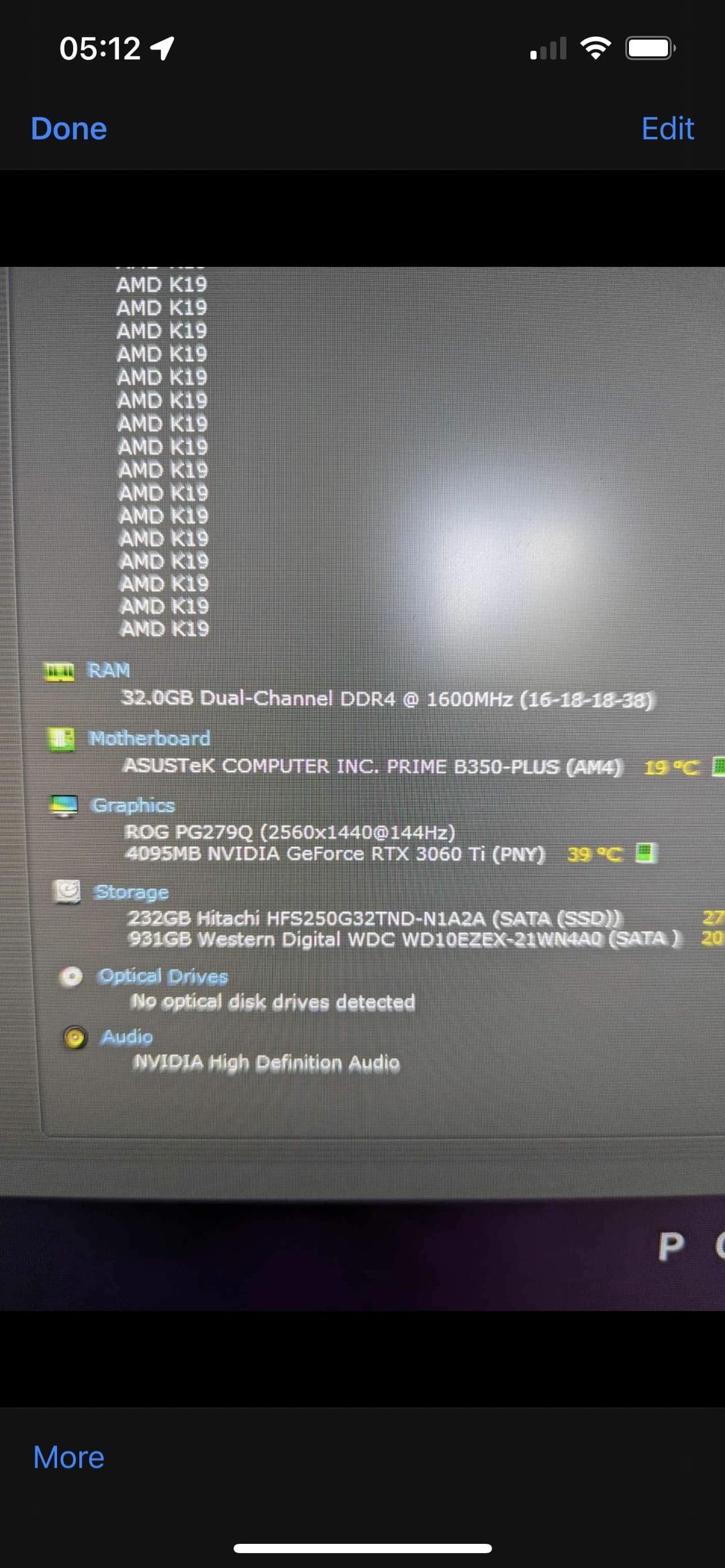
Sorry if this is a stupid question! I assume the local disk is the 232gb hitachi storage, but where is the 931gb western digital and how do I access it? If I can’t, how do I add more storage? Basically used up all the storage with two games and then regular admin stuff so any advice would be much appreciated
Rizleybear
Not an answer to your question but that ram speed is suspiciously low, especially for ddr4, have you got expo/xmp turned on in the bios?
oracle_dude
More than likely the second drive isn’t even formatted. Load disk management and see if it’s listed there. If so, you should have the option to format it and assign a drive letter.
bucketofbrain
Right click on start button -> File Explorer and the other drive should be on the left side panel under This PC along with your C drive
Or you can just click advanced storage options if you scroll down and hit Disk and volumes.
lxnch50
In Steam, when you install a game, click the “gear icon” and then you should have an option to add a drive for Steam to use.
Or in Steam: Steam>Settings -> Storage: Click the dropdown and then “Add Drive”
Look for partitions. Maybe there is no partition on it and you wont see it in file explorer before you create one.
GameUnionTV
Why 3060 Ti is 4GB VRAM, it should be 8GB.
LordJambrek
Win+R to open the run window. Type in diskmgmt.msc and you’ll see if the disk is listed there. Initialize it if needed, create partition etc. If it’s not, check inside the pc. Maybe just a loose cable.
delayed-wizard
Win+Shift+S
SlightStrength5822
Why do you have a 4gb rtx 3060 ti?
therubyminecraft
Search computer management in windows search then go to disk management and format the 1tb drive (DONT FORMAT THE 256 ONE)
I would recommend looking up a tutorial so you do nothing wrong

11 Comments
Sorry if this is a stupid question! I assume the local disk is the 232gb hitachi storage, but where is the 931gb western digital and how do I access it? If I can’t, how do I add more storage? Basically used up all the storage with two games and then regular admin stuff so any advice would be much appreciated
Not an answer to your question but that ram speed is suspiciously low, especially for ddr4, have you got expo/xmp turned on in the bios?
More than likely the second drive isn’t even formatted. Load disk management and see if it’s listed there. If so, you should have the option to format it and assign a drive letter.
Right click on start button -> File Explorer and the other drive should be on the left side panel under This PC along with your C drive
Or you can just click advanced storage options if you scroll down and hit Disk and volumes.
In Steam, when you install a game, click the “gear icon” and then you should have an option to add a drive for Steam to use.
Or in Steam: Steam>Settings -> Storage: Click the dropdown and then “Add Drive”
​
https://preview.redd.it/een3lnavl9zb1.png?width=816&format=png&auto=webp&s=39b659d7bd197e8cbff7afa7b5459358b8eca2de
Look for partitions. Maybe there is no partition on it and you wont see it in file explorer before you create one.
Why 3060 Ti is 4GB VRAM, it should be 8GB.
Win+R to open the run window. Type in diskmgmt.msc and you’ll see if the disk is listed there. Initialize it if needed, create partition etc. If it’s not, check inside the pc. Maybe just a loose cable.
Win+Shift+S
Why do you have a 4gb rtx 3060 ti?
Search computer management in windows search then go to disk management and format the 1tb drive (DONT FORMAT THE 256 ONE)
I would recommend looking up a tutorial so you do nothing wrong