
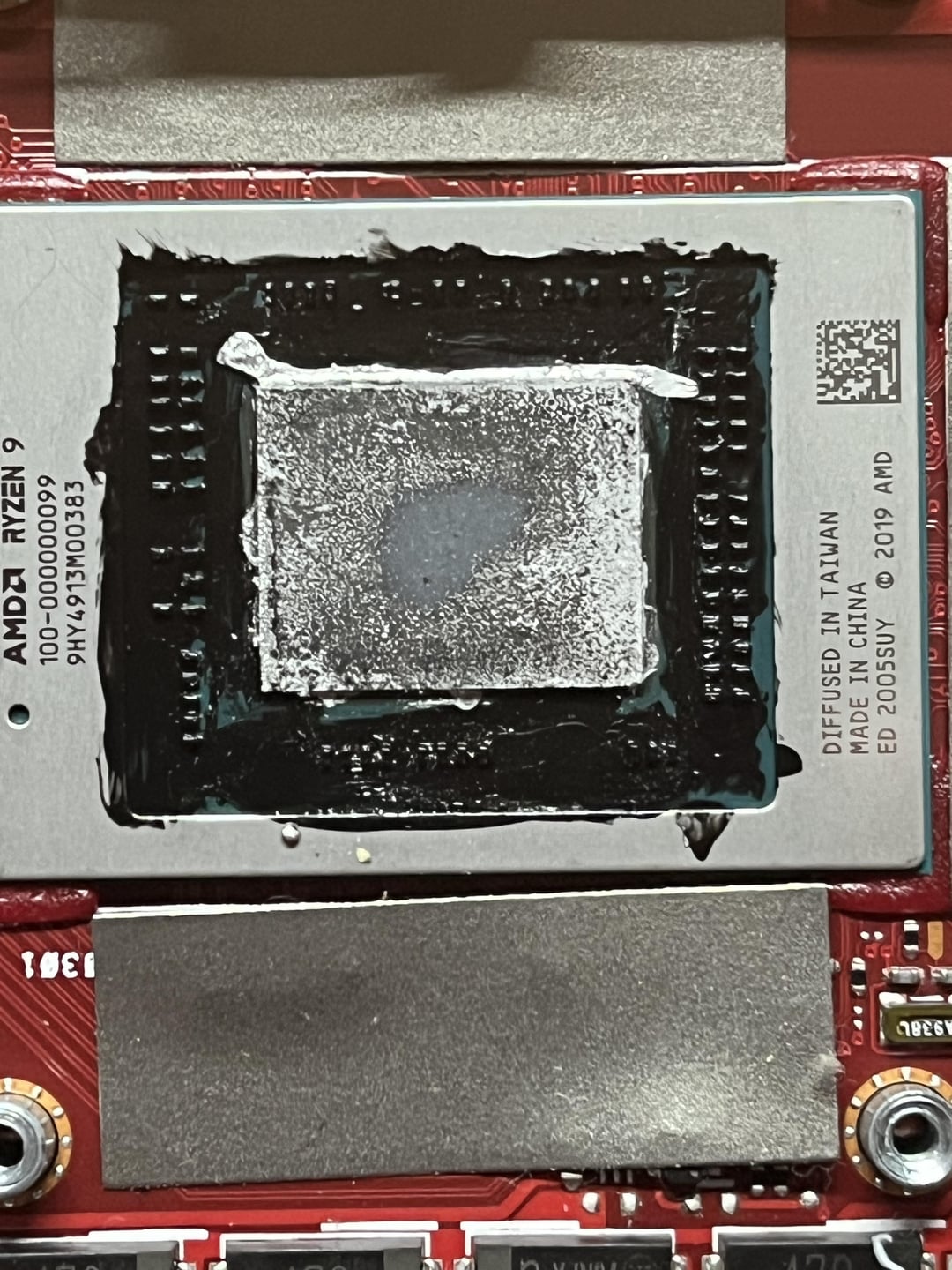
Hello, sorry if this is the wrong sub but I have close to zero experience with this.
Bought this laptop already liquid metal’d a few years ago from r/hardwareswap, handed it down to my younger sibling (switched to a 14” MBP) and was running fine up until earlier today when according to him it wouldn’t turn on when he got back from school.
Tried posting without anything connected – extra ram (this laptop has soldered-on ram + open slot), ssd, wifi card, battery – to no avail. Was hoping to at least see a no boot device detected when I removed the ssd.
Thats when I decided to check the cpu/gpu which I was dreading cuz I don’t have any firsthand experience with Liquid Metal. I’m more scared of the GPU as it feels like there’s a hole (shiny textured part) but I really cant tell if it’s raised or not.
Thank you for responses (if there would be any.)
2 Comments
You honestly should not have done that if you don’t know what you’re doing. Liquid metal needs to be dealt with gently. Any overspill will fry the device. At this point you’re better off cleaning all the liquid metal up and using regular thermal paste. Or have somebody who knows what they’re doing put it back together with liquid metal.
You need to make sure none of that metal is on anything other than the die. If you put new liquid metal on, watch a bunch of tutorials first and make sure you use a very small amount.
You should have started the troubleshooting before (I mean posted before ) taking the cooler off as now its gonna be extra hard for anybody to help because now there’s another variable to deal with.
I hope you disconnected the battery. If you haven’t, do so before going any further. You will immediately fry this thing at the smallest slip of a screwdriver or drop of liquid metal
Did it light up at all? What happened when you plugged your charger into it? Did it show it was charging?
If you have a syringe of Conductonaut, use the fine tip to very carefully suck up the upper left and right pools. Use clear nail polish to protect the SMDs on the outer ring of the die. Let dry and mask off the area with painters tape. Clean the die.
Edit: Just saw the second pic. That’s bad. Best you can do for those SMD areas is acetone/isopropyl and a Q-tip. Use a brushing/sweeping motion to get the LM away from those. I use a small phone tripod and my phone‘s optical zoom to act as a magnifying lens.
I wouldn’t worry about the pitting – if you can get it to boot, some regular paste will be fine.