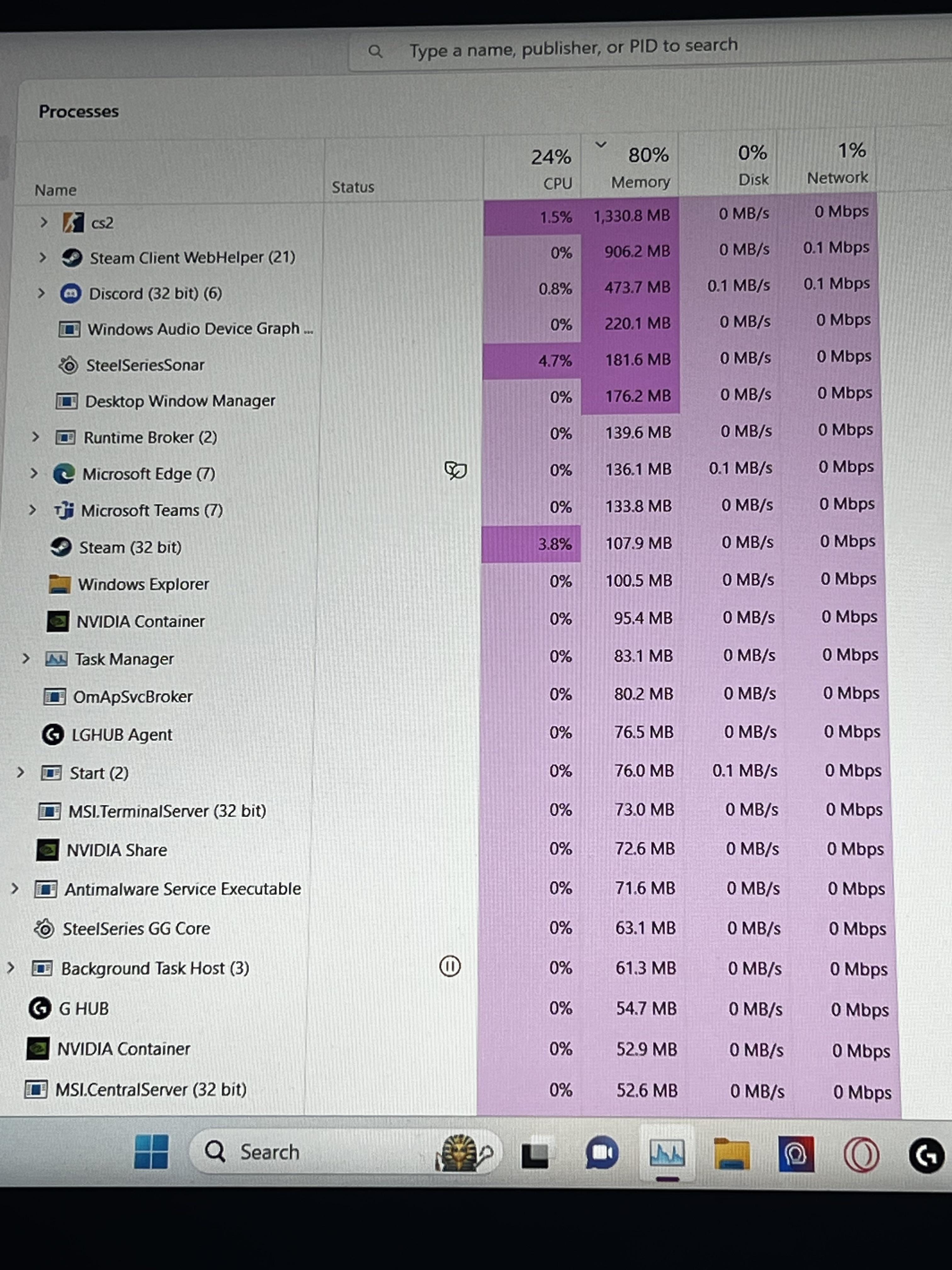
Holy shit why is my memory being used up so much. I have 16GBs and only gave me issues after I did a factory reset, now I’m always stuttering and crashing. Any ideas?

Holy shit why is my memory being used up so much. I have 16GBs and only gave me issues after I did a factory reset, now I’m always stuttering and crashing. Any ideas?
33 Comments
[deleted]
Start by disabling those apps you dont need, MSI whateveritis, Teams, SteelSeries Sonar, Edge, NvidiaShare, Ghub.
Take a baseline ram reading without anything going, no games, no discord, nothing.
Show the memory page in the performance window.
Used ram is good ram. I see nothing wrong here. Windows will automatically use and release ram as needed. I guarantee you’re not losing any performance in CS2.
The game is only using 1GB. The game is not the problem.
Use a different web browser and also get ISLC (intelligent standby list cleaner) and also others have said to disable startup programs and apps with an example being the like 3 or 4 steel series apps and programs running at once.
Looks like you don’t have much memory so the percentage looks high
https://preview.redd.it/lidktj8dfnyb1.png?width=3024&format=png&auto=webp&s=69131b719aa57ddb597d1507f15cca790cb82da9
What made you reset it in the first place? Have you run a memory test? I recommend the latest Memtest. It’s best to know the RAM is stable before troubleshooting anything else.
https://www.memtest86.com/
For the unaware, windows 11 will use 8gb of ram easily by default. Just basic windows shit at this point.
Check your drivers
I don’t see anything abnormal. I wouldn’t worry about the RAM percentage. Most software will hold allocated RAM until it is requested by another process. Also unused RAM is mostly a waste. Having 50% available instead of 20% will not give you any performance increase.
If you’re experiencing stuttering/crashing, it’s likely something else. I would suggest checking the event log after a crash to see if there are any errors. It should help point you in the right direction. Make sure you installed/updated all drivers since you reset your PC.
RAM is want to be used. Would you rather see it only using 30% of RAM available
The problem is you, being on Windows 11 and playing games with 7 browser tabs running in the background.
do you disable startup programs?
Also cutting down windows bloat allowed me to cut my ram usage down to 2.8gb on startup in a system with 32gb ram
By a factory reset, do you mean a clean reinstallation of Windows? Or is this a pre-built, and you reset it from a recovery partition?
Do not factory reset, reinstall the OS properly.
Also it seems like there’s a lot of shit running in the backround.
So i seeyou using geforce experience. I suggest doing a debloated graphics driver with nvclean install and ddu and not using geforce, theres YouTube vids how to do it. As when you do this it will eliminate stutters and most like all crashes as thats what it did for me
Disable more background processes.
Eh, that’s typical. I’m currently on 56^ memory usage with 32GB of ram. So more than 16gb being used on idle.
Programs use RAM and you have a lot of programs running. Windows also uses RAM.
Try to download ISLC (Intelligent Standby List Cleaner). It might help. Watch tutorial on YouTube and you good.
Windows 11 runs at 8 gb so all your applications have only 8
Pretty normal for windows. Last year I upgraded my ram for the first time since 2010. 32gb is borderline required these days. Only if you run a very optimised setup is 16 sufficient.
Although now I’m on Linux and feel like a dingo with my 32gb as Linux rarely uses more than 4g and is still somehow faster than windows. (And I’m running a very ram inefficient distro at that).
Someone I know recently had this issue, check how much RAM is actually in your system under the performance tab. You mentioned stuttering and freezing which can be caused by not having enough RAM.
If it does say there’s 8GB RAM you’ll have to turn your pc off. Replug the second stick, of course pay attention to the dual channel method. Then turn your pc on again and see if it’s being found by the system.
If it doesn’t, or your pc won’t turn on/give screen you have to start over again with one stick, then turn on the pc. After that repeat with the second stick, turn off, plug in and turn on.
Also check your RAM speeds under the bios since it might’ve been reset.
If it still won’t find the 16GB RAM, swap the sticks which might sound silly but worked in our case assuming you did all the above steps first.
I can see way too much crap there, Ghub, Msi shiz, steelseries, edge.. And also win11
Cs2 thanks you for feeding him.. Nom Nom
Maybe you forgot to enable xmp?
Free RAM is wasted RAM. And 16 GB isn’t thaat much anymore with Win 11 and modern games.
Nothing wrong here.
Upgrade to 32gb already. The 16gb meme.is long.since dead. You’ll thank me later.
As everyone already told you, this is fine
You’re stuttering and crashing in cs2, right? Does that happen in any other game?
Also if you want to reinstall windows, do it properly with an installer on a USB stick and not by using the option in the settings
Stop all memory hogging processes. I’d start with stopping that cs2 process.
this is why you dont listen to people thag say 16 is enough just get 32