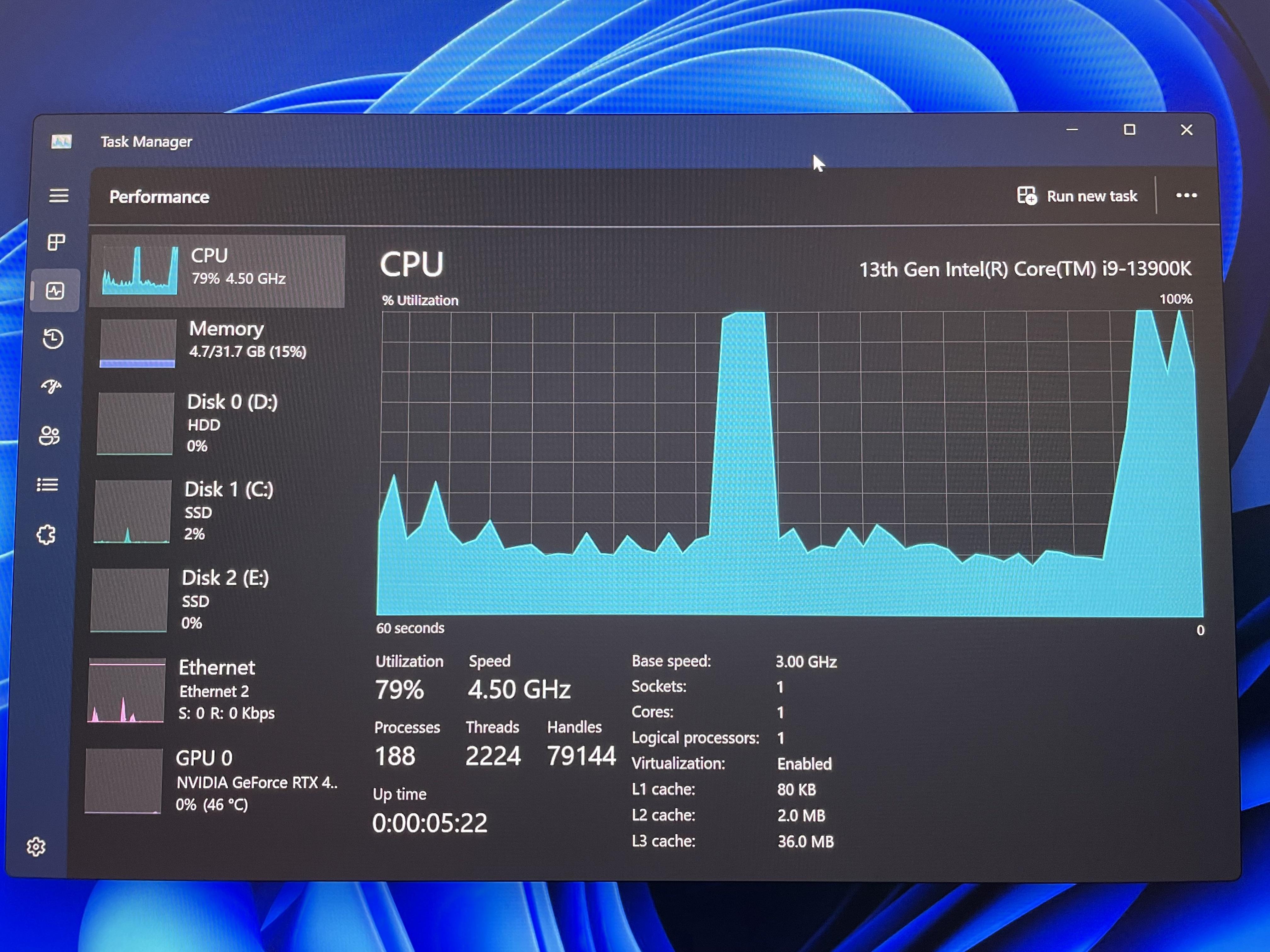
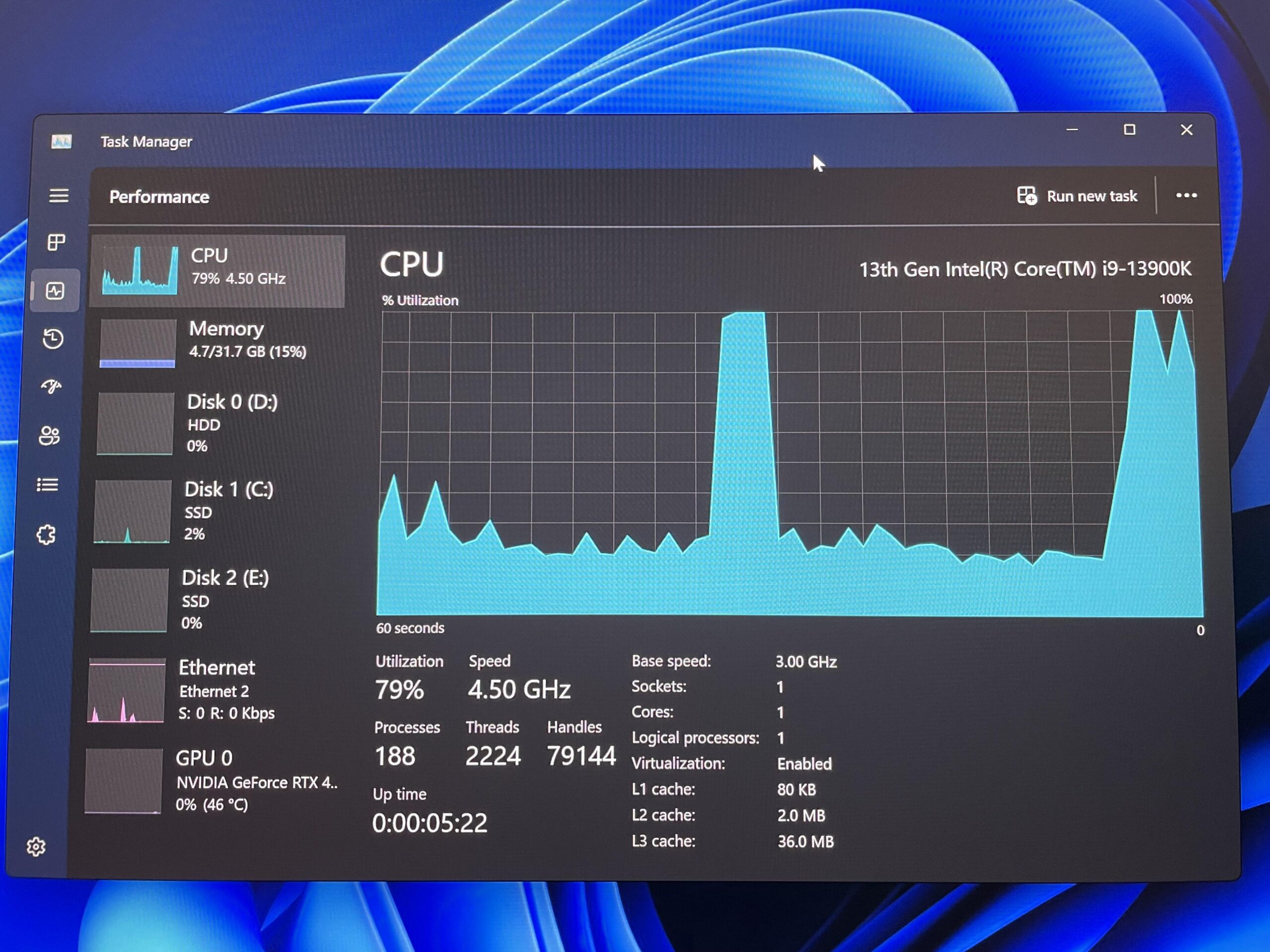
For context, I was playing ark survival accended and alt tabbed to check a website. Clicked back into the game and it hard crashed. I tried shutting down and when I turned it back on again, everything that usually took 2 seconds to open up was taking ages and when task manager finally opened, it said the cpu was at 100% usage….. for just having the task manager open…
Cinmarrs
Msconfig > boot > advanced options > make sure number of processors is unchecked, and if its checked, select all cores https://imgur.com/a/vjKicKM
B1ue-99
Your CPU uses unly 1 core.
In Windows open system configuration in the Boot tab klick on advanced options. There should be an option to limit Cpu Cores. Deaktivate that option.
If thats not the problem then check your BIOS, it is possible to deactivate cores there too.
I’ll assume it’s not a troll or someone using VMware that only shared 1cpu…. Something is wrong in your bios or with your windows install or both.
I would start in your bios to see if the motherboard. You should be seeing more than one core. Does your motherboard bios support that cpu? Maybe you need an update? Did your bios Bork and defaulted to a secondary bios that had an old version with no support for 13900k?
Flashy-Ad8008
It is intel forcing u to upgrade to the 14900k
iC0nk3r
We just gonna pass over the fact OP is trying to pass off “bottling” as the proper way to describe this issue?
YeahBoiSheThicc
Had this happen to me when on a Ryzen processor. Fixed it by reseating it.
XRaiderV1
legitimately had system restore on my old rig save me when an attempt at booting to safe mode failed, and resulted in the login processes suiciding every attempt at logging in.
I will NEVER knock system restore again, in fact.. -goes and makes system restore backup-
JewpiterUrAnus
Going to check mine when I get home you’ve made me paranoid. Mines been slow asf since the new update

13 Comments
It’s set to use 1 core and 1 thread, you can change that in the bios or using intels software
what?
​
https://preview.redd.it/c40h5z9x45yb1.png?width=256&format=png&auto=webp&s=50970e4b3aea36a9b0d24adb83e015b37af42e4e
For context, I was playing ark survival accended and alt tabbed to check a website. Clicked back into the game and it hard crashed. I tried shutting down and when I turned it back on again, everything that usually took 2 seconds to open up was taking ages and when task manager finally opened, it said the cpu was at 100% usage….. for just having the task manager open…
Msconfig > boot > advanced options > make sure number of processors is unchecked, and if its checked, select all cores https://imgur.com/a/vjKicKM
Your CPU uses unly 1 core.
In Windows open system configuration in the Boot tab klick on advanced options. There should be an option to limit Cpu Cores. Deaktivate that option.
If thats not the problem then check your BIOS, it is possible to deactivate cores there too.
It should say this:
https://preview.redd.it/2c55d5itc5yb1.jpeg?width=2592&format=pjpg&auto=webp&s=b56bf98a7e94ce6d0dfe8e9293031f38cfd2a966
Got the same cpu! i9-13900k FTW!
I’ll assume it’s not a troll or someone using VMware that only shared 1cpu…. Something is wrong in your bios or with your windows install or both.
I would start in your bios to see if the motherboard. You should be seeing more than one core. Does your motherboard bios support that cpu? Maybe you need an update? Did your bios Bork and defaulted to a secondary bios that had an old version with no support for 13900k?
It is intel forcing u to upgrade to the 14900k
We just gonna pass over the fact OP is trying to pass off “bottling” as the proper way to describe this issue?
Had this happen to me when on a Ryzen processor. Fixed it by reseating it.
legitimately had system restore on my old rig save me when an attempt at booting to safe mode failed, and resulted in the login processes suiciding every attempt at logging in.
I will NEVER knock system restore again, in fact.. -goes and makes system restore backup-
Going to check mine when I get home you’ve made me paranoid. Mines been slow asf since the new update
How many startup programs?