
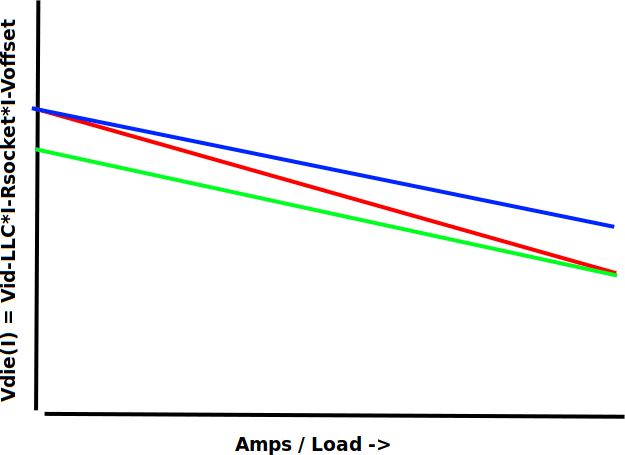
Then if the red line is stock behavior (pretty agressive LLC). Then if LLC is set less agressive the slope decreases (Blue line). Then when adding offset voltage: Green line. Ofcourse this is all static and not transient behavior or including ripple which increases with VRM load.duce the Vcore given by the motherboard when the load increases.
Now, why would you want to do that? I understand that at high load, the VRM’s might give more ripple voltage which could cause harm to the CPU (lets say, 1.4V + 0.2V ripple = 1.6V peak voltage which might be harming). Is this the actual reason for applying LLC?
But then, what my problem with this is, is that applying a high level of LLC (high vdroop) will cause very high *idle* voltages (at least that’s my observation). With LLC4 or LLC5, then it will apply like 1.5V when my CPU is at 6GHz and idle (if I have C-states disabled etc). I don’t want my cpu to be at 1.5V 24/7! Sure Vcore might drop then to 1.3V under load but it’s still 1.5V idle…
Anyway, my strategy has been to reduce the LLC and then apply undervolt. Just apply LLC3 (giving more voltage when CPU is loaded), but apply 100mV undervolt (to reduce idle voltage). Now CPU is stable under load at reasonable voltage but idle voltage is also reduced.
Of course this is all measured by superIO, so who knows what is actually the die voltage. Going to my next point: isn’t there already like a pretty large Vdroop because of the socket and trace resistance in the motherboard? So why would you apply even more Vdroop intentionally? Hypothetically shouldn’t the LLC work the other way (so apply more voltage when CPU is under load). Of course this ignores the ripple fact but that is what load line *compensation* should do… Compensate for the Vdroop caused by resistance….
Maybe I am completely wrong with my understanding and reasoning here…
​
Edit:
[https://i.imgur.com/bAM9ETq.png](https://i.imgur.com/bAM9ETq.png)
According to my understanding: Vdie(I) = Vid – LLC\*I – Rsocket\*I – Voffset
Then if the red line is stock behavior (pretty aggressive LLC). Then if LLC is set less aggressive the slope decreases (Blue line). Then when adding offset voltage: Green line. Ofcourse this is all static and not transient behavior or including ripple which increases with VRM load.
Why would you prefer red line over green line?
3 Comments
I leave my LLC in the bios on auto.
Couple things:
Firstly, LLC is shorthand for Load Line Calibration, which is the relative undershoot delivered by the vrm for a requested voltage. Proper implementation means that at the smallest/least different setting, the voltage the cpu requests is given as code to directly as possible, and at the greatest/most different setting it’s delivering less voltage than requested, with the total amount differing between vendors. LLC doesn’t deliver more voltage under load, that is not the purpose of LLC, that’s what a positive user-defined voltage offset does.
Secondly, LLC’s main design function is to provide the vrm with a margin of error to adjust to rapid load insert and removal. It’s meant to help your voltage output remain consistent during normal use, not reduce overshoot brought on by a load insert. Additionally, overshoot is something that’s expected to happen (admittedly briefly) as a response to load insert: the vrm controller, high side, and low side fets can’t anticipate load inserts, they can only respond to them and attempt to keep the overshoot to a relative minimum. The overshoot can’t be controlled, it’s decided by the latency between the output of the vrm being reported back to the controller via the super I/O or dedicated feedback circuitry. The more latency you have, the higher the output spike and voice versa. Of course there will always be some latency, and therefore some overshoot, but 10ms of 1.6v being sent to the cpu socket via overshoot isn’t going to kill your cpu outright for multiple reasons.
The easiest solution is to have a lower voltage with a tighter LLC setting. Just set it as low as you need for what you know to be safe (ie. LLC level 2 with vcore set to 1.25v or 1.3v or whatever, idk what safe voltages are on modern Intel chips)
Hopefully not to add more confusion, but I’ve been reading about this for undervolting a 14700k or 14900k. It’d be nice if there was something coherent out there about this.
When the CPU has a heavy load – like all cores running 100%, there will be voltage droop. The voltage to each core will drop. This always happens under heavy load, but in normal circumstances (no tweaking, standard settings), it usually won’t cause a crash.
When you start overclocking or undervolting, the cores can be starved when that heavy load kicks in. The LLC (load line calibration) setting in the bios is a way of compensating for this. Most motherboards use 1 – 5 for the LLC options with 1 being least and 5 being the most voltage compensation. Typical defaults are a 3, but it varies. Gigabyte uses words instead of numbers, with the first on the list being lowest and the last being heighest. Eg. “Normal, low, medium, high, turbo, extreme.” Really annoying names. With undervolting people seem to like “Medium”. But I haven’t tried it, as I said.
Do you want to mess with LLC at all? If you’re undervolting or OC’ing, you can try without it. The CPU lottery will determine your success. But it’s likely that adjusting LLC to a higher setting will let you drop the voltage a little more.
A common question: IF I’m setting my CPU voltage offset to a negative (undervolting), then what’s the point if I’m adding voltage back with LLC? People say… The LLC isn’t as much as the offset and it’s based on CPU demand, so it kicks in when there’s more droop. Higher LLC settings reduce droop the most, but also are supposed to increase your average CPU voltage the most. If you put the LLC too low, then the droop may, at times, drop the voltage enough to crash the machine. I hope that’s helpful. There are surprisingly few videos and posts that are clear about this and don’t make big errors. Undervolting is so common a strategy, you’d think there would be solid info on the major sites and channels. Nope. If they have anything they just tell you to use Intel XTU. That’s not a terrible idea, especially for getting an idea of what your CPU can handle, but it has limitations such as: Won’t run if you don’t have VBS memory protection enabled. But then you can’t undervolt! (This was because of a security issue that apparently no longer exists). Also, you have to always have XTU running. Anyway, it seems like the BIOS is the better option for long term undervolt/OC since more fine adjustments are available.