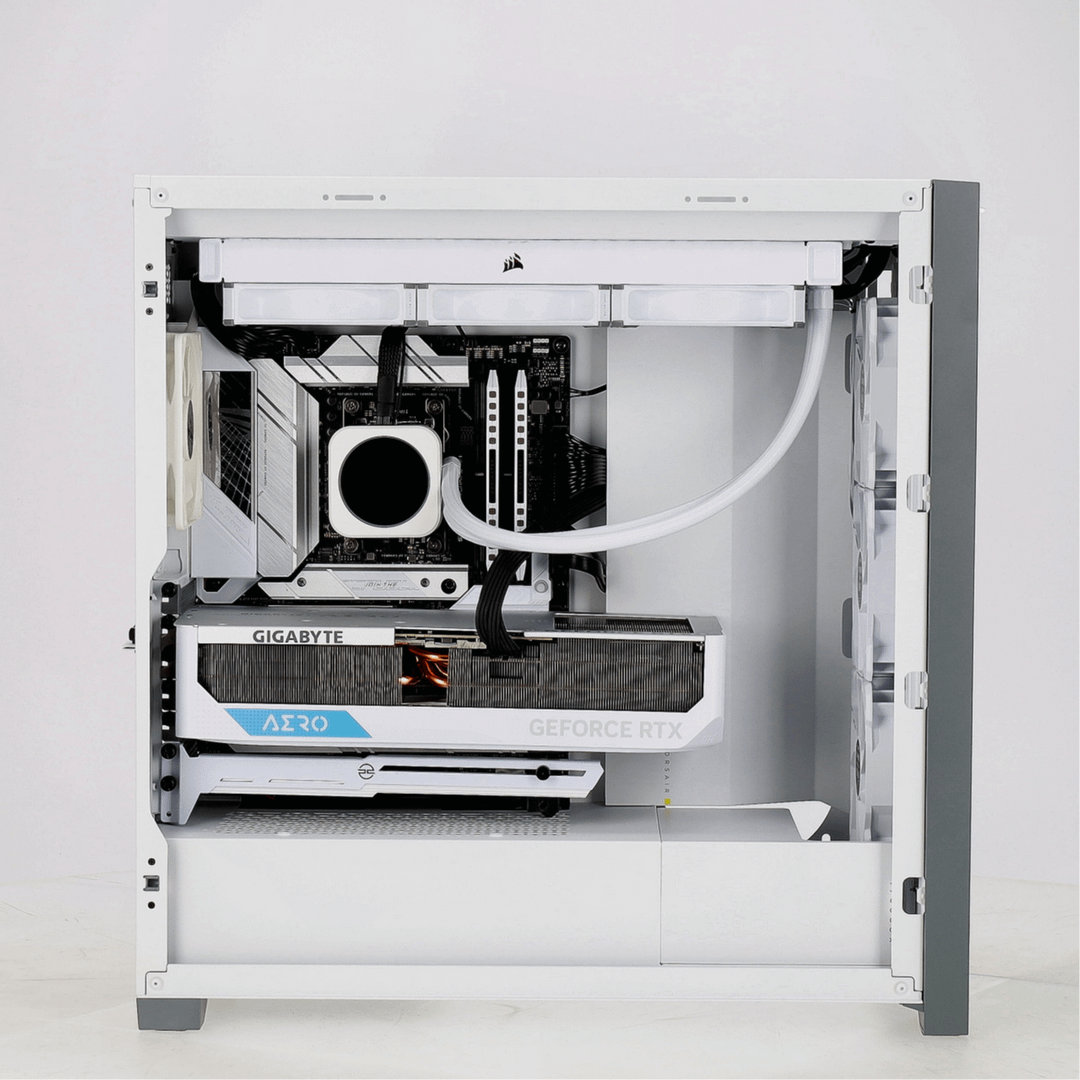
Recently ordered my first custom build & was sent these previews.. was a bit surprised with the way the GPU is sitting, is it anything to be concerned about?
Also, can anyone tell me what those 3 holes on the closed side are for? If they’re for fans, is it necessary to install some more?
Please let me know if you notice any other issues with this build that I can’t see, thank you kindly.
Cheesymaryjane
it’s sagging more than soulja boy in 2007.
TechCer
I don’t own the card, but i feel pain looking at this.
finH1
Bro just spend £10 to support a £1000+ card
Oninonenbutsu
Why not use the bracket which came with the card? And yeah that’s sagging quite a bit.
[deleted]
[deleted]
Aceman3k
Personally I’ve had a gpu that I put in my secondary build that sagged quite a bit more than this, and made a similar post. Everybody in the comments was making fun of me saying that I screwed it into the wrong slot, which I literally didn’t. I tried screwing into a different and it wouldn’t fit in the pcie slot. I still use that build to run servers to this day. Anyway, in my experience, you should be fine.
juustoplay
What is GPU sag?
DurpOverlord
Bro, just get a support or anything to prop it up. You can bend one of the pcie cover for a cheap soultion
With an OCD-esque build like that, why wouldn’t you want it level?
Gabarazzi
Aaaahh my eyes!!
Suikerspin_Ei
Correct me if I’m wrong, but isn’t that white support at the bottom the GPU support bracket to avoid your graphics card to sack?
abcdefGerwin
If you ask the question, what would you think
thiswayup420
I just got a PC from pc specialist you can put a comment in for changes before they ship, just tell them they’re missing a screw from the gpu bracket, you can see its missing on the picture, I have the same but has 3 in
bynarie
no
Iggy_DB
Kinda? Just put something under it
thehotdogman
No GPU sag is OK yah dingus. Use the support bracket.
meSh_1985
Its fine.
visual-vomit
I feel like these chonky cards should come with pcie cables, regardless of if you’re gonna mount it vertically or not. The whole mounting it directly to the mobo is kinda outdated now compared to when cards were way smaller.
Hypnotoddi
Use original one, maybe you should add 2 additional holes for screws, but original is much better.
Dubbleagent_hmm
It’s not that bad but you should definitely try to support it with something
Southern-Analyst-739
Just get a Lego and build a tower
DoughNotDoit
Jesus, I’m still blown away with how of a thiccboy gpus today
Murky-Fruit3569
Everything get saggy over time.
Everything.
oldmonk_97
just.. put a glue stick under it or something
aristo87
The GPU bracket they used typically don’t work well. You can get one that suports the right part of the GPU for not much money, but honestly just anything that is sturdy and the right size that fits under there is fine.
The one they used probably came with the GPU.
John_Mat8882
Even the anti sag is sagging under that behemoth.
You should use one of those magnetic extensible columns and place it towards the front of the GPU.
The uphere anti sag bracket, isn’t clearly enough..
Maybe_Next_Time_22
These “anti sag” things are so useless, it would work on some dual fan 3060 maybe, but that doesnt need it to begin with lol. Just prop the card with something from directly below on the opposite side.
Dry-Percentage-5648
These horizontal “anti sag” brackets are absolutely useless most of the time. Get a vertical one and you’re set. Cheap and reliable.
Henriquest18
I have a old hd6850 that stopped working because of that. If It sag too much big chances of problems.
azab1898
I’m gonna say a no. No amount of sag should be good for a gpu
Practical-Cup9537
That card comes with a support bracket that mounts under the Motherboard and screws into the front of the GPU. Why not use that one?
Breklin76
A decent vertical mount is under $10 on Amazon.
fromlevel2ofhell
I prefer 0 sag. A gpu that new should still be perky and extremely fun to play with
*
Did you order from PC specialist? They just sent me a preview for mine too. I didn’t consider the colours of the parts too much but oh well. Looks like that missing screw on the anti-sag bracket might make a difference.
Master_Lord-Senpai
On the anti sag bar, bring the black adjustable notch more and more to the left until sag is gone.
Tadashix
Just build a small thin lego tower to support it. I’ve seen more people post about it

41 Comments
Recently ordered my first custom build & was sent these previews.. was a bit surprised with the way the GPU is sitting, is it anything to be concerned about?
Also, can anyone tell me what those 3 holes on the closed side are for? If they’re for fans, is it necessary to install some more?
Please let me know if you notice any other issues with this build that I can’t see, thank you kindly.
it’s sagging more than soulja boy in 2007.
I don’t own the card, but i feel pain looking at this.
Bro just spend £10 to support a £1000+ card
Why not use the bracket which came with the card? And yeah that’s sagging quite a bit.
[deleted]
Personally I’ve had a gpu that I put in my secondary build that sagged quite a bit more than this, and made a similar post. Everybody in the comments was making fun of me saying that I screwed it into the wrong slot, which I literally didn’t. I tried screwing into a different and it wouldn’t fit in the pcie slot. I still use that build to run servers to this day. Anyway, in my experience, you should be fine.
What is GPU sag?
Bro, just get a support or anything to prop it up. You can bend one of the pcie cover for a cheap soultion
https://preview.redd.it/76ss2lrbvixb1.jpeg?width=3072&format=pjpg&auto=webp&s=6ef74de9eae9d6ea6da944d662426f7423b7909f
With an OCD-esque build like that, why wouldn’t you want it level?
Aaaahh my eyes!!
Correct me if I’m wrong, but isn’t that white support at the bottom the GPU support bracket to avoid your graphics card to sack?
If you ask the question, what would you think
I just got a PC from pc specialist you can put a comment in for changes before they ship, just tell them they’re missing a screw from the gpu bracket, you can see its missing on the picture, I have the same but has 3 in
no
Kinda? Just put something under it
No GPU sag is OK yah dingus. Use the support bracket.
Its fine.
I feel like these chonky cards should come with pcie cables, regardless of if you’re gonna mount it vertically or not. The whole mounting it directly to the mobo is kinda outdated now compared to when cards were way smaller.
Use original one, maybe you should add 2 additional holes for screws, but original is much better.
It’s not that bad but you should definitely try to support it with something
Just get a Lego and build a tower
Jesus, I’m still blown away with how of a thiccboy gpus today
Everything get saggy over time.
Everything.
just.. put a glue stick under it or something
The GPU bracket they used typically don’t work well. You can get one that suports the right part of the GPU for not much money, but honestly just anything that is sturdy and the right size that fits under there is fine.
The one they used probably came with the GPU.
Even the anti sag is sagging under that behemoth.
You should use one of those magnetic extensible columns and place it towards the front of the GPU.
The uphere anti sag bracket, isn’t clearly enough..
These “anti sag” things are so useless, it would work on some dual fan 3060 maybe, but that doesnt need it to begin with lol. Just prop the card with something from directly below on the opposite side.
These horizontal “anti sag” brackets are absolutely useless most of the time. Get a vertical one and you’re set. Cheap and reliable.
I have a old hd6850 that stopped working because of that. If It sag too much big chances of problems.
I’m gonna say a no. No amount of sag should be good for a gpu
That card comes with a support bracket that mounts under the Motherboard and screws into the front of the GPU. Why not use that one?
A decent vertical mount is under $10 on Amazon.
I prefer 0 sag. A gpu that new should still be perky and extremely fun to play with
Buy the anti-sag leg ?
My solution
https://preview.redd.it/1g5o49bkdjxb1.jpeg?width=3024&format=pjpg&auto=webp&s=bc44e5b8f74b47b64f20ea690166f47c4ac1cc87
Take a lego guy, have them hold up the brick.
That gpu comes with an anti-sag bracket. Use it.
*
Did you order from PC specialist? They just sent me a preview for mine too. I didn’t consider the colours of the parts too much but oh well. Looks like that missing screw on the anti-sag bracket might make a difference.
On the anti sag bar, bring the black adjustable notch more and more to the left until sag is gone.
Just build a small thin lego tower to support it. I’ve seen more people post about it