Honestly I would just take the money and squirrel it away until you can afford a new build. That system is obsolete.
Acceptable_Ad_7137
Thing is , changing the cpu would mean new board and ram than gpu becomes bottleneck, so just fight with it and save up for a budget build
aminy23
You have 3 options:
1. Cheap, but can improve day to day use – 16GB RAM and SSD
2. Needed to keep your PC up to date by 2025 – new CPU, motherboard, and RAM
3. To actually improve gaming performance – graphics card, and possibly a power supply
Kulaoudo
Save money and buy all new when you can.
Otherwise, add SSD if you don’t already have one.
just-_-just
I’d only upgrade that PC if it was for daily office tasks and browsing, an SSD and more RAM. If you want gaming performance, nuke it and start over.
Username125628
GPU first although you might need a new PSU for that.
Cave_TP
Everything, upgrading either the CPU or the GPU is going to leave you limited by the other one.
Sell your old one to get some extra cash then buy a used office PC with a 9400 for ~150$. You can upgrade the PSU for 40-50$ (you might need a 10$ adapter if you get something with a proprietary MoBo) and then get an RX 5700 for ~100$.
peter_picture
Buy a console
Jhawk163
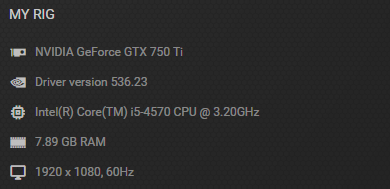
Gaming perf wise, none that are really worth it. Your CPU (and likely motherboard) have no room for OC, and I’d hazard a guess your GPU is a 750ti because it’s a prebuilt or modified Dell/HP, which means short of buying a new PSU as well as a new GPU, there’s nothing you could really upgrade to graphics wise.
The best you could maybe get out of it is 16GB of RAM and an SSD just to make it feel snappier, but any money spent on performance for this system at this point is a waste, it won’t be any meaningful upgrade for modern titles and won’t be able to be used in a newer system down the road.
If it were me, I’d just save up and buy a new system entirely.
NoStructure5034
Do people not see the “Meme/Macro” flair?
EntrepreneurFancy918
If you absolutely can’t wait to afford a full new system, just put 16gigs of ram and buy a 1060
swordfi2
Pretty much everything.
Goldenflame89
Holy crap no one can read flairs lmfao
Noxious89123
Everything you’ve pictured is so old, it really all wants an upgrade.
* What games do you want to play with it?
* What region are you in? (This affects used prices)
* What is your budget? $100? €300? £500?
I used a 2600K with a 980Ti and it worked pretty well. With that said, the 2600K is an i7 not an i5, and I also had it overclocked up to the eyeballs, with over a +30% overclock on the CPU and +75% on the RAM.
If you just want a little more FPS in some not-so-demanding older games, you could probably just grab a second hand GTX970 / RX570 / GTX1060 etc.
You’d see some benefit in everyday use from moving to 16GB of RAM too.
Unseen_Cereal
Stop giving legit answers guys, it’s a meme this time.
ZoharDTeach
Probably the motherboard first
and then everything else
lol
Bladed_Cargo
Man, people are posting 750 TIs with fourth gen i5s as memes..
ExcitingDrink2139
Get a 1050 ti
Latiesh
Don’t upgrade anything. Save more and just buy a new PC. If you decide to upgrade, you end up in a bottomles loop, new gpu, oh your current power supply don’t have enought juice to power that gpu, only upgraded your gpu? Your old CPU is dragging it down and you see no increase in frames or graphics. Can’t buy new cpu without buying new motherboard and ram. Can your current cpu cooler handle something above 4000 series cpu. Easier to just buy new, only keep your hdd/ssd, monitor and other stuff
slayez06
Memory by far it will give you the biggest user experience upgrade. Next might actually be your wifi if you are not direct connected just based off dates of your other products.
KRawatXP2003
Display
WilNotJr
Need all new everything. You would see the largest immediate boost from a GPU if your PSU can handle it. This is a good time to start saving for a new build because the 14th Gen Cores and 8th Gen Ryzens are just being released or right around the corner and you can move your GPU to the new system when it’s completed.

22 Comments
Honestly I would just take the money and squirrel it away until you can afford a new build. That system is obsolete.
Thing is , changing the cpu would mean new board and ram than gpu becomes bottleneck, so just fight with it and save up for a budget build
You have 3 options:
1. Cheap, but can improve day to day use – 16GB RAM and SSD
2. Needed to keep your PC up to date by 2025 – new CPU, motherboard, and RAM
3. To actually improve gaming performance – graphics card, and possibly a power supply
Save money and buy all new when you can.
Otherwise, add SSD if you don’t already have one.
I’d only upgrade that PC if it was for daily office tasks and browsing, an SSD and more RAM. If you want gaming performance, nuke it and start over.
GPU first although you might need a new PSU for that.
Everything, upgrading either the CPU or the GPU is going to leave you limited by the other one.
Sell your old one to get some extra cash then buy a used office PC with a 9400 for ~150$. You can upgrade the PSU for 40-50$ (you might need a 10$ adapter if you get something with a proprietary MoBo) and then get an RX 5700 for ~100$.
Buy a console
Gaming perf wise, none that are really worth it. Your CPU (and likely motherboard) have no room for OC, and I’d hazard a guess your GPU is a 750ti because it’s a prebuilt or modified Dell/HP, which means short of buying a new PSU as well as a new GPU, there’s nothing you could really upgrade to graphics wise.
The best you could maybe get out of it is 16GB of RAM and an SSD just to make it feel snappier, but any money spent on performance for this system at this point is a waste, it won’t be any meaningful upgrade for modern titles and won’t be able to be used in a newer system down the road.
If it were me, I’d just save up and buy a new system entirely.
Do people not see the “Meme/Macro” flair?
If you absolutely can’t wait to afford a full new system, just put 16gigs of ram and buy a 1060
Pretty much everything.
Holy crap no one can read flairs lmfao
Everything you’ve pictured is so old, it really all wants an upgrade.
* What games do you want to play with it?
* What region are you in? (This affects used prices)
* What is your budget? $100? €300? £500?
I used a 2600K with a 980Ti and it worked pretty well. With that said, the 2600K is an i7 not an i5, and I also had it overclocked up to the eyeballs, with over a +30% overclock on the CPU and +75% on the RAM.
If you just want a little more FPS in some not-so-demanding older games, you could probably just grab a second hand GTX970 / RX570 / GTX1060 etc.
You’d see some benefit in everyday use from moving to 16GB of RAM too.
Stop giving legit answers guys, it’s a meme this time.
Probably the motherboard first
and then everything else
lol
Man, people are posting 750 TIs with fourth gen i5s as memes..
Get a 1050 ti
Don’t upgrade anything. Save more and just buy a new PC. If you decide to upgrade, you end up in a bottomles loop, new gpu, oh your current power supply don’t have enought juice to power that gpu, only upgraded your gpu? Your old CPU is dragging it down and you see no increase in frames or graphics. Can’t buy new cpu without buying new motherboard and ram. Can your current cpu cooler handle something above 4000 series cpu. Easier to just buy new, only keep your hdd/ssd, monitor and other stuff
Memory by far it will give you the biggest user experience upgrade. Next might actually be your wifi if you are not direct connected just based off dates of your other products.
Display
Need all new everything. You would see the largest immediate boost from a GPU if your PSU can handle it. This is a good time to start saving for a new build because the 14th Gen Cores and 8th Gen Ryzens are just being released or right around the corner and you can move your GPU to the new system when it’s completed.