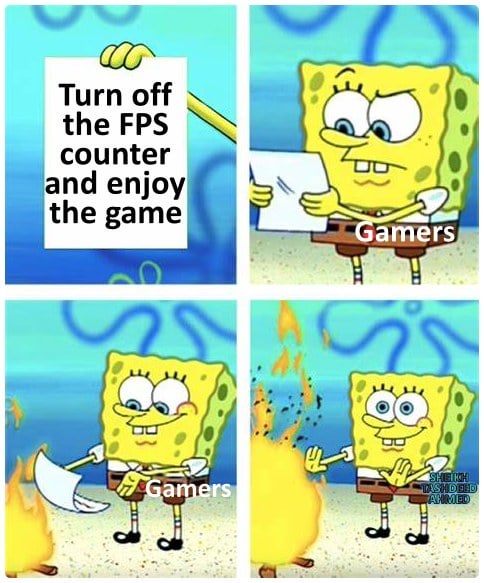
It’s just basically the number “120” sitting static in the corner of my screen. I probably should just turn it off, but I won’t.
Chakramer
As long as it feels smooth, that’s all that matters. I’ve realized as long as it’s above 90 I perceive it as liquid smooth and don’t need anything more than that to be happy.
ViolentPhrog
They should make games run well and I’ll consider it.
superhakerman
I was happy playing crysis 3 at 15 fps on my gt730 few years ago, then my eternal suffering started when I found out about Fraps/RTSS
hardlyreadit
Gamers cant have fun without being able to verify that their fun is more fun than the other guy
Cyrus_DeVeRaKe
I always tell this to myself “stop monitoring your hardware and fps counter” and I proceed to monitor everytime 🥲
Callinon
I generally only turn it on as a sanity check if I think there’s something wrong.
Always nice to have the confirmation that I’m not just nuts.
El_Mariachi_Vive
Part of the joy of PCMR is maintaining a machine in tip-top shape. Sure, the games are fun, but working on the PC is also very fun. I’m constantly staring at this screen:
I keep it on early on in a new game to ensure I’m where I want to be framerate wise. Once happy, I don’t turn it on again unless something feels off.
Lovehistory-maps
I love getting 20-40 fps in CoD, or any FPS. It makes the game unplayable when everyone else walks around with 90 or 120, if I get a new GPU then im gonna burn my 1030
grumblemooch
Sometimes Windows messes up my monitor refresh rate when I switch between PC and Steam Link. So I keep the FPS counter up to make sure it’s not stuck at 60 fps or something.
Dealric
You dont need fos counter to feel dips really.
justglassn
Nice try Bethesda
Jabba_the_Putt
wait…I thought the counter WAS the game
rimakan
I remember playing bf3 with the counter haha
MelchiahHarlin
I’m not fond of first person shooters; I prefer third person and over the shoulder camera.
nickname7312
I have such a potato pc that fps indicator affects fps.
So “enjoy” is a very relative term.
LordFendleberry
FPS counter is useful for multiple things, not just flexing.
– If visuals are choppy it helps determine if it’s frame rate or frame times.
– Helps determine where frame rate is dipping so you can adjust visual settings.
– Helps show how much performance increase/decrease you get by adjusting settings.
I have it turned on in Steam settings so it shows up in every single game I launch. Simple piece of information that says a lot. And yeah, makes me feel good when I see it holding at around 80-100 in games like Doom Eternal, even with ray tracing turned on.
Sailed_Sea
My monitor switched to 60hz and I could immediately tell.
ScF0400
I can’t enjoy the game if I miss a head shot because my 1% low decided to tank my FPS on that one frame!
Yeah… Lag is why I’m bad /s
ZoharDTeach
If you can’t tell when your game dips below 60fps without a counter, then I dunno what to tell you. It’s very jarring.
EDIT: same goes with dips from 30fps. It’s very jarring. A solid fps is more important than a high one.
_Spastic_
While I run AIDA64 and have it monitor fps with a graph charter, I only look at it if I “feel” a problem.
Kalcinator
I enjoy my FPS yes
YerGodSterculius
Phhtttt… we ricers want a 4k fuzzy donut, with 8x, to run at 120fps.
atm I want to play tiny tina’s adventures in 4k with high detail… But I am still sporting a rx570 on my 2021 build because I’ve not decided on a video card (I didn’t want to play a lot for that muffler in 2021).
X-ATM095
It’s not the frame counter I look at it’s more the Temps
bottlecandoor
It is nice to know when you need to turn graphic settings down vs. something else causing the slow down.
EventHorizon67
I only turn the counter on if I notice my game feeling sluggish or when changing graphical settings to gauge the loss/gain in framerate vs the fidelity of the settings I just changed. Otherwise I don’t really care if I’m getting 80 or 160 as long as it’s smooth enough
AgentSmith2518
I leave it off, especially with new games, but I can usually just feel if a game isn’t running well.
FurryBrony98
This is good advice lol tune and forget.
heatlesssun
Sometimes it is as simple as that.
BloxMaster3
here’s a quote I live by:
“the less FPS you tolerate, the more your computer can do”
D34thst41ker
I can’t tell the difference between most frame counts. As long as it’s not a slideshow, it doesn’t matter how many frames it is.

43 Comments
Oh yeah, sometimes i count the frames
Focuses on the FPS counter, plays game in peripheral vision
I can literally feel my game dip from 144 to 90 so I need the counter to confirm my suspicions
I don’t usually have the FPS counter on unless I made a configuration change or I’m troubleshooting something.
I play everything with MSI Afterburner 😄. Gotta check my frames and temperatures!
I like having it on just to see if it’s the game having lag spikes or stutters or just me imagining things.
Haha, my PC averages 30 FPS on max settings(non ray tracing) with Cyberpunk and I enjoy the game nonetheless
no i need the counter so that i can create a post on reddit saying said game has shit fps on higest end graphics card
Well you know if the game fucking dips it is noticeable whether you have fps counter on or off.
[No](https://i.imgur.com/5F897Ss.png)
It’s just basically the number “120” sitting static in the corner of my screen. I probably should just turn it off, but I won’t.
As long as it feels smooth, that’s all that matters. I’ve realized as long as it’s above 90 I perceive it as liquid smooth and don’t need anything more than that to be happy.
They should make games run well and I’ll consider it.
I was happy playing crysis 3 at 15 fps on my gt730 few years ago, then my eternal suffering started when I found out about Fraps/RTSS
Gamers cant have fun without being able to verify that their fun is more fun than the other guy
I always tell this to myself “stop monitoring your hardware and fps counter” and I proceed to monitor everytime 🥲
I generally only turn it on as a sanity check if I think there’s something wrong.
Always nice to have the confirmation that I’m not just nuts.
Part of the joy of PCMR is maintaining a machine in tip-top shape. Sure, the games are fun, but working on the PC is also very fun. I’m constantly staring at this screen:
​
​
https://preview.redd.it/c755y4zuszvb1.jpeg?width=593&format=pjpg&auto=webp&s=3d5407ee937e7bc02067853c87bd0a2a85dc03df
The game is just a background for the counter
I keep it on early on in a new game to ensure I’m where I want to be framerate wise. Once happy, I don’t turn it on again unless something feels off.
I love getting 20-40 fps in CoD, or any FPS. It makes the game unplayable when everyone else walks around with 90 or 120, if I get a new GPU then im gonna burn my 1030
Sometimes Windows messes up my monitor refresh rate when I switch between PC and Steam Link. So I keep the FPS counter up to make sure it’s not stuck at 60 fps or something.
You dont need fos counter to feel dips really.
Nice try Bethesda
wait…I thought the counter WAS the game
I remember playing bf3 with the counter haha
I’m not fond of first person shooters; I prefer third person and over the shoulder camera.
I have such a potato pc that fps indicator affects fps.
So “enjoy” is a very relative term.
FPS counter is useful for multiple things, not just flexing.
– If visuals are choppy it helps determine if it’s frame rate or frame times.
– Helps determine where frame rate is dipping so you can adjust visual settings.
– Helps show how much performance increase/decrease you get by adjusting settings.
I have it turned on in Steam settings so it shows up in every single game I launch. Simple piece of information that says a lot. And yeah, makes me feel good when I see it holding at around 80-100 in games like Doom Eternal, even with ray tracing turned on.
My monitor switched to 60hz and I could immediately tell.
I can’t enjoy the game if I miss a head shot because my 1% low decided to tank my FPS on that one frame!
Yeah… Lag is why I’m bad /s
If you can’t tell when your game dips below 60fps without a counter, then I dunno what to tell you. It’s very jarring.
EDIT: same goes with dips from 30fps. It’s very jarring. A solid fps is more important than a high one.
While I run AIDA64 and have it monitor fps with a graph charter, I only look at it if I “feel” a problem.
I enjoy my FPS yes
Phhtttt… we ricers want a 4k fuzzy donut, with 8x, to run at 120fps.
atm I want to play tiny tina’s adventures in 4k with high detail… But I am still sporting a rx570 on my 2021 build because I’ve not decided on a video card (I didn’t want to play a lot for that muffler in 2021).
It’s not the frame counter I look at it’s more the Temps
It is nice to know when you need to turn graphic settings down vs. something else causing the slow down.
I only turn the counter on if I notice my game feeling sluggish or when changing graphical settings to gauge the loss/gain in framerate vs the fidelity of the settings I just changed. Otherwise I don’t really care if I’m getting 80 or 160 as long as it’s smooth enough
I leave it off, especially with new games, but I can usually just feel if a game isn’t running well.
This is good advice lol tune and forget.
Sometimes it is as simple as that.
here’s a quote I live by:
“the less FPS you tolerate, the more your computer can do”
I can’t tell the difference between most frame counts. As long as it’s not a slideshow, it doesn’t matter how many frames it is.