I have an nvme on a pcie x1 slot using a cheap adapter from aliexpress. You will also need a x1 riser.
Before commiting, you should know your transfer speeds are going to be limited (check your motherboard specs).
· PCIE2.0 = 500MB/s
· PCIE3.0 = 1GB/s
firestar268
You won’t be able to lol
KokakGamer
That is, unfortunately a disadvantage that came with your motherboard and it’s MATX config. Lesser expansion ports in lesser convenient places. And you buy them with the expectation that some slots can be covered by your GPU so you plan ahead if you’re getting an MATX.
IMO I’d consider getting external SSD. It wouldn’t be as fast, but its more storage.
etfvidal
Best method for you would be to just upgrade your current nvme and sell your old one.
ash549k
My motherboard has an nvme slot right under the GPU, I just unplugged the GPU then connected the ssd then put the GPU back in
sleepingAurochs
Willpower and raccoon-like fingers
9____________9
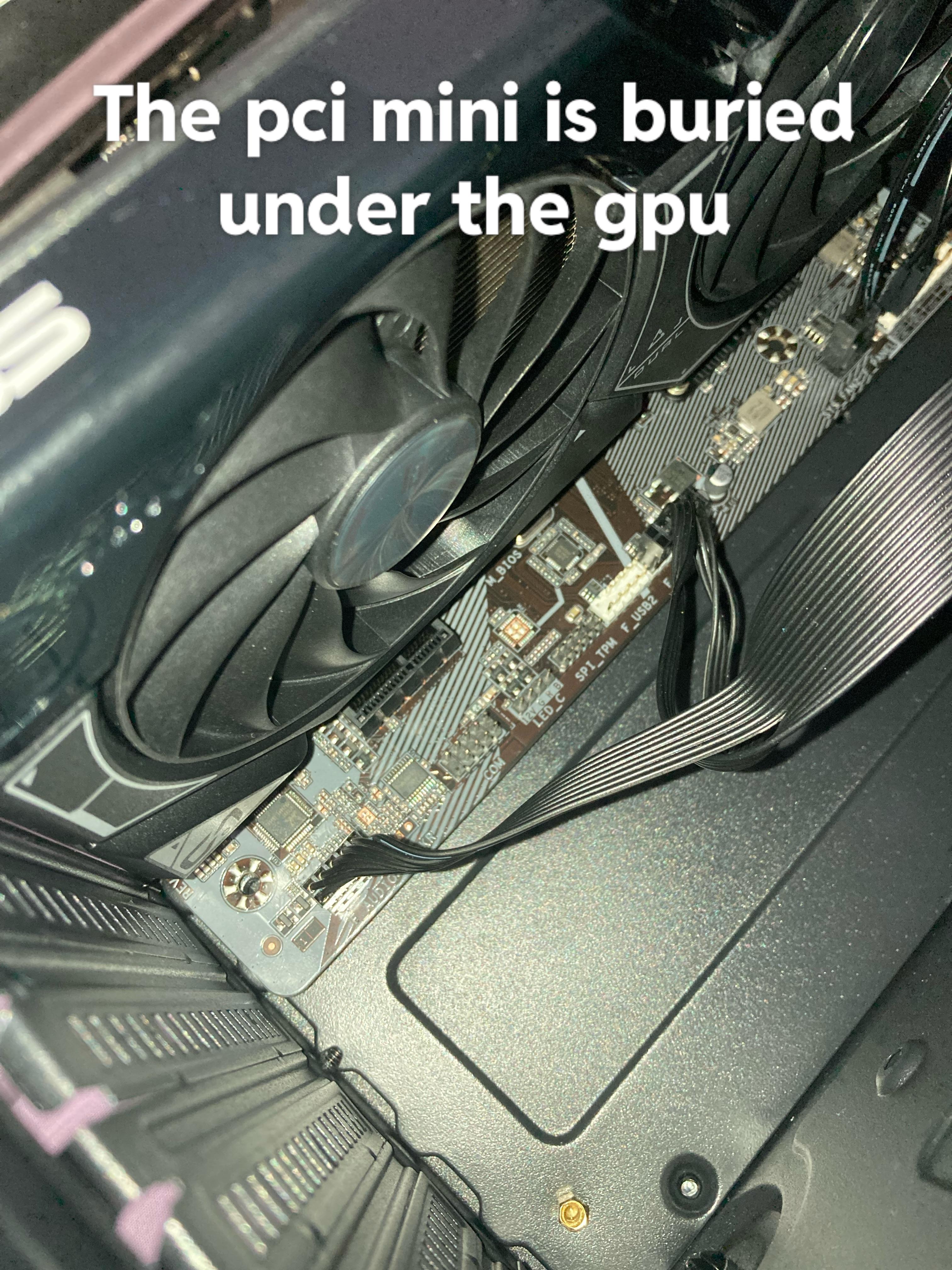
Are you talking about that black plastic connector? That’s not PCI Mini. That’s a PCIEx1.
Adding another NVME will be very very tricky. Assuming that the GPU even has enough space below it, you will need a PCIEx1 to PCIE x [4, 8 or 16] adapter (basically a combination cable extension + adapter), then in that adapter, you will need to plug in a PCIE x [4, 8 or 16] to NVME adapter, and then add an NVME to that. It’s probably not worth it.
You should instead just get a SATA SSD if you have any SATA ports & connector available.
Edit: Or alternatively, you could look at mounting your GPU vertically with an adapter kit, and then *maybe* you might have enough space to fit a small PCIEx1 to NVME adapter. Maybe.
ilikeag
First of all, screw in your motherboard buddy
2nd, if you’re actually talking about nVME, if there’s one under the GPU, just take the GPU out, put in your nVME SSD, then put the GPU back in.
3rd: If you’re talking about the PCI-E (like for a WiFi card), then you’ll need to get a riser cable. I recommend installing the cable first, then the GPU. Royal pain in the ass, and you might need to use a zip tie to keep the cable from hitting the GPU fan, but doable.
smithversman
Don’t forget your mb screw bro
smoothartichoke27
i just use an x1 riser/extension
SlipAffectionate5708
Screw in your motherboard bruv 😭
apachelives
Dude you don’t even have stand offs or screws under half your motherboard.

14 Comments
An NVMe drive goes in an m.2 slot.
You would need a different motherboard with more expansion slots in order to add more NVMe storage.
In theory you could install one in a PCIe x1 slot using a riser card, but it would be at 1/4 the speed.
https://preview.redd.it/wsq0dfmwb2vb1.jpeg?width=728&format=pjpg&auto=webp&s=7f574b6c3327265c9c6a37a8402abb53b3cc1874
I have an nvme on a pcie x1 slot using a cheap adapter from aliexpress. You will also need a x1 riser.
Before commiting, you should know your transfer speeds are going to be limited (check your motherboard specs).
· PCIE2.0 = 500MB/s
· PCIE3.0 = 1GB/s
You won’t be able to lol
That is, unfortunately a disadvantage that came with your motherboard and it’s MATX config. Lesser expansion ports in lesser convenient places. And you buy them with the expectation that some slots can be covered by your GPU so you plan ahead if you’re getting an MATX.
IMO I’d consider getting external SSD. It wouldn’t be as fast, but its more storage.
Best method for you would be to just upgrade your current nvme and sell your old one.
My motherboard has an nvme slot right under the GPU, I just unplugged the GPU then connected the ssd then put the GPU back in
Willpower and raccoon-like fingers
Are you talking about that black plastic connector? That’s not PCI Mini. That’s a PCIEx1.
Adding another NVME will be very very tricky. Assuming that the GPU even has enough space below it, you will need a PCIEx1 to PCIE x [4, 8 or 16] adapter (basically a combination cable extension + adapter), then in that adapter, you will need to plug in a PCIE x [4, 8 or 16] to NVME adapter, and then add an NVME to that. It’s probably not worth it.
You should instead just get a SATA SSD if you have any SATA ports & connector available.
Edit: Or alternatively, you could look at mounting your GPU vertically with an adapter kit, and then *maybe* you might have enough space to fit a small PCIEx1 to NVME adapter. Maybe.
First of all, screw in your motherboard buddy
2nd, if you’re actually talking about nVME, if there’s one under the GPU, just take the GPU out, put in your nVME SSD, then put the GPU back in.
3rd: If you’re talking about the PCI-E (like for a WiFi card), then you’ll need to get a riser cable. I recommend installing the cable first, then the GPU. Royal pain in the ass, and you might need to use a zip tie to keep the cable from hitting the GPU fan, but doable.
Don’t forget your mb screw bro
i just use an x1 riser/extension
Screw in your motherboard bruv 😭
Dude you don’t even have stand offs or screws under half your motherboard.