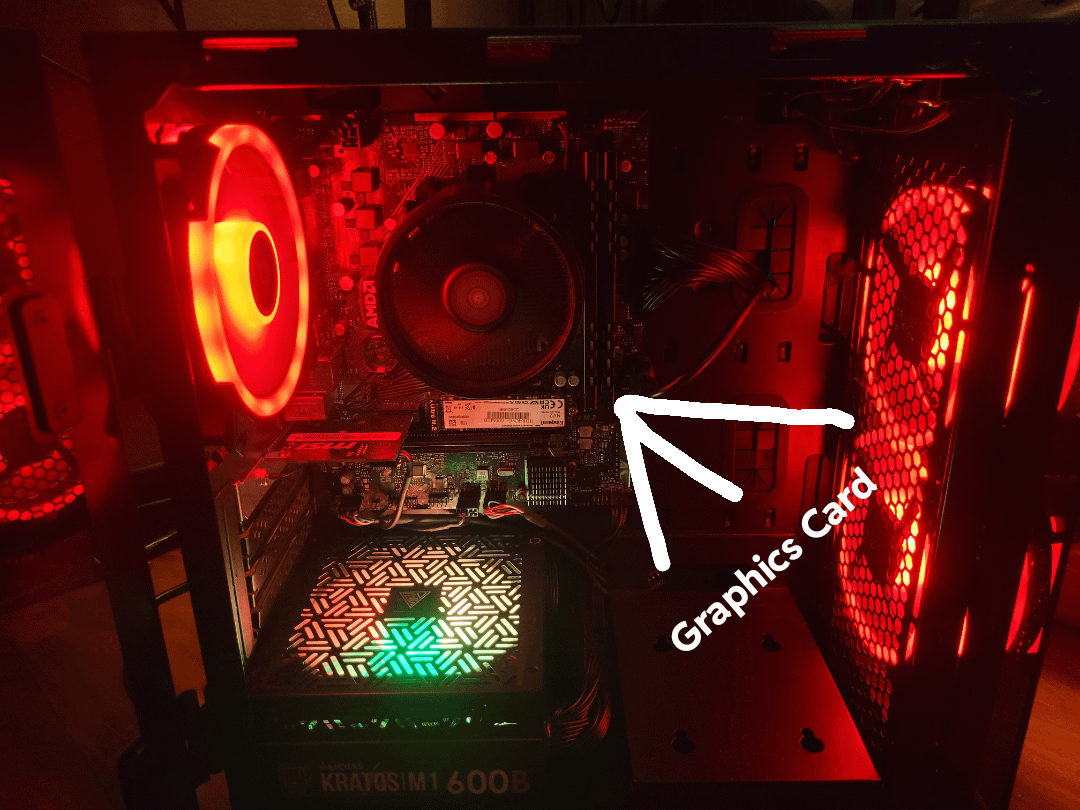
Graphics card it ccame with is vertical and maybe attached to more stuff? Its a crappy 2gb card simply labled “radeon graphics” on the website

Graphics card it ccame with is vertical and maybe attached to more stuff? Its a crappy 2gb card simply labled “radeon graphics” on the website
34 Comments
I might be blind, but there is no graphics card in the pictures. You seem to be referring to your motherboard back panel, not a dedicated GPU. Also sounds like onboard graphics based on your description.
That sir is ram you pointed at. Your pcie is horizontal just below your m.2 ssd. There is no dedicated graphics card in there that I can see
Hy buddy, this is running integrated graphics meaning there is no actual dedicated graphics card in your machine. The graphics is currently handled by the CPU (with in built/integrated graphics). Your new graphics card would slot in below the wifi card and would need your display to be plugged into it.
Whether or not the machine could handle a 2060 would depend on the specs.
That pc is using integrated graphics, there’s no dedicated GPU
10/10 nice one OP, that’s your RAM. You have no GPU currently installed and are running on onboard graphics.
You’re pointing at ram slots. You have no gpu in there and there appears to be a pcie slot that support one below that MSI network card (or whatever it is).
How much are you paying for the 2060? Just as it’s quite a few generations old now and you can probably get better value from a newer card
[deleted]
The GPU goes above where your PSU is, it has no GPU and is running on integrated graphics, so if the PSU is powerful enough you can definitely get a 2060 in there.
You’re pointing at the RAM, I honestly hope this is satire lol
That aint GPU you pointed that’s RAM, but you can replace it if you need more memory to handle running programs
You can buy the GPU and install it. When you do, look for a long slot that looks like RAM ones but horizontal. That one is a PCIE x16 slot for GPU.
Also please make sure you plug in external power cord from power supply to the GPU as well. Otherwise your PC cant display anything
Bro bro, said the ram is the graphics card.
The only card you have installed is a wifi card by the looks of it, but people have seemed to answer your question already lol
I ah.. Hmm..
Watch this: https://youtu.be/BL4DCEp7blY?si=-4SQzJRJJOla1Sll
The arrow appears to be pointing at ram. My guess is that it’s integrated graphics. Meaning you have an APU with the CPU and GPU in one unit.
From reading all your replies, yes you can with a 550w, could be worth looking at a similarly priced amd gpu as it would perform much better likely, also make sure your psu has pcie cables for the gpu, if not u could get a 650w psu and go for a more expensive gpu as ur gpu could handle a fair amount
Prebuilt is using an APU, the GPU part is built in to the CPU, and yes, you can install a GPU in the PCIe slot and use it. Just make sure your PC can handle the new GPU and it won’t bottleneck, and also plug the HDMI or DP cable into the GPU instead of the Motherboard as it is now.
not gonna lie chap, I cant see shit about whats going on here.
Go for a 3060 or 3060 ti at the very least. That is what I recommend.
Oh sweet summer child
I was really confused at first, was like “Wth was the manufacturer thinking? Putting a vertical graphics card mount on top of the MB?!?!?”, but then I realized you’re new at this haha.
As others pointed out, the thing you pointed as the graphics card is actually your motherboard, your system doesn’t have a dedicated graphics card. The “Radeon Graphics” you see in your specs is built into your CPU, so that’s why it’s very humble (Radeon integrated graphics are actually the best integrated graphics, but yeah any modern dedicated card will crush it).
You have a free 16x PCI-e slot right below your Wi-Fi card, so you can add a dedicated GPU. Your power supply seems to be a Gamdias Kratos M1 600B, which claims to be 80 Plus Bronze certified, so it should be able to handle most mid-tier graphics cards, RTX 2060 included.
Edit: MAKE SURE TO CHECK CLEARANCES!!!
I’ve seen way too many posts in this sub of people buying GPUs that don’t fit their cases. Check the dimensions for the GPU and measure how wide your case is internally.
It doesn’t have a gpu, it should go on the long horizontal port under the cpu
I thought this was a shit post until I saw ops comments
What in the hell
When you do buy one, just be sure to plug the hdmi cord into the graphics card and not the mother board
https://preview.redd.it/xfpskcy9jzub1.jpeg?width=396&format=pjpg&auto=webp&s=c5d65801512a98c46774fb6ce9c4d4a166c4c87f
As others have pointed out the position is wrong, just to demonstrate this should be what’s known as the pcie slot and is where you would plug in a graphics card. Most will also need some power cables, which should be attached to your power supply at the bottom.
>pointing at ram and calling it “graphics card”
Not even my grandparents would confuse the ram for a video card. OP, have you never seen a PC irl?
Since I haven’t seen anyone mention this: if you do install a GPU, make sure you plug your monitor into the GPU and not the integrated slot on the back panel in your picture. It wouldn’t harm anything, but you won’t be utilizing your GPU unless plugged into it directly. I’ve seen many newbies make that mistake.
What are you on, boy?
jeezus hell almighty failure all the way around, you are pointing at the ram, there is no graphics card, your using cpu/gpu graphics.
please look up what a graphics card is and where it goes before you brick your pc and have nothing but a paper weight.
Since I don’t think anyone mentioned it, be sure to connect your monitor to the graphics card once you install it. Otherwise you will still be using the onboard one.
That is a picture of RAM…..
Is this an actual request or someone trolling?
Use some lights, or the flash next time you’re trying to show people something. It makes things a lot easier.
It’s so dark I can’t even see the PCIE slots.
I thought this was a shitpost at first as others have mentioned but reading some of ops comments it makes sense now.
That is RAM you’re pointing to, you have an empty PCIe slot beneath that capture card or whatever it is on the bottom.
Could you find the name or serial number of the prebuilt so we can see what component you have?