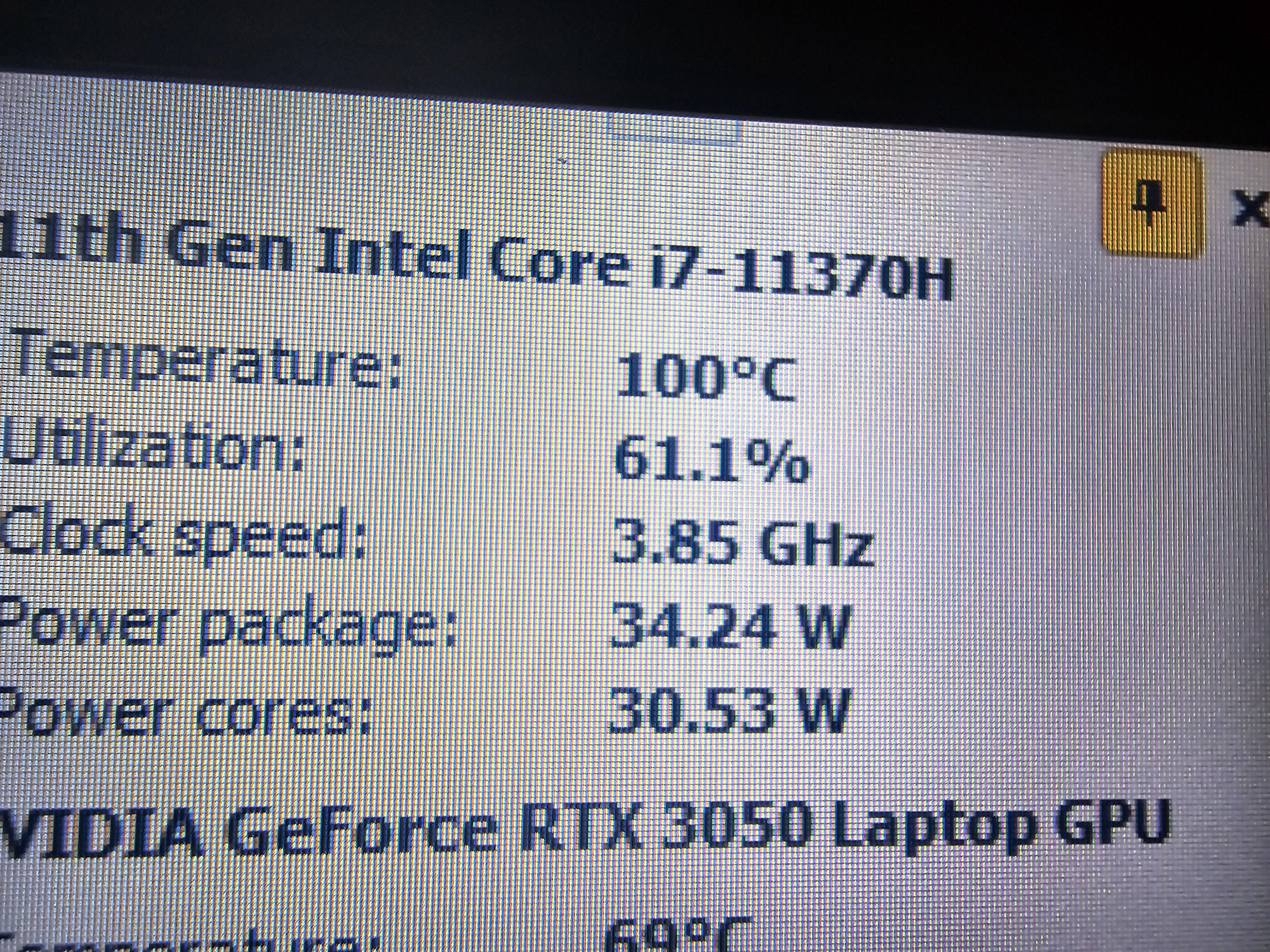
Laptop kept randomly shutting down for no reason shile in-game. Decided to check on temps is this is on the main menu of overwatch 2 not even in-game. What should I do?

Laptop kept randomly shutting down for no reason shile in-game. Decided to check on temps is this is on the main menu of overwatch 2 not even in-game. What should I do?
30 Comments
Can you set manually the vents to max speed?
> What should I do?
Clean your laptop vents, check that the CPU fan is spinning, play on a hard flat surface like a desk.
Is it a Dell? I have a Precision 7670 here which basically keeps the entire room warm in the middle of winter just by running OpenLens and Slack on it. I also have two dead Precision 5550’s which they never bothered to collect which died from thermal problems.
I would first clean the fan and change thermal paste
> Laptop
> 100°
> 34 Watts
Seems to be running as expected
Disassemble your laptop (or give it to someone who knows how to do it if you’re not sure or don’t know how it’s done). Clean the inside of your laptop like fans, CPU radiator, etc. Replace your CPU thermal paste because right now it may be more like a stone than a paste. After that, it should be fine, but keep in mind that this is still a laptop so if your temps while gaming will stay at let’s say 85-90 degrees – it’s fine.
Laptops gonna laptop
That is hot – Hey M1/M2 runs cool as ice in macbook pros LOL

Clean fan and vents with air duster. If you are capable you could also replace the thermal compound with a better one. I would personally use IC diamond or even one of the graphite pads. (I’ve had great results with both)
laptop?
oh joy….
that’s a pain to optimize for gaming while keeping everything chill…
“Let him cook”
Increase fan speed/ adjust usage slope, reapply thermal paste, clean fans and vents.
Capping fps is good practice for laptops if you want too extend the life of the hardware. Just because it’s advertised to run 240 fps at 4K doesn’t mean you should
Cleaning vents and making sure the whole heat dissipation system is working fine.
Then you might want to consider a cooling pad. Some kind fan device that goes under laptop for better airflow.
Most likely the power draw is so low _because_ of the temperature.
Your laptop is deseperately trying to protect itself from catching fire.
You most likely need to clean any obstructions from your fan intakes and exhausts.
At least the graphics temps are still pretty nice.
Turns out it had a reason to shut down. Lol.
When “let him cook” is literal.
How long you had this laptop if its more than a year your fans might be cloggef open the laptop and clean it also your thermal paste might be lost its functionality replace them too if it’s not that old might be other issues
Put it in the freezer.
Use it in a desk, not your lap
Place it on one of those laptop stands with or without the fans running – more room under laptop = more air available for it to push through the heatsink
Main menu of a game doesn’t mean anything if you haven’t capped your frame rate some main menus will run at 300dps if you let em.
Clan your laptop….
Is your charger in all the time? Could be what happens to all rechargeable batteries. They degrade over time and do so based on your charging habits.
The average intel laptop experience
Nice
Without any other info, I’m guessing this is:
(1) laptop
(2) using liquid metal
(3) you’ve ran it for like 6-12 months and it’s *recently* begun hitting max temps
OR
‘what’s compressed air?’
Clean the vents and fans.
Repaste.
What are you using to check your temps?
I’ve gotten false temps before. To be certain, I would compare it across a few resources.
I’m not telling you not to clean it and give it better airflow. It’s just good to be certain.
Gaming laptops in general run hot af. They’re a totally valid option of course but definitely not comparable to a desktop in terms of temps/performance. Unless you’re running a laptop with water cooling I guess, but that would effectively be a desktop lol
Pretty pretty sure it’s filled with dust and hair and exhaust can’t circulate air.
You’re not playing with it on your actual lap, are you? Not putting it on a blanket or anything?